The strongest invoice connects those intangible services to recognizable business information. A client should be able to see who performed the work, which engagement the invoice relates to, what period or milestone is being billed, how the amount was calculated, when payment is due, and how the client can pay. Current consulting invoice guidance from major accounting and invoicing providers consistently emphasizes these fundamentals. :contentReference[oaicite:0]{index=0}
This guide explains how to design, customize, and use a solution consulting invoice template for hourly projects, fixed-fee engagements, milestones, retainers, reimbursable expenses, and recurring advisory services. It also compares practical file formats such as Excel, Word, PDF, Google Docs, and Google Sheets so you can choose a workflow that fits your business.
Although the examples in this article use consulting scenarios, the principles apply broadly to management consultants, technology advisors, financial consultants, marketing strategists, operations specialists, business coaches, research consultants, and independent professionals who need a dependable billing process.
The goal is not simply to make an invoice look polished. The goal is to make every invoice accurate, understandable, traceable to the underlying engagement, and easy for the recipient to approve and pay.
What Is a Solution Consulting Invoice Template?
A solution consulting invoice template is a reusable document structure for billing clients for professional advice, analysis, strategy, implementation support, or related consulting services. Instead of rebuilding an invoice every time a project reaches a billing point, the consultant keeps a standardized layout and replaces the variable information such as client details, invoice number, service dates, quantities, rates, expenses, taxes, and payment instructions.
The word “solution” is useful because consulting invoices frequently need to communicate more than a simple number of hours. A consultant may have investigated a business problem, developed a recommended solution, facilitated workshops, prepared an implementation roadmap, or supported a client through execution. The invoice should therefore identify the engagement and describe the work at a level that supports financial approval without turning the invoice into a lengthy project report.
A practical template normally contains the consultant’s identity, client billing information, unique invoice identifier, invoice date, due date, engagement or project reference, service period, itemized services, quantity or hours, rate, line totals, expenses, taxes where applicable, total amount due, payment instructions, and relevant notes. These fields are consistent with the core information recommended by established invoicing resources. :contentReference[oaicite:1]{index=1}
The template should also be flexible enough to support different commercial arrangements. An hourly consulting assignment needs hours and rates, while a fixed-fee strategy project may need milestones or deliverables instead. A retainer may require a billing period and an explanation of the retainer drawdown, while an expense-heavy engagement may require a separate reimbursement section.
In other words, the best solution consulting invoice template is not the one with the most decorative elements. It is the one that gives the client enough information to understand and approve the charge without forcing the consultant to duplicate the entire statement of work.
Why a Structured Consulting Invoice Matters
Consulting services can be difficult to evaluate from an invoice alone because the deliverable may be knowledge, analysis, decisions, recommendations, or access to expertise rather than a physical product. A vague line such as “consulting services — $4,000” may technically communicate an amount, but it gives the client little context for reconciling the charge with a contract or project.
A structured invoice solves that problem by translating the engagement into a small number of recognizable billing components. For example, an invoice could show “Executive strategy workshop — 1 session,” “Market analysis — 12 hours,” and “Implementation roadmap — fixed project fee.” The descriptions should be concise but specific enough to connect the charge to agreed work.
Clear invoices also reduce administrative friction. Accounts-payable teams commonly need an invoice number, supplier information, purchase order or engagement reference where applicable, service period, amount due, and payment terms before they can route a payment. A missing reference can cause an otherwise legitimate invoice to be returned for clarification.
A reusable template improves consistency across clients. When the same basic structure is used every month, you are less likely to forget a due date, omit an expense, accidentally change a payment instruction, or use an inconsistent numbering system. Standardization is especially useful when multiple consultants or administrative staff prepare invoices.
Finally, a professional invoice contributes to the client experience. The invoice is one of the few documents that directly connects the value delivered by the consulting team with the commercial terms of the engagement. Clear presentation reinforces the idea that the project is being managed with the same care as the consulting work itself.
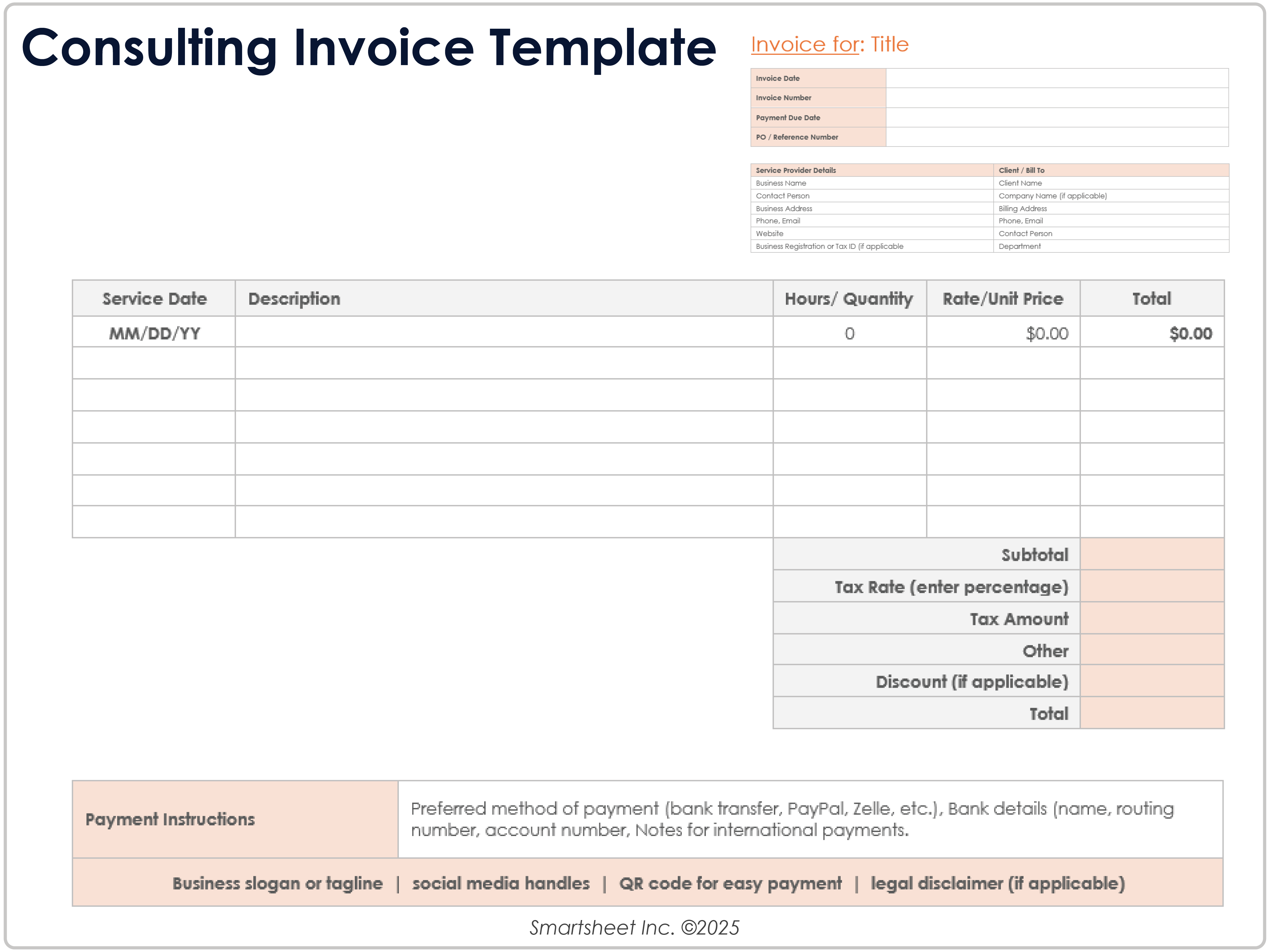
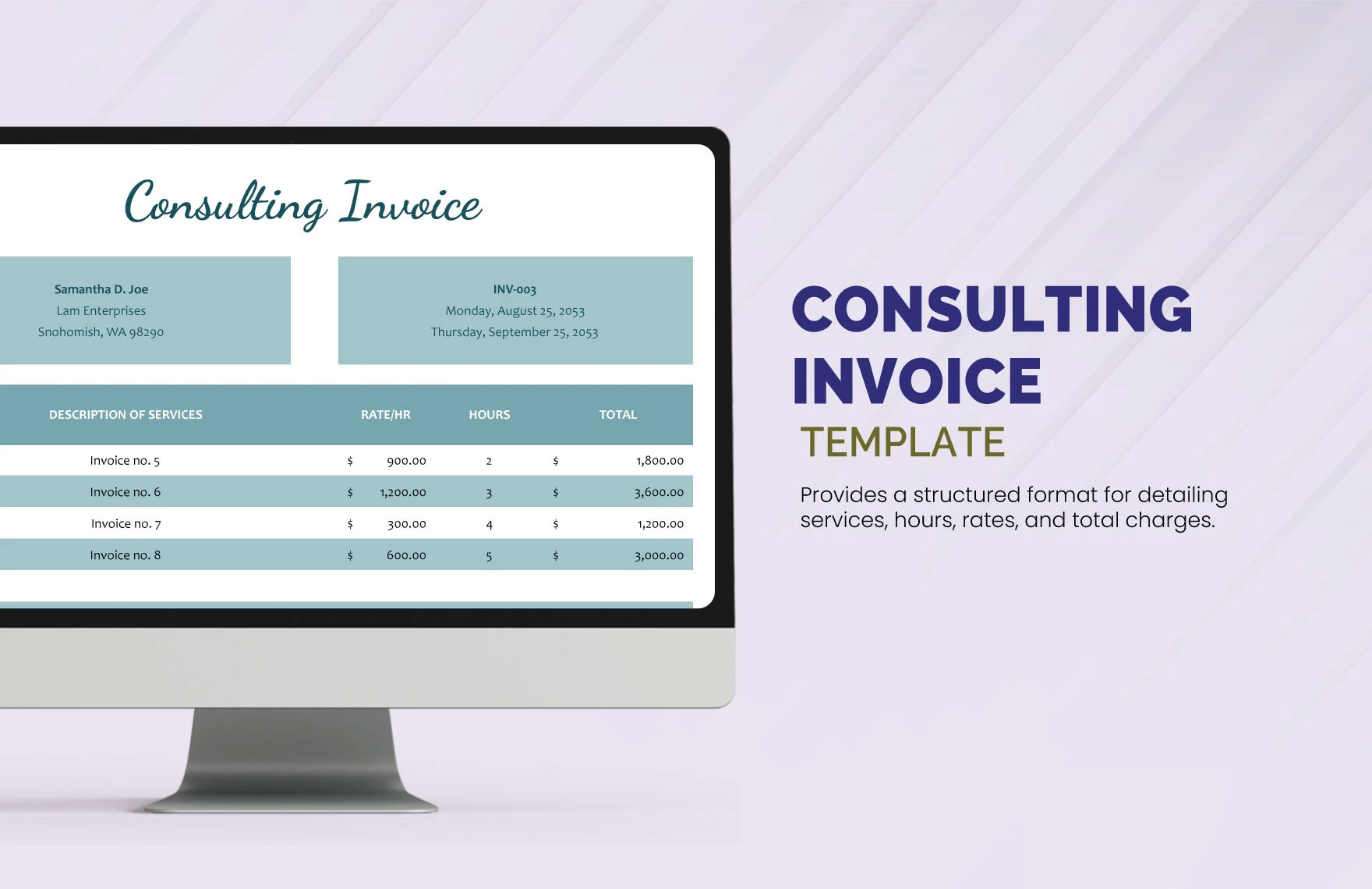
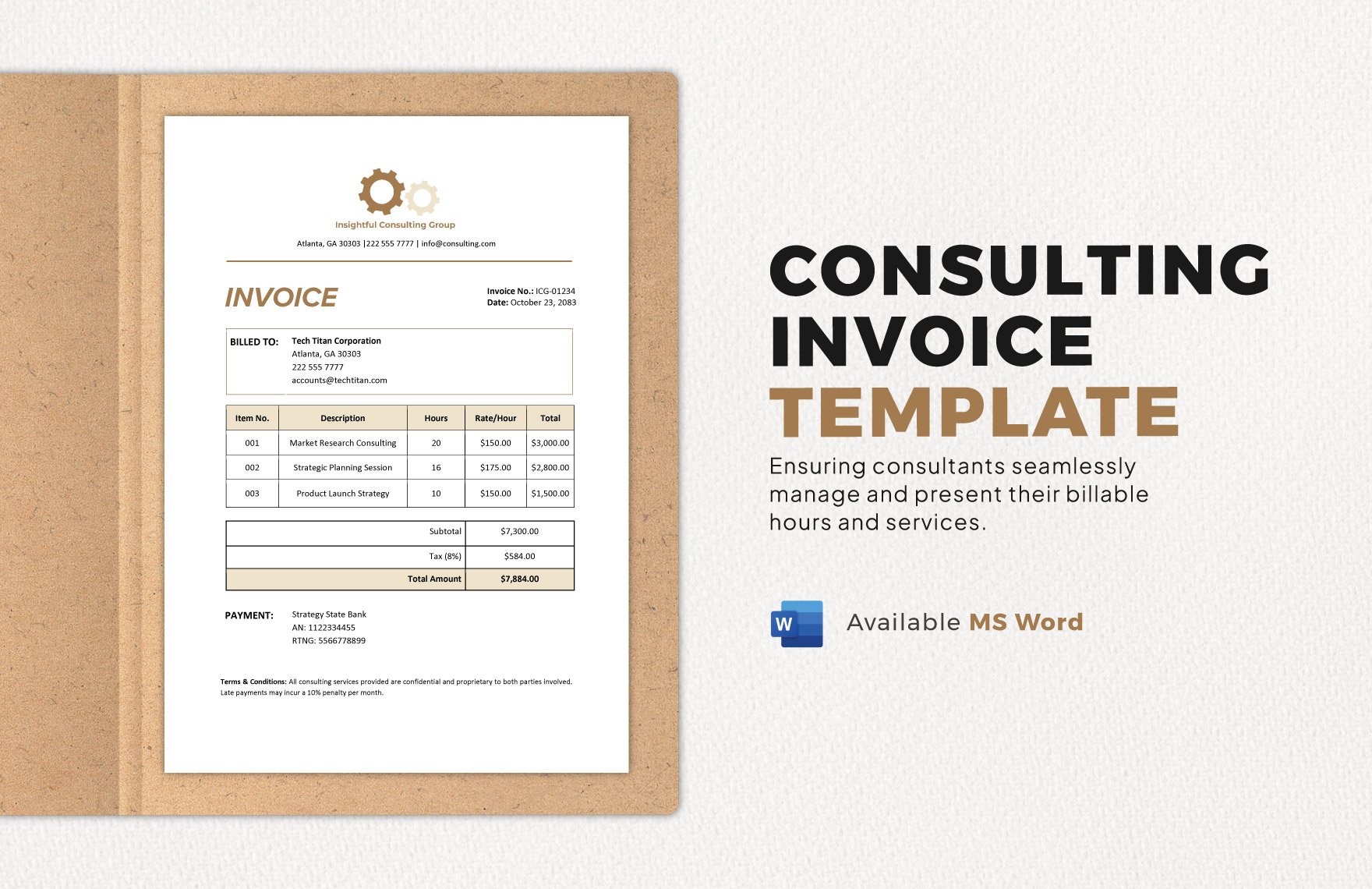
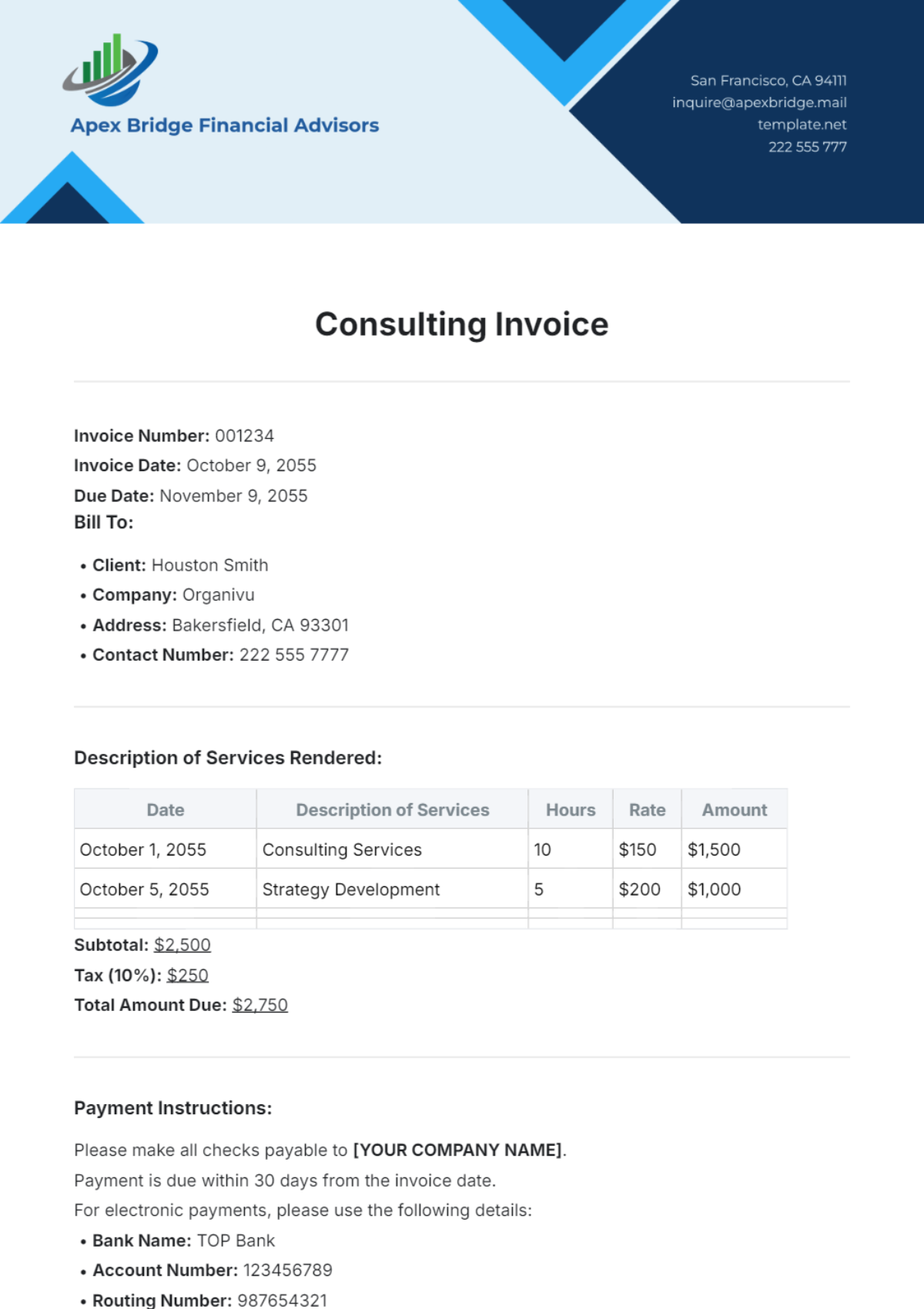
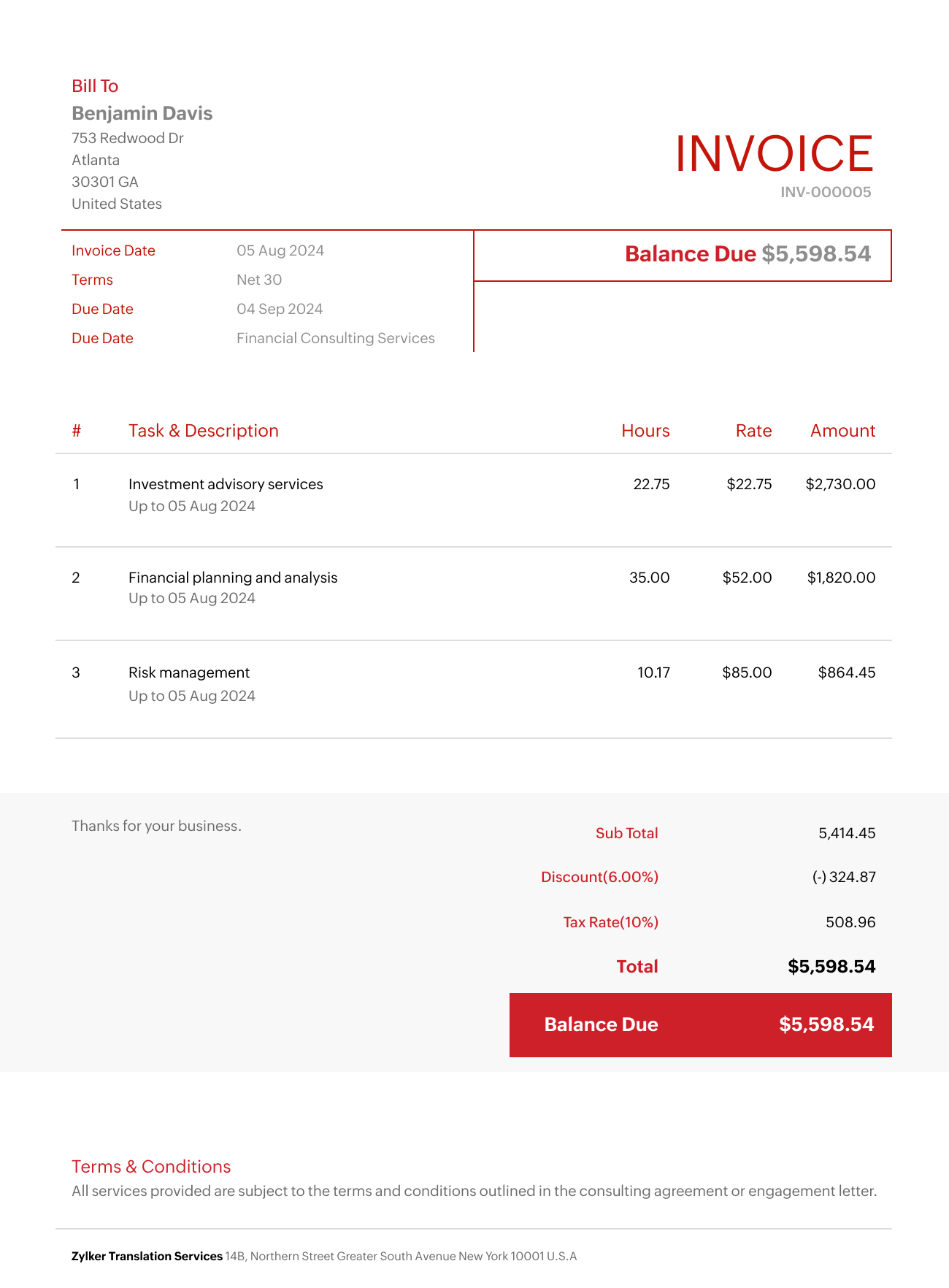
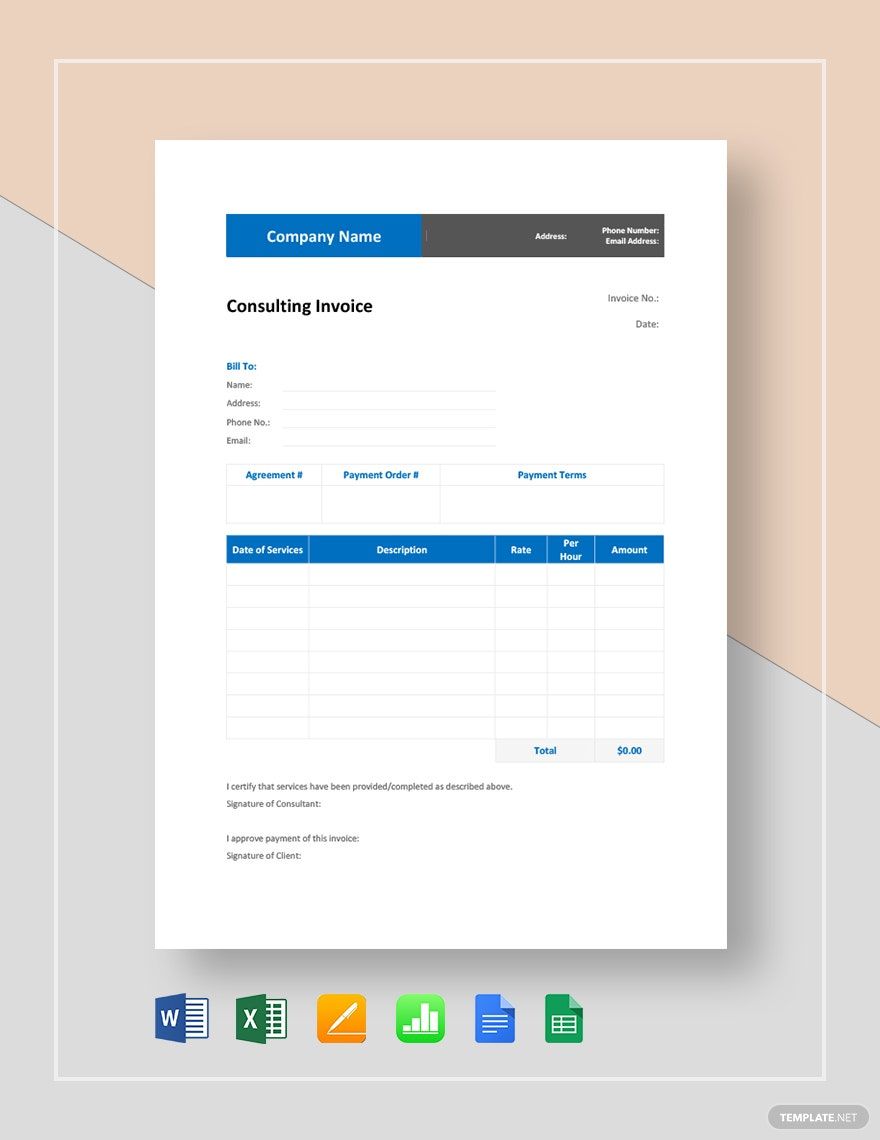
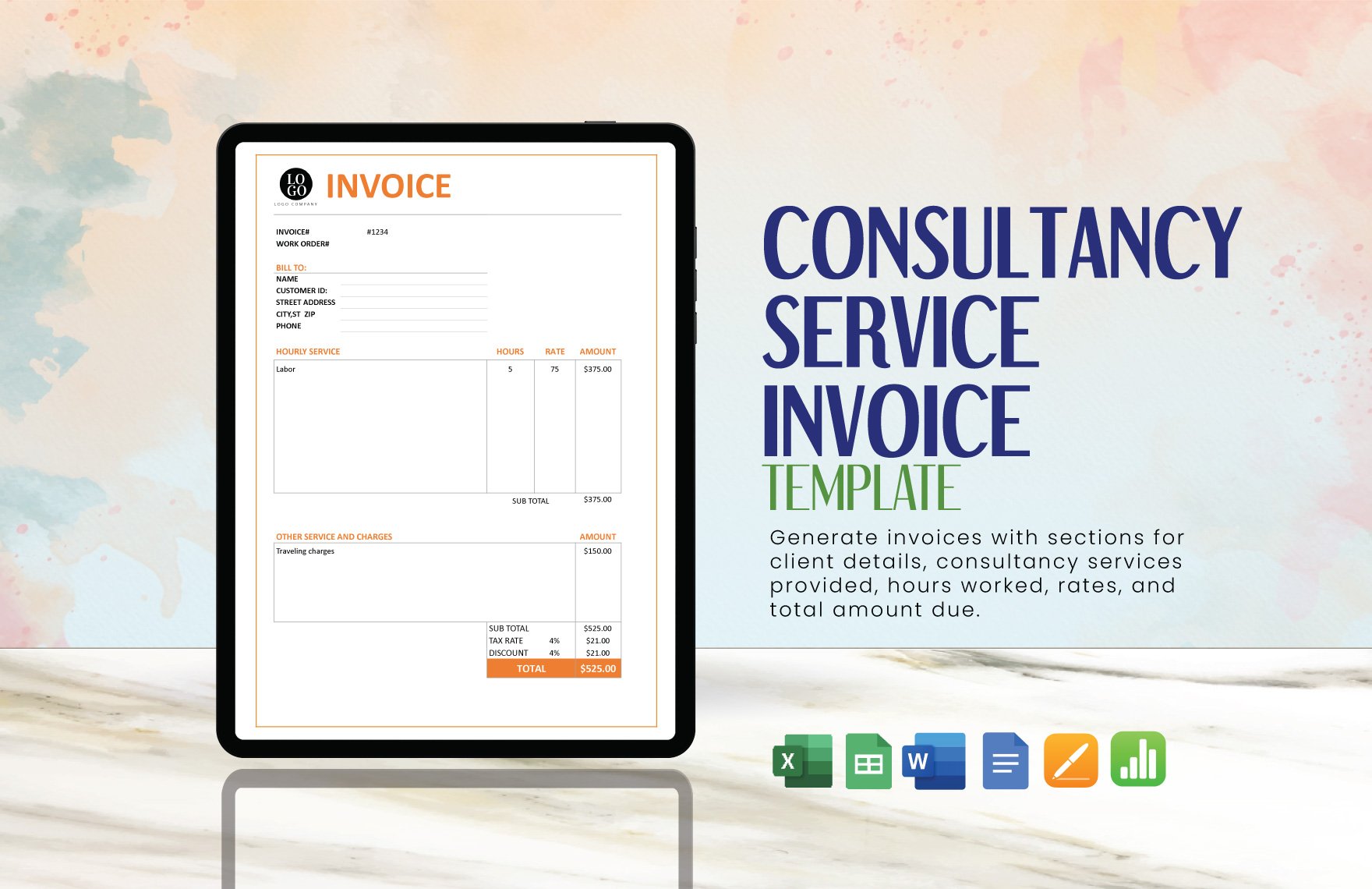
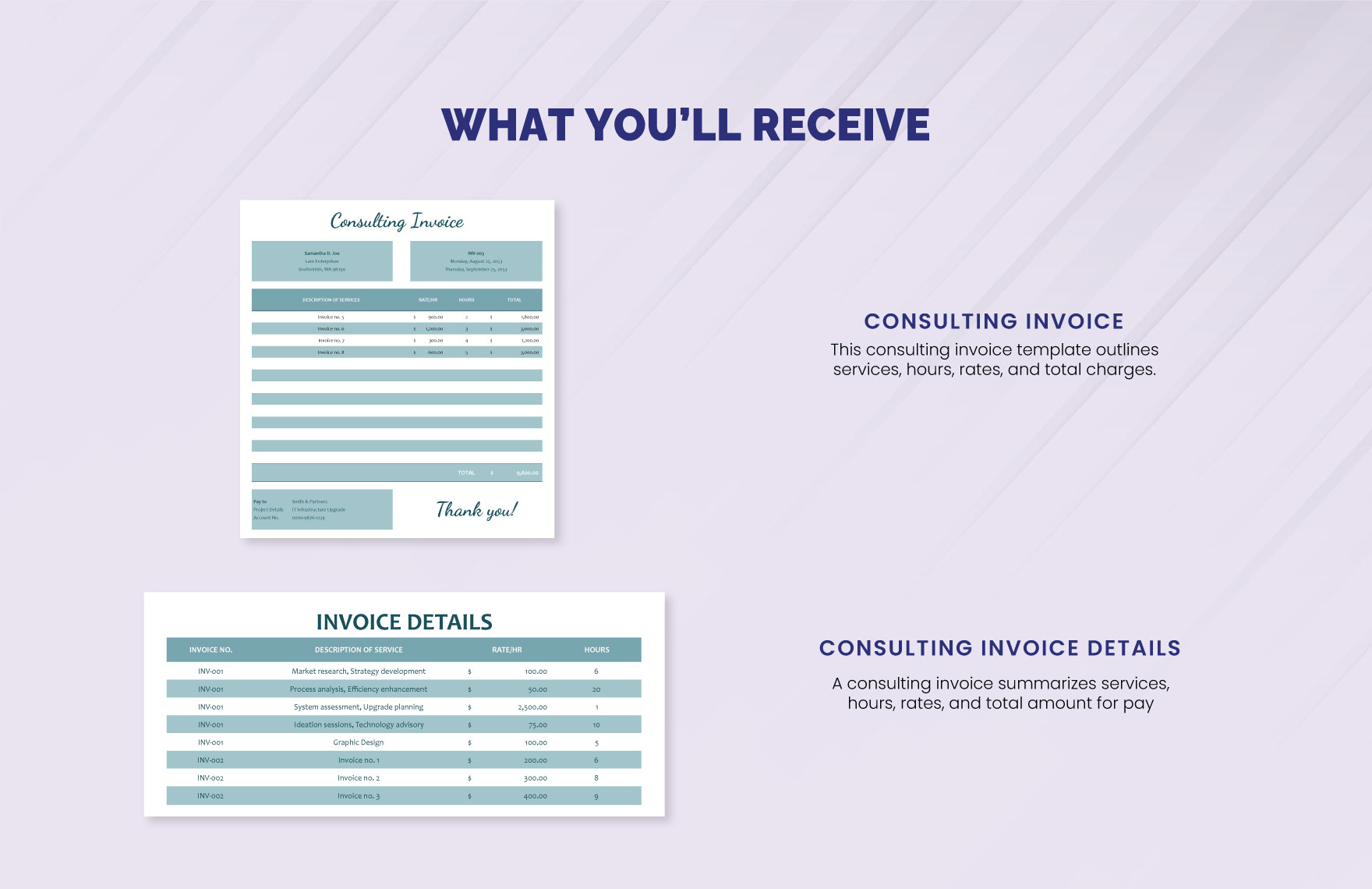
Visual examples of consulting invoices show why a structured page works well: the strongest layouts separate the consultant and client information from the service table, then make subtotal, tax, and total figures easy to find.
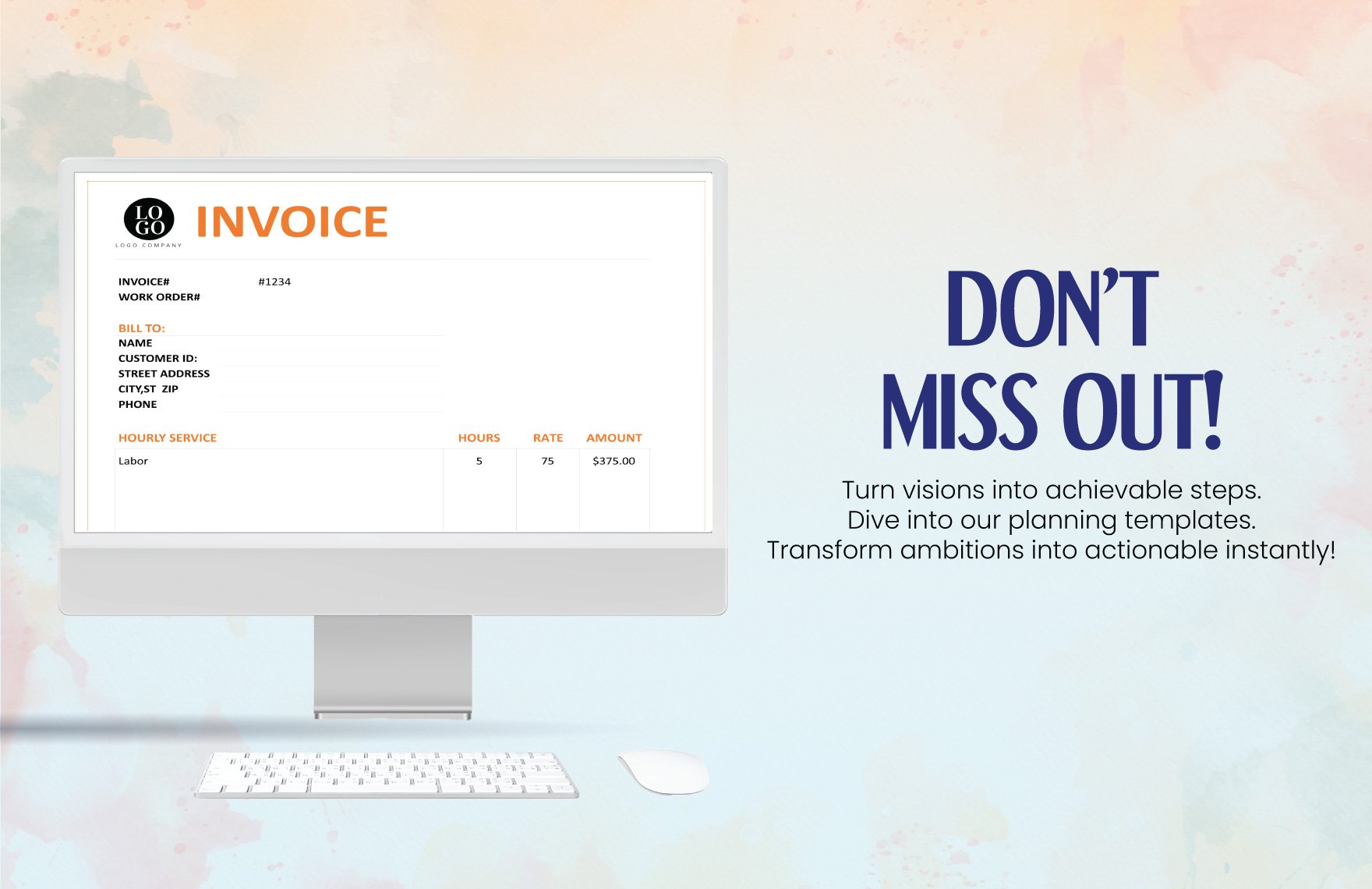
A useful service table generally contains a description column followed by quantity or hours, rate, and amount. This arrangement allows the client to understand how the line total was calculated without reading a paragraph of explanatory text.
The visual hierarchy should guide the reader from identity to engagement context, then to charges and finally to payment instructions. This is more important than using elaborate colors or decorative graphics.
For recurring consulting work, the same visual structure can be reused each month while changing only the billing period, line items, quantities, and totals. That consistency can make recurring invoices easier for both parties to review.
The following examples illustrate the kind of clean, itemized structure that works well for professional consulting billing.

What the Visual Structure Communicates
A professional consulting invoice normally gives the invoice identifier and date enough visual prominence that the recipient can reference the document immediately. These fields should not be hidden in a footer or buried among service descriptions.
The client section should identify the legal or billing entity that will actually pay the invoice. If a project sponsor hired the consultant but a different company department processes payment, the invoice should reflect the billing information supplied by the client.
The engagement context can include a project name, statement-of-work reference, purchase order number, contract number, or billing period. Which field is necessary depends on the commercial arrangement and the client’s internal process.
The service table should be detailed enough to explain the calculation. A consultant charging by the hour should normally show hours and rate, while a consultant charging a fixed project fee can identify the deliverable or milestone being invoiced.
The bottom section should make the amount due unmistakable. A client should not have to add several figures manually to discover the final balance.
Essential Components of a Solution Consulting Invoice Template
1. Consultant or Firm Details
Start with the name of the consultant or consulting company and the contact details needed for billing questions. Depending on the business and jurisdiction, this can include a business address, email address, telephone number, website, tax registration details, or other identifiers that the client has requested.
The business identity should remain consistent across invoices. If your consulting business operates under a legal entity but markets itself under a different trading name, use the information that matches the agreement and the client’s vendor records.
A logo can be useful for brand recognition, but it is optional. The priority is readability. A small, well-positioned logo is better than a large graphic that pushes billing information below the fold.
Consultants working with corporate clients should also consider whether the client has specific vendor-registration information that must appear on invoices. This can include tax identifiers, supplier numbers, or other references, but these should only be added when they are actually applicable.
Keep the identity block stable in your master template. Changing the address or payment details manually on every invoice increases the risk of sending incorrect information.
2. Client and Bill-To Information
The client block should identify the party being billed. Use the client name, company name, billing address, billing contact, and email address according to the information supplied by the client.
If a large organization uses a central accounts-payable department, the person who approved the project may not be the same person who processes the invoice. Including the appropriate billing contact or department can therefore help route the document correctly.
When a project involves several legal entities, confirm which entity signed the agreement and which entity is responsible for payment. The invoice should not casually substitute a parent company, subsidiary, or project brand for the actual billing party.
For international clients, pay attention to address formatting, currency, tax information, and payment instructions. International invoices can require additional information depending on the countries involved, so general template guidance should not be treated as universal legal or tax advice.
A good template gives the client block enough space to remain readable without overwhelming the service table. The purpose is identification, not biography.
3. Invoice Number and Dates
Every invoice should have a unique identifier that can be used by both the consultant and the client. A simple sequential system such as INV-2026-001 can work well, provided it is applied consistently.
The invoice date tells the recipient when the document was issued. The due date communicates the actual payment deadline. These should not be confused with the service period, which identifies when the consulting work was performed.
For monthly retainers, for example, an invoice might be issued on the first day of a month for services covering that month. For hourly consulting, it may cover work performed from the first through the last day of the previous month.
Use one date convention consistently. If your clients operate internationally, writing the month as a word can reduce ambiguity compared with purely numeric dates such as 04/05/2026.
Invoice numbering is also valuable for internal bookkeeping. If a client asks about a payment several months later, a unique number makes the document easier to locate and reconcile.
4. Engagement and Purchase References
A project or engagement reference helps connect the invoice to the commercial agreement. This can be the project name, statement-of-work number, purchase order, contract number, or another identifier provided by the client.
For corporate consulting, this field can be particularly useful because the person who receives the invoice may not know the project details. A reference lets the accounts-payable team route the invoice to the correct budget owner.
If a purchase order is required by the client, place the PO number prominently rather than hiding it in a notes section. Missing procurement references can create avoidable delays.
For smaller consulting engagements, the project name may be sufficient. The objective is always the same: make the relationship between the invoice and the underlying agreement obvious.
Do not invent a PO number or contract reference. Use only identifiers that have actually been supplied or agreed.
Invoice templates are most effective when they separate administrative references from the actual service calculation. The client can then verify the project identity first and review the charges second.
A service table can accommodate hourly work, daily consulting rates, sessions, workshops, fixed deliverables, and other agreed units. The unit should match the pricing model used in the engagement.
Descriptions should use terminology that resembles the statement of work without copying lengthy contractual language. “Process analysis and findings report” is more useful than a generic “consulting” label.
Where several consultants work at different rates, separate lines can identify the role or workstream. This makes the calculation easier to audit while avoiding unnecessary disclosure of internal project information.
The most important principle is traceability: a reviewer should be able to connect each charge to a real service, deliverable, milestone, or approved expense.
5. Service Description
The service description is one of the most important parts of a consulting invoice because consulting work can otherwise look abstract. The description should identify the work in plain business language.
For hourly consulting, descriptions can reference workstreams such as strategic analysis, stakeholder interviews, process review, technical advisory, research, or project management support.
For fixed-fee engagements, the description should normally identify the deliverable or milestone rather than pretending the fee represents a number of hours. This keeps the invoice aligned with the commercial structure.
For retainers, state the covered period and the nature of the advisory service. If the contract includes a defined number of hours, the invoice can also show hours used or remaining when appropriate.
Avoid descriptions that are so vague that a reviewer cannot determine what was purchased. At the same time, do not turn the invoice into a confidential consulting report.
6. Quantity, Hours, Rate, and Amount
For hourly work, the basic calculation is straightforward: billable hours multiplied by the agreed hourly rate. The invoice should make that relationship visible.
Daily or session-based consulting can use the same structure with “days” or “sessions” as the unit. The wording should match the engagement agreement so the client does not have to guess what one unit represents.
Fixed-fee work may use a quantity of one and a description such as “Phase 2 implementation roadmap.” The amount then represents the agreed fee for that deliverable or milestone.
When multiple rates apply, identify the role or category associated with each rate. A senior consultant, analyst, project manager, or specialist may have different approved rates under the same engagement.
Do not alter agreed rates simply to make the invoice total look attractive. If the commercial terms need to change, resolve that issue before issuing the invoice.
7. Expenses, Taxes, Discounts, and Adjustments
Consultants may incur reimbursable travel, accommodation, research subscriptions, software costs, materials, or other expenses depending on the agreement. These should generally be separated from professional fees so the client can distinguish service charges from pass-through costs.
Where expenses require supporting documentation, retain receipts or other records according to your bookkeeping process and the contract. The invoice itself does not necessarily need every receipt attached unless the client requires them.
Taxes should be calculated according to the applicable rules for the transaction. Do not assume that a generic invoice template automatically makes an invoice tax compliant in every country or situation.
Discounts should be explicit rather than hidden inside a changed rate. A separate discount line makes the original charge and the adjustment easier to understand.
The final calculation should show subtotal, adjustments, applicable taxes, and total due in a logical order. Spreadsheet formulas can reduce arithmetic errors, but the completed invoice should still be reviewed manually before sending.
Choosing the Right Billing Model
The invoice layout should reflect how the consulting engagement is priced. There is no universal format that works equally well for hourly advisory work, fixed-fee transformation projects, milestone billing, and retainers.
Hourly billing is useful when the amount of effort is difficult to predict or when the agreement explicitly sells time. The invoice should show the period covered, work categories, hours, rate, and line totals.
Fixed-fee billing is better represented by deliverables or project phases. Showing an arbitrary number of hours can confuse the client because the price is based on the agreed scope rather than the consultant’s internal effort.
Milestone billing connects payment to progress. A consulting project might have discovery, analysis, recommendation, implementation planning, and completion milestones, with each stage triggering an agreed percentage or amount.
Retainers usually benefit from a recurring structure. The invoice should state the covered period and the retainer charge, while any additional work or reimbursable expenses can be listed separately when permitted by the agreement.
Hourly Consulting Example
Imagine a hypothetical strategy consultant who performed 18 hours of analysis at an agreed rate of $175 per hour during a monthly billing period. The invoice could contain one line for strategy analysis, another for stakeholder interviews, and a third for report preparation.
Each line would show the number of hours and the same or applicable rate. The line amounts would be calculated individually before being combined into a services subtotal.
This approach gives the client visibility without requiring the invoice to list every individual time entry. If the client requires detailed timesheets, those can remain a separate supporting record.
The invoice should also reference the relevant engagement and billing period. That helps the client compare the charges against the agreed scope.
A spreadsheet-based template is particularly convenient for hourly billing because formulas can calculate line totals, subtotals, taxes, and balances automatically.
Fixed-Fee Example
Consider a hypothetical consulting engagement priced at $12,000 for a strategic transformation roadmap. The contract could divide that amount into three milestones: discovery, analysis, and final roadmap delivery.
An invoice issued at the analysis milestone should identify the milestone and the agreed amount. There is no need to manufacture an hourly calculation when the commercial agreement is based on deliverable completion.
If the client has already paid a deposit, the invoice should show how that payment affects the current balance when the contract requires it. The client should be able to understand the relationship between prior payments and the current amount due.
This format works well for projects where the consultant is being paid for a defined outcome rather than for a measured quantity of time.
Clear milestone language also makes it easier to reconcile the invoice with project acceptance records.
Retainer Example
A hypothetical advisory client might pay a recurring monthly retainer for access to strategic guidance. The invoice could identify the month, advisory scope, retainer amount, and any approved additional services.
If the agreement includes a monthly hour allowance, the consultant can show the allowance and usage in a supporting schedule. Whether that information belongs directly on the invoice depends on the client’s needs and the contract.
Retainer invoices should be especially consistent because the same client may receive one every month. A stable template reduces repetitive administrative work.
Additional work beyond the retainer should only be billed when the engagement permits it. The invoice should make the distinction between included services and additional charges clear.
Recurring billing is also an area where dedicated invoicing software can become more useful than manually editing a document every month.
The most effective consulting invoices make the pricing model visible without making the document complicated. A client should quickly understand whether the amount is based on time, a deliverable, a milestone, a retainer, or approved expenses.
This principle also helps consultants select the right file format. An hourly invoice with many calculations benefits from a spreadsheet, while a finalized fixed-fee invoice may be better distributed as a PDF.
Consistency matters more than a particular software brand. A Word document can be perfectly adequate for a small consultancy, while a larger team may benefit from an integrated invoicing platform.
The important part is that the billing method, invoice structure, and supporting records tell the same story.
Templates should simplify that alignment rather than become another administrative burden.
Comparing Excel, Word, PDF, Google Docs, and Google Sheets
Excel
Excel is often a strong choice when invoices require calculations. A properly designed spreadsheet can calculate line totals, subtotals, tax, discounts, and the final balance using formulas.
A spreadsheet can also support reusable lists for services, rates, client references, or expense categories. This can reduce manual typing for consultants who issue many invoices.
The main risk is accidental formula or cell modification. A spreadsheet should be reviewed before delivery and, when appropriate, exported to PDF so the client receives a stable final document.
Excel is particularly helpful when the consultant needs to see the underlying calculation rather than simply edit a visual document.
For recurring consulting work, a carefully protected master workbook can become the foundation of a repeatable billing workflow.
Word
Word is useful when the invoice is primarily a document rather than a calculation engine. It provides straightforward control over headings, tables, branding, notes, and page layout.
It is well suited to fixed-fee consulting invoices with a small number of line items. The consultant can duplicate the previous document and update the relevant fields.
The weakness is that arithmetic is more manual unless fields or tables are configured carefully. For invoices with many hours or expense lines, a spreadsheet can be safer.
Word can also be convenient when a client requests an editable document for review before final issuance.
Regardless of the editing platform, the final client-facing copy should be checked for formatting errors before it is sent.
PDF is generally useful for the final delivery version because it preserves the visual layout across devices and software. It is especially practical when the client needs to archive or print a finalized invoice.
A PDF should normally be created after the editable version has been reviewed. Converting a flawed spreadsheet or Word document into PDF does not fix the underlying billing error.
For consultants who use an editable PDF template, it is still important to confirm that all fields display correctly after completion and that no sample information remains.
PDF can also be a useful format for keeping a final copy of the exact document sent to the client.
Where sensitive payment information is included, follow appropriate security and document-handling practices.
Google Docs
Google Docs is convenient when consultants need browser-based editing or collaboration. A team can maintain a master template and create a copy for each client or billing period.
Its main advantage is accessibility rather than complex calculation. It works particularly well for simple fixed-fee invoices or documents with a small number of line items.
Care should be taken with sharing permissions. An invoice containing client or payment information should not be broadly accessible simply because it was created in a shared workspace.
Google Docs also makes it easy to export a finalized invoice into PDF when the client should receive a fixed document rather than an editable working file.
A consistent naming convention for the document and invoice number can make cloud-based recordkeeping much easier.
Google Sheets
Google Sheets is useful when consultants want spreadsheet calculations combined with browser-based access. It can support formulas, recurring invoice structures, and collaborative review.
It can also be useful for teams where an administrator prepares billing information and a consultant checks the service details before the invoice is finalized.
Like Excel, Google Sheets should be protected against accidental formula changes where possible. Separate input cells from calculation cells so the workflow is easy to understand.
When the invoice is ready to send, export a final version rather than giving the client unnecessary access to the working spreadsheet.
The best platform is the one that matches the complexity of the billing process and the capabilities of the people maintaining it.
Format choice should follow workflow rather than search popularity. A consultant who sends two simple invoices per month may not need a complex accounting system.
A consulting firm with multiple billable employees, several currencies, recurring retainers, expenses, and purchase-order requirements may eventually outgrow manual templates.
Templates remain useful even when software is adopted because they help define what information the billing process should capture.
The important distinction is between the template as a document design and the invoice as a financial record. A beautiful template cannot compensate for missing or inaccurate data.
Choose the format that makes accuracy easiest to maintain.
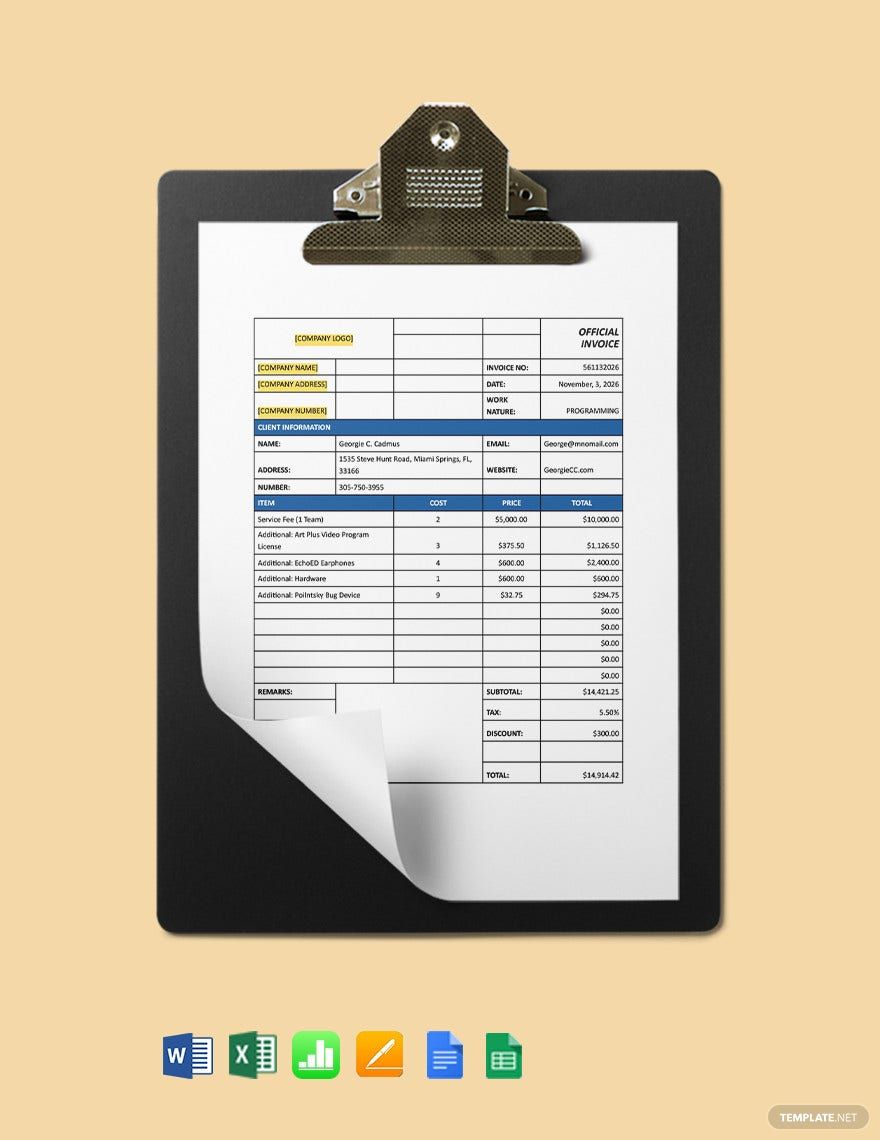
How to Build a Solution Consulting Invoice Template in Excel
Start by creating a clean worksheet with a defined invoice area. Keep the business identity and invoice metadata near the top, followed by client details and the service table.
Use clearly labeled cells for invoice number, invoice date, due date, engagement reference, and billing period. These should be visually distinct from editable line-item data.
Create columns for service description, quantity or hours, unit rate, and line amount. If expenses are included, consider a separate section so the client can distinguish reimbursable costs from professional fees.
Use formulas for line totals and the subtotal. If tax or discounts apply, calculate them in dedicated cells rather than manually entering the final total.
Finally, protect or visually differentiate formula cells so that someone updating the invoice knows which fields should be edited and which should calculate automatically.
Suggested Spreadsheet Logic
For an hourly line, the line amount can be calculated as quantity multiplied by rate. For example, a hypothetical row containing 12 hours at $180 per hour would produce a line amount of $2,160.
If several rows exist, the subtotal should add the line amounts rather than relying on a manually typed figure. This makes the invoice easier to update when hours change.
If a discount is permitted, calculate it from the agreed basis and display the adjustment separately. The same principle applies to applicable taxes.
Do not hard-code totals into multiple locations. Ideally, the final amount should be driven from the underlying line-item calculations so that changes propagate automatically.
Before sending an invoice, compare the calculated result against the contract or approved billing record.
Spreadsheet Quality Checks
Check that every service line has a description. A blank description paired with a monetary amount is difficult to approve.
Check that hours and rates use the correct units. A rate intended to be hourly should not accidentally be applied as a daily rate.
Check that formulas include every populated row. Adding a new line beneath a formula range can sometimes cause a subtotal to exclude the new charge if the workbook was not designed carefully.
Check tax and discount logic independently. A spreadsheet can produce a mathematically correct answer from an incorrect tax assumption.
Finally, print or export the sheet to PDF and inspect the page visually. A technically correct workbook can still produce an awkward PDF with cut-off columns or a second page containing only one line.
Spreadsheet design should favor simplicity. A consultant usually needs a reliable billing sheet, not a complex financial model.
Use consistent number formatting so rates and totals are easy to scan. Currency symbols should match the invoice currency.
Keep service descriptions wide enough to remain readable. If descriptions wrap excessively, the invoice may become unnecessarily long.
Place the total amount in a visually prominent area and avoid burying it among supporting calculations.
Store a clean master version separately from completed client invoices so that historical documents are not accidentally overwritten.
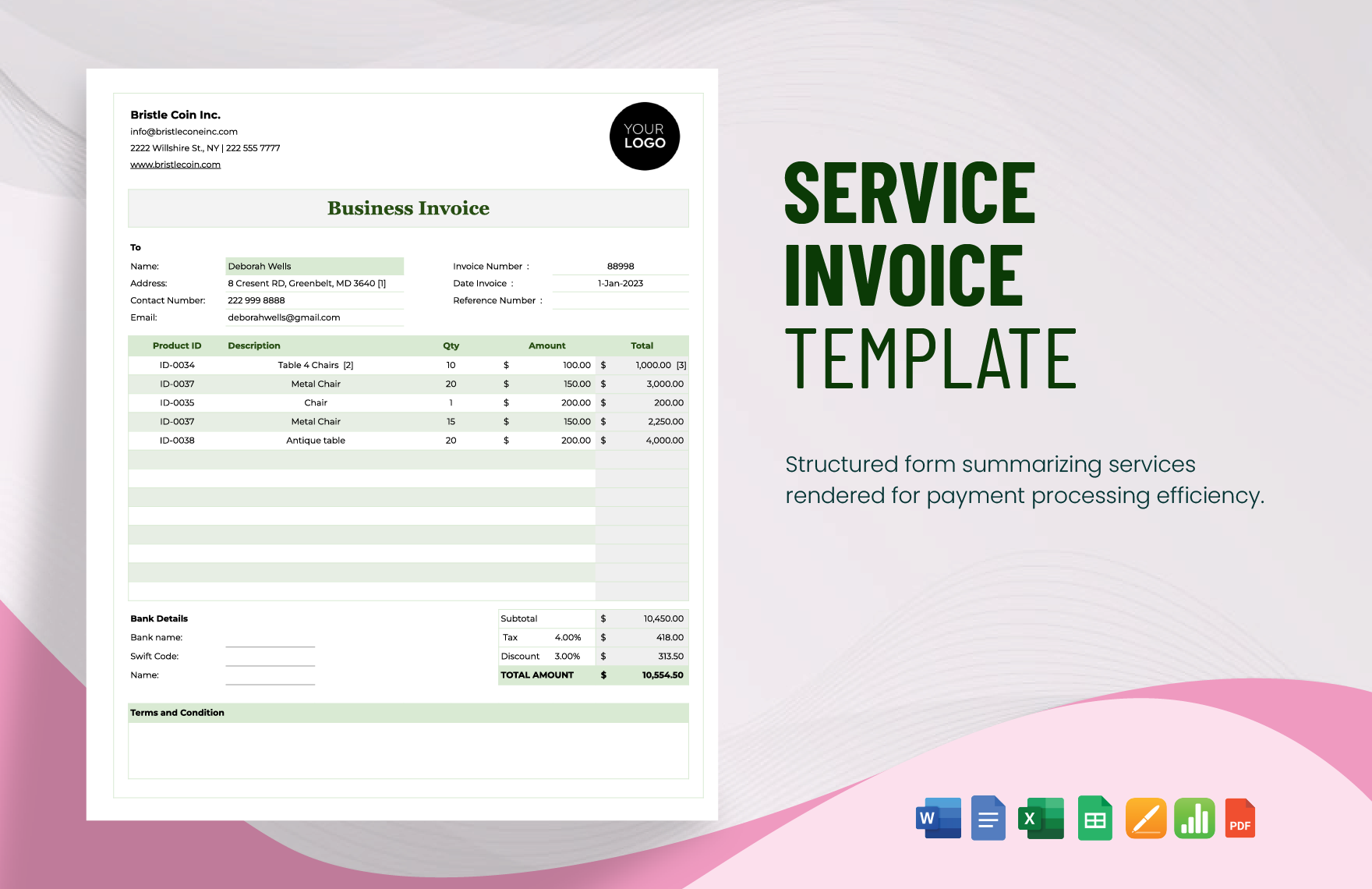
How to Create a Professional Consulting Invoice in Word or Google Docs
For document-based invoices, begin with a simple page structure. A header can contain the consulting business identity, while a separate metadata block contains the invoice number, issue date, due date, and engagement reference.
Place the consultant and client information in clearly separated sections. This prevents the recipient from confusing the supplier’s details with the bill-to information.
Use a table for services. Tables make quantity, rates, and totals easier to compare than paragraphs of text.
Keep the number of colors limited. One primary brand color plus neutral text and borders is usually enough to create a professional appearance.
Use a consistent font hierarchy. The word “Invoice,” invoice number, and total due should be more prominent than supporting notes.
Making the Invoice Easy to Review
A reviewer should be able to identify the supplier and client within seconds. If the client has to search through a decorative header to find the bill-to information, the design is working against the purpose of the document.
The service section should answer three basic questions: what was provided, how much was provided, and what was charged. If the invoice uses a fixed fee, the description should explain the relevant deliverable or milestone.
Payment instructions should be concise. Include the accepted payment method and the information necessary for the client to complete payment.
Notes can be used for a brief thank-you message, project reference, or explanation of a billing period. Avoid putting important commercial terms exclusively in tiny footer text.
Before exporting, review page breaks. A professional invoice should not split a service table awkwardly or place the total on an almost-empty second page unless the document genuinely requires multiple pages.
When a Word Template Is Better
Word is particularly convenient for consultants who bill fixed projects, workshops, or a small number of services. It is also useful when the invoice needs explanatory notes or a custom document structure.
A Word template can be duplicated for every billing cycle. Save each completed invoice using the invoice number and client name so the record is easy to locate.
For collaborative environments, Google Docs provides similar document-editing capabilities while making browser access easier.
However, neither platform should be treated as a substitute for bookkeeping. The invoice document is only one part of the financial record.
Keep supporting records such as approved proposals, timesheets, expense documentation, and payment confirmations according to your normal accounting process.
Good invoice design is ultimately about reducing cognitive load. The recipient should understand the document without having to decode the layout.
White space is useful because it separates information groups. It does not mean the invoice needs to look empty.
Consistent alignment is equally important. Currency amounts should line up, headings should follow a predictable hierarchy, and related fields should appear together.
A template can be branded without becoming promotional. The purpose is to facilitate a commercial transaction, not to turn the invoice into a marketing brochure.
Once the template is approved internally, avoid changing the layout casually from one invoice to the next.
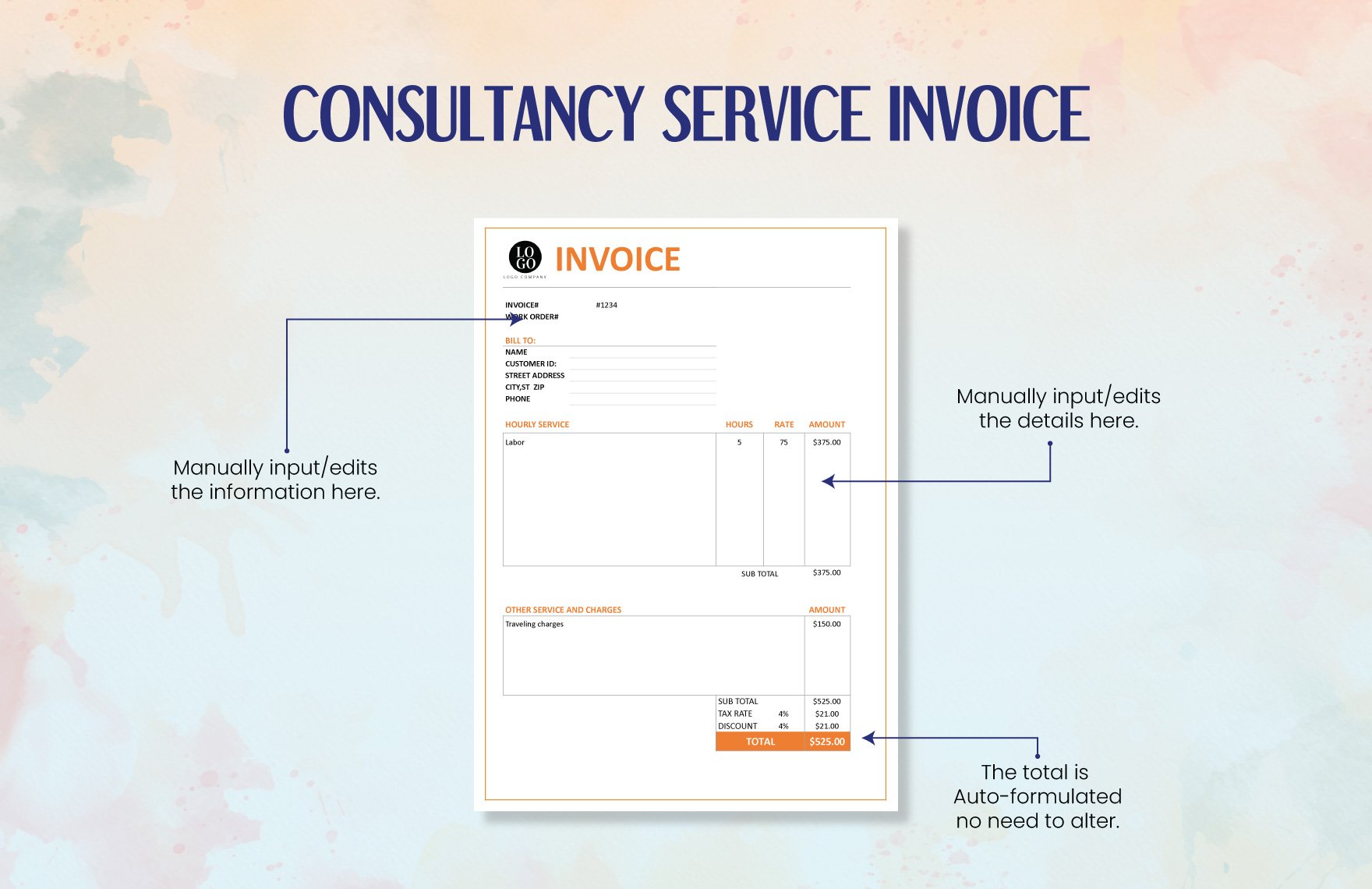
Using an Online Workflow
An online invoicing workflow can reduce repetitive manual work by storing client details, services, rates, payment terms, and invoice history. This becomes more valuable as the number of clients increases.
Many online invoicing tools also provide functions such as recurring invoices, payment reminders, expense tracking, and online payment options. These capabilities can be useful when manual templates begin creating administrative bottlenecks.
However, online does not automatically mean better. The system should still produce invoices that clearly show the engagement, services, amount due, and payment instructions.
Before adopting an online workflow, check whether it supports the currencies, tax requirements, document formats, and approval process relevant to your clients.
For consultants who only need occasional billing, a simple template may remain the most efficient solution.
Creating a Consulting Services Invoice Template Online
A consulting services invoice template online can be useful when you want to create and send invoices without maintaining local document files. Online systems can save client details, calculate totals, and provide a consistent invoice format.
The workflow typically starts with the consultant’s business information and the client’s billing details. The consultant then adds the engagement reference, invoice date, due date, service lines, quantities, rates, and payment terms.
For recurring clients, stored information can eliminate repeated data entry. This can reduce errors caused by copying addresses, tax identifiers, or payment instructions manually.
Online systems may also provide invoice-status tracking, which can help distinguish drafts, sent invoices, overdue invoices, and paid invoices.
Even when using a generator, the consultant remains responsible for reviewing the invoice before it is delivered. Automation reduces repetitive work but does not replace professional judgment.
What to Check Before Sending an Online Invoice
Confirm that the client name matches the billing entity. This is particularly important for organizations with multiple subsidiaries.
Confirm the invoice number is unique and follows your numbering system.
Confirm that the billing period and service descriptions match the engagement.
Confirm that the rates, quantities, expenses, discounts, and taxes are correct.
Confirm the due date and payment instructions before clicking send.
Online Versus Downloadable Templates
Downloadable templates are useful when you want full control over the working document and do not need a centralized invoicing system. They can be stored with project records and edited offline.
Online tools are more attractive when several people need access to the same billing workflow or when recurring invoices and payment reminders are important.
The choice also depends on the client’s preferences. Some corporate clients prefer PDF attachments, while others use supplier portals or electronic invoicing systems.
Do not assume that an online invoice can replace a client’s required procurement process. If a client requires a particular portal or reference, follow that requirement.
A flexible consultant can maintain a master template while also using online tools when a particular client or project benefits from them.
Online workflows can also improve invoice history. Instead of searching through folders for every previous document, you may be able to filter invoices by client, date, status, or project.
This becomes especially useful when a consultant has recurring advisory clients with similar monthly invoices.
Nevertheless, historical records should be retained according to the applicable accounting and business-record requirements for the consultant’s jurisdiction.
Security should also be considered when invoices contain client information or payment details. Use appropriate account controls and avoid sharing documents more broadly than necessary.
The best online process is therefore one that combines convenience with accuracy, security, and traceability.
Common Mistakes in Consulting Invoices
Using Vague Descriptions
“Consulting” is often too broad to be useful. The client may know what the engagement is about, but the accounts-payable reviewer may not.
A better description identifies the workstream, deliverable, meeting, period, or milestone. This does not need to be lengthy; it simply needs to provide enough context.
For example, “Operational process review — Phase 1” communicates more than “Consulting — 10 hours.” The exact wording should reflect the actual engagement.
Descriptions should never claim work that was not performed. Accuracy matters more than impressive terminology.
When in doubt, use the language already established in the proposal or statement of work.
Missing Dates or Payment Terms
An invoice without a clear due date can create unnecessary uncertainty. Even when the contract contains payment terms, putting the relevant due date on the invoice makes the document easier to process.
Payment terms should reflect the agreement rather than being selected arbitrarily when the invoice is prepared.
If late-payment charges apply under the contract, the invoice can reference the relevant policy, provided the terms are accurate and legally appropriate.
Do not add unexpected fees simply because a template contains a late-fee field. Optional template fields should only be used when they reflect actual commercial terms.
Clarity at the billing stage is better than trying to resolve ambiguity after an invoice becomes overdue.
Incorrect Totals
Arithmetic errors undermine confidence quickly. A client may question the entire invoice after discovering that a subtotal does not match the line items.
Use formulas where practical, especially for invoices containing several hourly lines or expenses.
Even automated calculations should be checked. A formula can be correct while the underlying hours or rate are wrong.
Compare the completed invoice against the source records before delivery.
A second-person review can be particularly valuable for larger consulting invoices.
Another common mistake is mixing currencies. Every monetary field should make the currency clear, particularly when working with international clients.
Consultants should also avoid changing the agreed rate because of a formatting or currency-conversion assumption. Commercial changes should be approved before billing.
Another problem is leaving sample information in the template. Generic client names, sample invoice numbers, or example payment instructions must be replaced before the invoice is sent.
Finally, check the final PDF visually. A document can be mathematically correct but still contain a cut-off service description, missing line, or badly positioned total.
Proofreading is one of the simplest quality-control steps in the entire invoicing process.
Best Practices for Faster, Cleaner Consulting Billing
Maintain One Master Template
Keep a clean master copy that contains your preferred branding, standard fields, payment instructions, and layout. Do not use a previously issued client invoice as the master unless all client-specific information has been removed.
Store the master template separately from completed invoices. This reduces the risk of accidentally editing an old invoice and sending it as a new document.
Review the master periodically. If your address, payment account, tax registration, or standard terms change, update the master and communicate the change through the appropriate business process.
A master template should be intentionally boring in the best possible way: predictable, clean, and difficult to misuse.
The more stable the master is, the less work each future invoice requires.
Connect Invoices to Source Records
Every invoice should be traceable to the underlying commercial record. Depending on the engagement, that may be a signed proposal, statement of work, contract, approved timesheet, milestone acceptance, or expense record.
For hourly consulting, maintain a time record that supports the billed hours. The invoice can summarize the work without reproducing every internal time entry.
For fixed-fee projects, retain evidence of the agreed scope and milestone. This helps if the client later asks why a particular amount was billed.
For expenses, keep supporting receipts or documentation when the agreement requires reimbursement.
Good source records make invoice preparation faster because the consultant is not reconstructing the project after the work is finished.
Use a Pre-Send Checklist
A short checklist can catch most avoidable invoice errors. Check the client, invoice number, dates, project reference, service descriptions, quantities, rates, expenses, taxes, total, due date, and payment instructions.
For corporate clients, also check purchase-order requirements or supplier references.
For recurring invoices, compare the current document with the previous invoice and identify what should have changed. This can catch a stale address, old rate, or incorrect billing period.
After the invoice is sent, save the final copy and record its status in your accounting system or invoice tracker.
A repeatable checklist is more reliable than relying on memory.
Professional invoicing is fundamentally a process-design problem. A consultant who creates a clear process will generally spend less time correcting documents later.
The process can be simple: perform work, record billable information, verify against the agreement, prepare invoice, review, send, track, and reconcile payment.
Templates help by standardizing the document stage, while spreadsheets or software can standardize calculations and tracking.
The consultant should still retain responsibility for understanding what is being billed and why.
When these components work together, invoicing becomes routine instead of disruptive.
Keep Client-Facing Detail Appropriate
Consulting invoices should be informative without revealing unnecessary internal information. A client usually needs to know what was billed, but not every internal activity, employee note, or confidential research detail.
For example, “Competitive landscape analysis and findings report” can be sufficient without revealing confidential research sources or internal project commentary.
If the client requires detailed timesheets, provide them through the agreed process rather than placing excessive detail on the invoice itself.
The invoice should remain a financial document with enough operational context to support approval.
This balance is especially important for consulting projects involving sensitive commercial information.
Practical Examples of Consulting Invoice Line Items
A strategy consultant might bill “Strategic planning workshop — 1 session,” followed by “Executive recommendations — fixed fee.” This structure communicates the nature of the work without implying that every deliverable was priced hourly.
A market research consultant might use “Research design and questionnaire development,” “Interview analysis,” and “Market findings report.” Each line can use the pricing unit established in the engagement.
An IT consultant might bill “Systems assessment — 8 hours,” “Architecture recommendations — 6 hours,” and “Implementation planning — 4 hours.” The invoice can reference the project phase without exposing technical details that belong in the project documentation.
An operations consultant might use “Process mapping workshop,” “Operational gap analysis,” and “90-day improvement roadmap.” These descriptions connect billing to recognizable deliverables.
A financial consultant might separate “Financial model review,” “Scenario analysis,” and “Management presentation preparation.” The exact descriptions should always reflect actual work performed.
Hypothetical Hourly Invoice Example
Consider a fictional consulting engagement with three workstreams: strategy analysis, stakeholder interviews, and report preparation. The consultant records 10 hours, 6 hours, and 4 hours respectively.
If the agreed rate is $200 per hour, the three hypothetical line amounts would be $2,000, $1,200, and $800, creating a professional-services subtotal of $4,000 before any applicable adjustments.
The invoice would identify the engagement, billing period, and payment terms. It could also include an approved expense section if the contract permits reimbursement.
The example illustrates why itemization matters: the client can see how the subtotal was created without needing to ask the consultant to explain every figure.
The numbers are purely illustrative and should not be interpreted as a market-rate recommendation.
Hypothetical Fixed-Fee Example
Suppose a fictional consultant agrees to deliver a strategic roadmap for a fixed fee of $15,000. The contract divides payment into three milestones of $5,000 each.
The first invoice could state “Discovery and current-state assessment milestone — $5,000.” The second could state “Strategic options and recommendation milestone — $5,000.” The final invoice could state “Final roadmap and executive handoff milestone — $5,000.”
This is more appropriate than converting the fixed project into artificial hours because the commercial agreement is based on deliverables.
If a deposit was paid before work began, the invoice should account for it according to the agreed billing structure.
The important principle is to make the billing event recognizable to the client.
Examples also show why consultants should avoid creating one universal line-item style for every engagement.
The same firm may have one client paying hourly, another paying by milestone, and another paying a recurring retainer.
A flexible solution consulting invoice template can accommodate all three without changing the overall identity of the invoice.
The header, client block, invoice metadata, totals, and payment instructions can remain consistent while the service table changes.
This gives the consultancy both standardization and commercial flexibility.

Example Expense Section
Imagine a fictional consultant traveling to a client site under an agreement that allows approved travel reimbursement. The invoice might separate professional fees from airfare, hotel, and local transportation.
The professional-fee section could show the agreed consulting work, while the expense section lists each reimbursable category and amount.
This separation helps the client verify whether the expenses are within the contract and prevents pass-through costs from being confused with consulting revenue.
If receipts are required, the consultant should retain them and provide them through the client’s preferred process.
Never add expenses merely because a template contains an expense section. Every billed expense should have a legitimate basis.
Research, Data Collection, and Reporting Behind Consulting Billing
Although an invoice is a financial document, the quality of the invoice often depends on the quality of the consultant’s project records. Research, analysis, workshops, interviews, and reporting create the evidence needed to describe and support the work.
For research-heavy engagements, maintain a simple project log that records the workstream, date, responsible person, output, and billable status where relevant.
For survey or interview projects, record the research activity separately from the final report deliverable. This makes it easier to explain whether the agreement prices research effort, a finished report, or both.
For data analysis, maintain version-controlled working files and document the scope of analysis. The invoice itself can remain concise while the project records preserve the technical detail.
For advisory projects, meeting notes and decision records can help establish what was delivered during a billing period.
Data Collection Workflow
A practical consulting workflow can begin with a clearly defined research question. The consultant then identifies the required data sources, collects or receives the information, cleans it, analyzes it, and develops findings.
Each stage may have a different billing treatment depending on the contract. Some engagements price the entire research package as a fixed deliverable, while others bill research activity by the hour.
The invoice should not expose confidential research information merely to prove that the work occurred. A concise description and a reference to the agreed deliverable are usually more appropriate.
Where a client requests detailed supporting evidence, provide it through the agreed reporting channel.
The result is a clean separation between project evidence and the financial document.
Data Analysis and Interpretation
Consulting analysis may involve spreadsheets, dashboards, financial models, market research, process metrics, or operational data. The invoice should describe the analysis in business terms rather than technical jargon unless the client specifically expects technical language.
For example, “Financial scenario analysis and management recommendations” communicates the business purpose of the work more effectively than a list of internal spreadsheet operations.
If the analysis produces a report, the invoice can reference the report title or milestone. If the work is hourly, the invoice can identify the analysis workstream and number of hours.
The supporting analytical files should remain separate from the invoice unless the client specifically requests them.
This structure allows the invoice to remain concise while preserving a defensible project record.
Reporting is another area where a template can help create consistency. A consultant may use the same terminology across proposals, project plans, reports, and invoices.
When the wording is aligned, the client can more easily connect the original scope to the completed work and the final charge.
That does not mean every document should be identical. A proposal describes what will happen, a report describes what was discovered, and an invoice describes what is being billed.
Each document has a different purpose, but they should not contradict each other.
Consistent terminology is therefore a practical quality-control tool.
Using Visual Analysis in Consulting Work
Charts and dashboards are often used during consulting engagements to help clients understand trends, performance, risks, or opportunities.
They are not normally necessary on the invoice itself. An invoice should remain focused on billing rather than becoming a project presentation.
However, visual reporting can help consultants organize their work internally. A dashboard can show project status, budget consumption, outstanding deliverables, and other operational information.
That information can then support accurate billing decisions without being reproduced on the invoice.
The distinction keeps the invoice concise while allowing the broader consulting process to remain data-driven.
How to Improve Invoice Approval and Payment Workflows
Payment delays often begin with administrative uncertainty rather than disagreement over the value of the consulting work. A clear invoice removes many of those points of friction before the document reaches the client.
Start by identifying the client’s required submission process before the first invoice. Ask whether the client needs a purchase order, vendor number, specific billing email, supplier portal, or particular file format.
Next, agree on the billing cadence. Hourly projects might be billed monthly, while milestone projects may be billed when specific deliverables are accepted.
Document the agreement internally so the person preparing the invoice does not have to rediscover the rules each month.
Finally, create a pre-send review that checks both the commercial calculation and the client’s administrative requirements.
Invoice Approval Example
A fictional consulting firm could use the following workflow: consultant submits billable hours by the last business day of the month; project manager reviews the hours; finance prepares the invoice; a senior reviewer checks the total; finance sends the PDF to the approved billing contact.
The process can be adapted for fixed-fee work by replacing the time review with milestone approval.
The value of the workflow is not complexity. It is clarity about who is responsible for each stage.
Small consulting businesses can use a simple checklist, while larger firms may implement formal approval systems.
In either case, the final invoice should have one clear owner before it is sent.
Handling Invoice Corrections
If an invoice contains an error, correct it promptly rather than silently changing a copy after the client has received it.
The exact correction method depends on the accounting system and jurisdiction. Some businesses issue a revised invoice or credit document rather than modifying the original record.
Keep an audit trail of what changed and why. This is especially important when the invoice has already entered the client’s accounts-payable process.
Do not reuse an invoice number for a completely different document simply because the original contained an error.
Consistency in corrections helps preserve trust and makes bookkeeping easier.
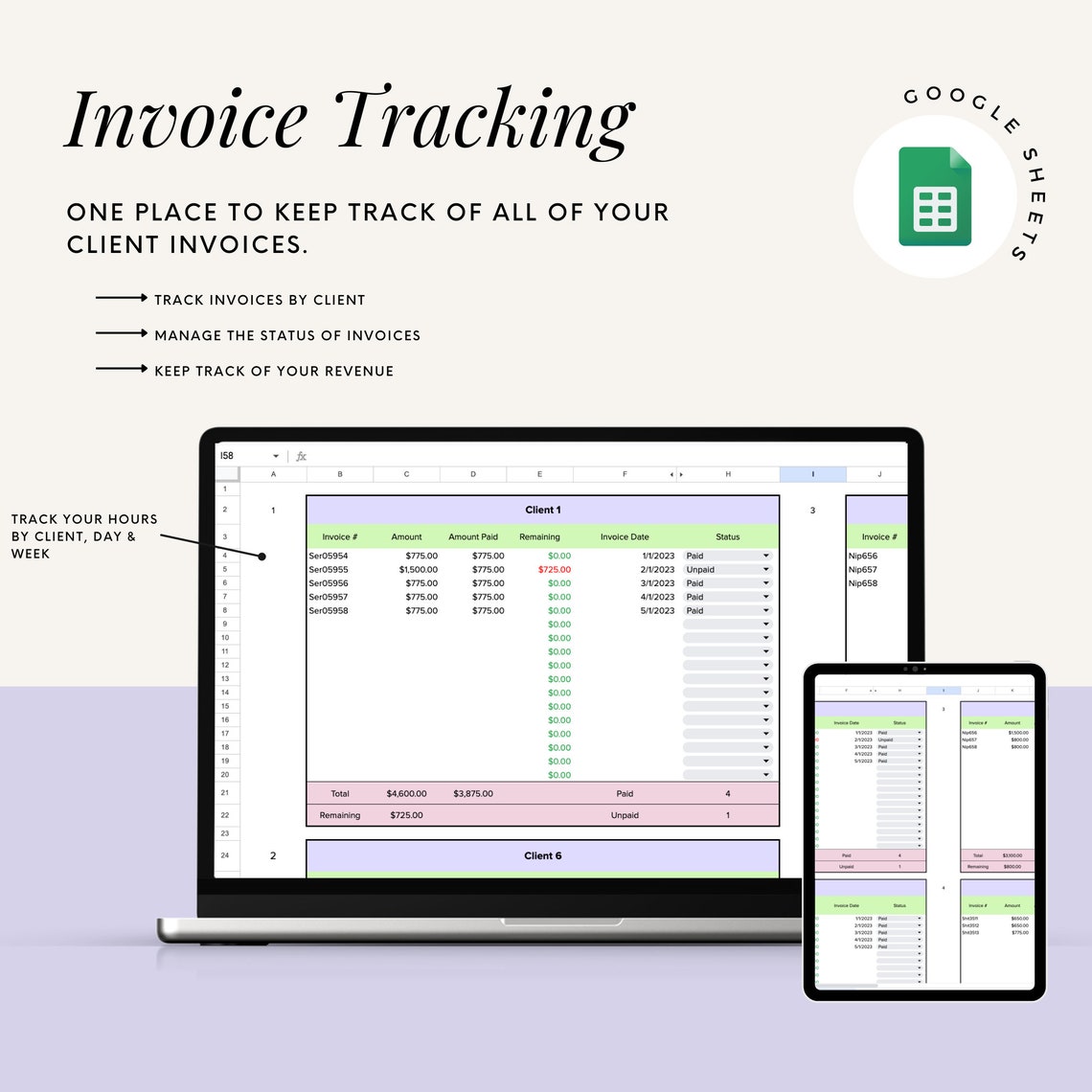
A consulting firm can also use a dashboard or spreadsheet to monitor invoice status. Useful fields include invoice number, client, project, issue date, due date, amount, status, and payment date.
This is particularly useful when multiple invoices are outstanding at the same time.
Separate invoice preparation from payment reconciliation. Creating an invoice records an amount owed; recording payment confirms that money has actually been received.
Keeping these states separate prevents accidental assumptions that a sent invoice has already been paid.
Good tracking turns invoicing into a manageable business process rather than an occasional administrative emergency.
Practical Solution: A Repeatable Consulting Invoice Workflow
The most practical solution is to build one master solution consulting invoice template and connect it to a repeatable billing workflow. The template should contain stable business information and editable placeholders for the client, engagement, billing period, services, quantities, rates, expenses, taxes, and payment terms.
Step one is to define the billing model for each engagement. Mark the project as hourly, fixed-fee, milestone-based, retainer, or another agreed structure. This determines which invoice fields should be used.
Step two is to maintain source records throughout the project. Record billable hours as they occur, retain approved expenses, and track milestone completion rather than trying to reconstruct the project at the end of the month.
Step three is to prepare the invoice from the source records. Match the client, engagement reference, billing period, descriptions, quantities, and rates against the agreement.
Step four is to review the arithmetic and administrative information. Confirm the invoice number, dates, due date, payment instructions, currency, taxes, discounts, expenses, and total amount.
Step five is to export or finalize the invoice in the format appropriate for the client. Excel or Google Sheets can be useful for calculation, while PDF is often practical for final delivery. Word or Google Docs can work well when the invoice is primarily document-based.
Step six is to save the final version using a consistent filename that includes the invoice number and client identifier. Avoid ambiguous names such as “final invoice new version.”
Step seven is to record that the invoice was sent and track its status. If the client has an established accounts-payable process, follow up through the appropriate contact rather than repeatedly sending the invoice to unrelated people.
Step eight is to reconcile payment when it arrives. Mark the invoice as paid only after the payment has actually been received and matched to the correct invoice.
Step nine is to review the process periodically. If the same error keeps appearing, change the template or workflow instead of relying on reminders to avoid it.

Practical Template Design
At the top, place your consulting business name and contact information. Beside or below it, place the invoice number, invoice date, due date, and engagement reference.
Below the header, create a clear bill-to block for the client. Include the billing contact and address exactly as supplied by the client.
The main table should contain service description, quantity or hours, rate, and amount. Add a separate expense section only when the engagement uses reimbursable expenses.
Place subtotal, discount, tax, and total in a visually distinct area. Make the final amount due the most prominent financial figure.
Finish with payment instructions and concise notes. If the client requires special references, place them where the accounts-payable team can find them easily.
Practical Quality-Control Checklist
Before sending, ask whether the invoice identifies the correct consultant and client. If either party is unclear, stop and correct the document.
Ask whether every line item corresponds to work that was actually performed or a milestone that was legitimately reached.
Ask whether the quantities and rates agree with the commercial terms. Do not rely on memory when the agreement can be checked.
Ask whether the total was calculated correctly and whether the tax treatment is appropriate for the transaction.
Ask whether the document can be understood by someone who did not participate in the consulting engagement.
A practical template should also minimize the number of decisions made during invoice preparation. The consultant should not have to decide where the invoice number goes or how the total is calculated every month.
Those choices should already be built into the master document.
At the same time, the template should not be so rigid that it cannot accommodate different billing structures.
The ideal design has stable administrative fields and flexible service lines.
This combination provides the best balance between consistency and real-world consulting work.
When to Move Beyond a Template
A template may be enough when invoices are relatively simple and the consultant has a small number of clients.
Consider a dedicated invoicing or accounting system when the business needs recurring invoices, automated reminders, payment tracking, multiple users, integrated time tracking, expense management, or more sophisticated reporting.
Even then, the principles described here remain important. Software automates a process; it does not define whether the underlying billing information is accurate.
When selecting software, evaluate the complete workflow rather than focusing only on invoice appearance.
The right system should make accurate billing easier, not simply produce attractive documents.
Reference Examples
The following reference examples illustrate different consulting invoice formats and workflows, including spreadsheet-oriented layouts, editable documents, PDF-ready designs, and browser-based templates. The examples are visual references rather than claims that every format is appropriate for every jurisdiction or client.
solution consulting invoice template excel

Source: FinancialAha
solution consulting invoice template free
Source: Xero
solution consulting invoice template pdf
Source: Zoho Invoice
solution consulting invoice template free download
Source: Template.net
solution consulting invoice template word
Source: Template.net
solution consulting invoice template google docs
Source: Smartsheet
solution consulting invoice template excel free
Source: Template.net
solution consulting invoice template google sheets
Source: Etsy
consulting services invoice template online
Source: Zoho Invoice
consulting service invoice template
Source: Template.net
template invoice for consulting services
Source: Venngage
consulting services invoice template download
Source: Template.net
Frequently Asked Questions
What should a solution consulting invoice template include?
At minimum, include consultant details, client billing details, a unique invoice number, invoice date, due date, service or project reference, itemized charges, applicable taxes or adjustments, total amount due, and payment instructions. Add purchase-order or contract references when the client requires them. :contentReference[oaicite:2]{index=2}
Is Excel a good format for consulting invoices?
Yes. Excel is particularly useful when the invoice contains multiple hours, rates, expenses, discounts, or taxes because formulas can automate calculations. The completed invoice can then be exported to PDF for final delivery.
Should I send an editable Word invoice or PDF?
For most final client-facing invoices, PDF is useful because it preserves the finished layout. Word is better suited to creating and editing the source document. The right choice can also depend on the client’s submission requirements.
Can I use Google Docs for consulting invoices?
Yes. Google Docs works well for document-oriented invoices and collaborative workflows. Keep the master template protected and create a separate copy for each client invoice.
Can Google Sheets be used for consulting billing?
Yes. Google Sheets combines spreadsheet calculations with browser-based access and collaboration. It can be particularly useful for hourly billing and recurring invoices, provided formula cells and access permissions are managed carefully.
What is the difference between an invoice and a receipt?
An invoice requests payment and records an amount owed. A receipt generally documents payment that has already been made. They serve different stages of the transaction.
Should consulting invoices list every hour worked?
Not necessarily. If the engagement is hourly, the invoice can summarize hours by workstream or service. If the client requires detailed timesheets, provide the supporting record according to the agreed process.
Should a fixed-fee consulting invoice show hours?
Usually not unless the agreement specifically calls for that information. A fixed-fee invoice is generally clearer when it identifies the relevant deliverable, project phase, or milestone instead of implying that the price is calculated from hours.
How should expenses appear on a consulting invoice?
When reimbursable expenses are permitted, list them separately from professional fees. Identify the category or description and amount, and retain supporting receipts or documentation when required by the agreement.
What payment terms should consultants use?
Use the terms agreed with the client rather than choosing a standard term after the work is completed. Common commercial arrangements can include different due-date structures, but the invoice should reflect the actual agreement.
Can a consulting invoice include taxes?
Yes, when applicable. Tax treatment varies by jurisdiction, transaction type, customer location, and business circumstances. A generic template should not be treated as proof of tax compliance.
When should a consultant send an invoice?
Send it according to the billing schedule established in the engagement. Some consultants bill after a service period, while milestone projects may trigger invoices when agreed deliverables are completed.
Conclusion
A dependable solution consulting invoice template should make billing clearer, not more complicated. The strongest template connects the consultant, client, engagement, service period, pricing model, charges, payment terms, and final amount into one document that can be reviewed quickly.
Whether you choose Excel, Word, PDF, Google Docs, Google Sheets, or an online invoicing system, the same fundamentals apply: use accurate information, itemize meaningful charges, reference the engagement, calculate totals carefully, follow agreed payment terms, and keep the final invoice consistent with the underlying project records.
The best workflow is repeatable. Record billable work as it happens, prepare the invoice from reliable source information, review it against the agreement, send it through the client’s required channel, track its status, and reconcile payment when received.
A well-built template can save time, reduce avoidable errors, and make professional consulting work easier for both the consultant and the client to understand.
Most importantly, treat the invoice as part of the consulting delivery experience. When the billing document is as clear and disciplined as the consulting work itself, it becomes a practical business tool rather than merely a request for payment.
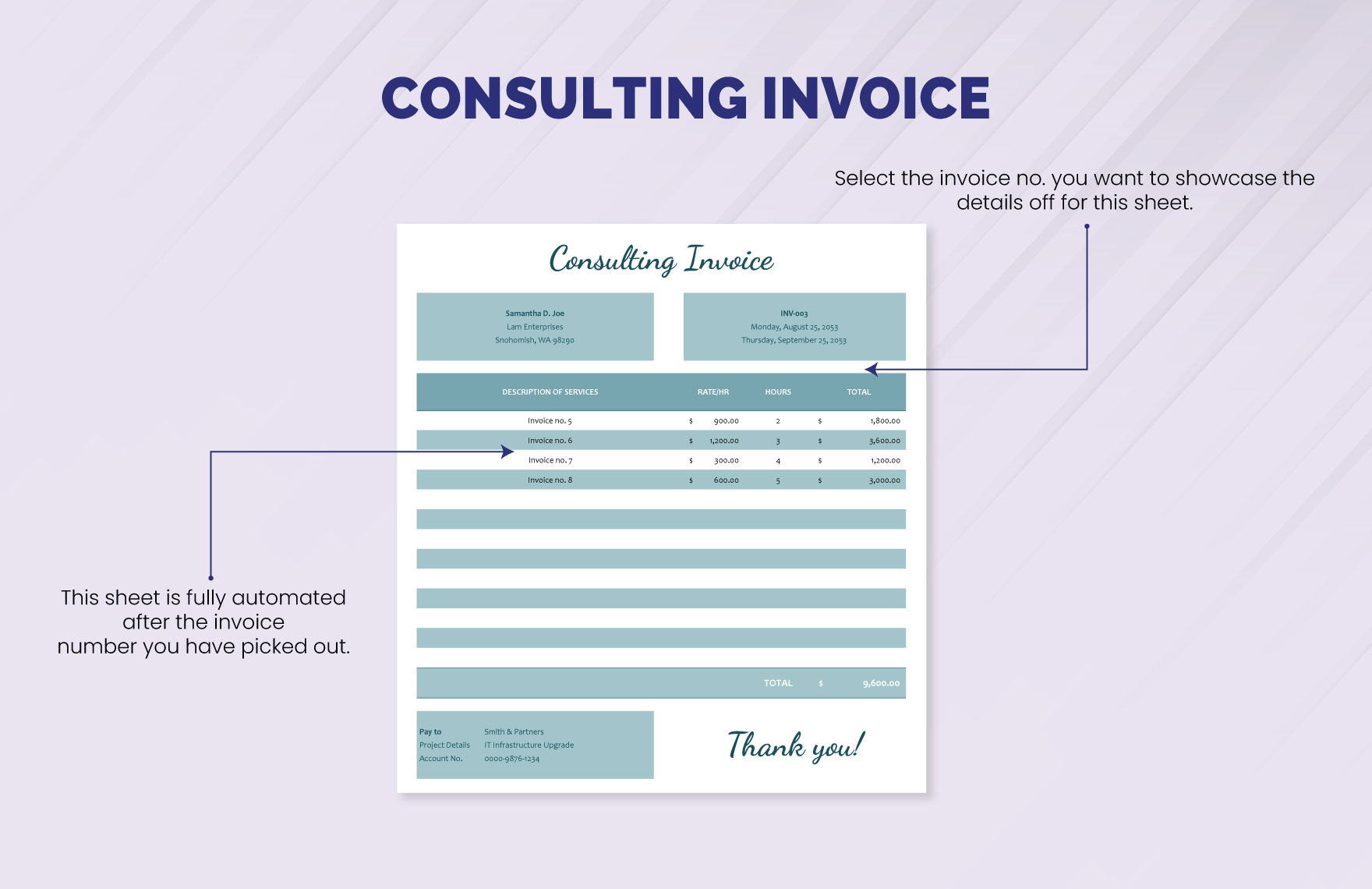
A thoughtfully designed solution consulting invoice template gives every project a consistent financial finish: clear scope, transparent charges, traceable references, and an amount due that the client can understand and act on without unnecessary back-and-forth.
