Managing daily operations can quickly become complicated when tasks, responsibilities, deadlines, inputs, and expected results are spread across different documents. A Printable Operations Matrix provides a simple way to bring these details together on one organized page. It helps teams understand what needs to be done, who is responsible, what resources are required, and when each activity should be completed.
Unlike a complex project management system, a printable operations matrix is easy to review, share, and update. It can be printed for meetings, placed on a planning board, or saved as a reference document for recurring workflows. Whether you manage a small business, department, office, project, or operational team, an operations matrix can make responsibilities and processes easier to understand.
This guide explains what an operations matrix is, how to use one effectively, what information to include, and how a printable template can improve operational planning.
What Is a Printable Operations Matrix?
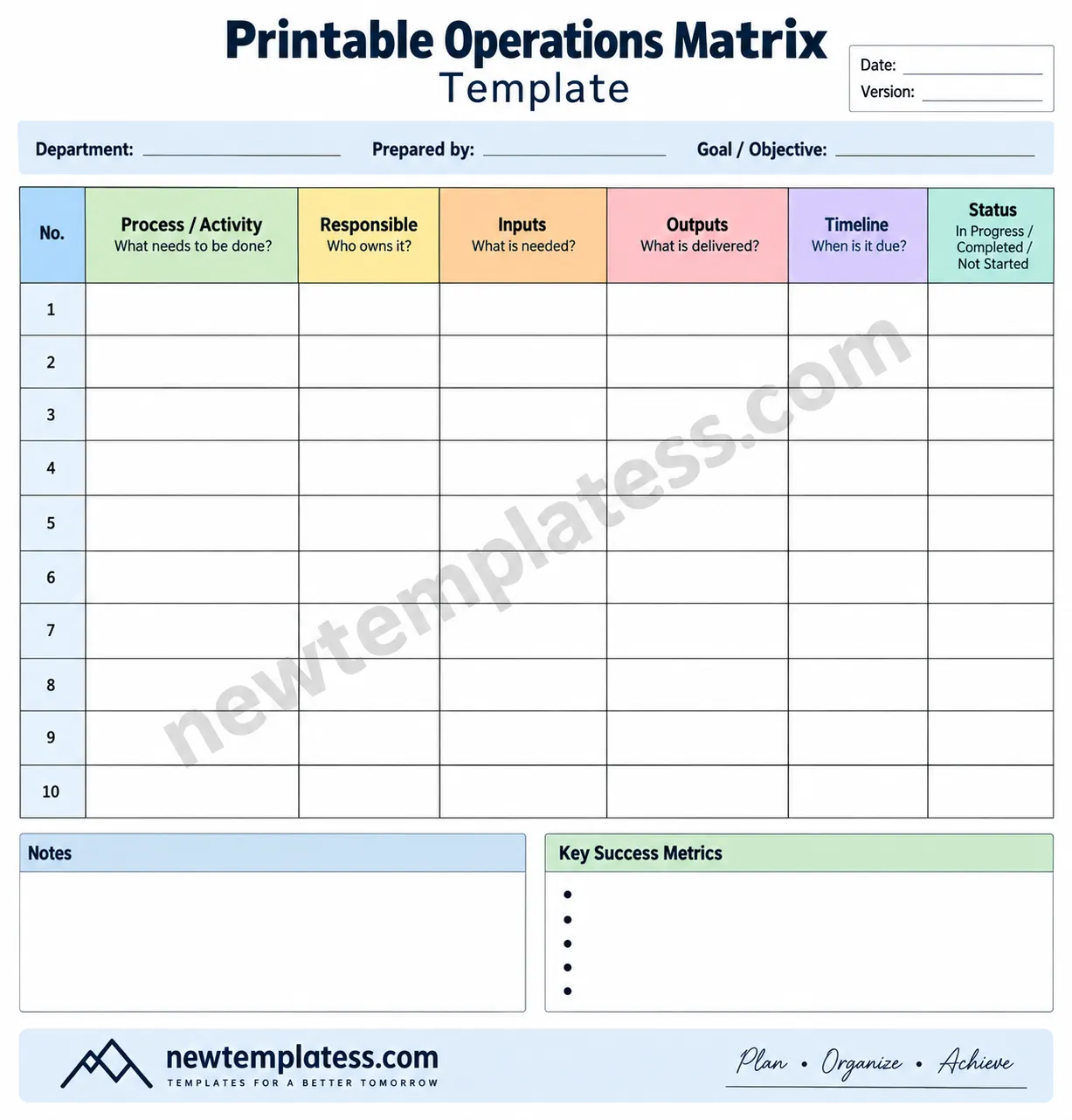
A Printable Operations Matrix is a structured planning document that organizes operational activities into a clear table. Each row can represent a process, task, or activity, while columns capture important information such as the person responsible, required inputs, expected outputs, timeline, and current status.
The purpose is to create a visual overview of operational work. Instead of searching through emails, notes, spreadsheets, or separate task lists, team members can refer to one document to understand how activities fit together.
A typical operations matrix may include the following fields:
- Process or Activity: The task or operational step that needs to be completed.
- Responsible Person: The individual, role, or department accountable for the activity.
- Inputs: Materials, information, approvals, or resources needed to begin.
- Outputs: The result, deliverable, or completed item expected from the activity.
- Timeline: The planned deadline or completion period.
- Status: The current condition of the task, such as not started, in progress, or completed.
Why Use an Operations Matrix?
Good operations management depends on clarity. When employees are unsure about ownership, deadlines, or expected results, small misunderstandings can create delays. An operations matrix addresses these problems by making important information visible.
1. Clarify Responsibilities
One of the most useful benefits of an operations matrix is that it identifies who owns each activity. Clearly assigning responsibility reduces confusion and makes follow-up easier.
For example, instead of writing “prepare the monthly report,” a matrix can identify the specific person or department responsible for preparing it. This creates accountability without requiring a lengthy explanation.
2. Improve Workflow Visibility
A printable workflow matrix provides a quick overview of how operational activities are organized. Managers can identify tasks that are delayed, duplicated, missing, or dependent on another activity.
This is especially helpful during weekly planning sessions and operational review meetings.
3. Make Meetings More Productive
A printed operations matrix gives teams a shared reference point. Instead of spending meeting time reconstructing what happened, participants can review activities, discuss exceptions, and focus on decisions that require attention.
4. Support Consistent Processes
Businesses often perform the same operational activities repeatedly. A matrix can document these recurring processes and provide a consistent framework for completing them.
It can also help new employees understand basic responsibilities and workflow expectations more quickly.
What to Include in a Printable Operations Matrix
A useful matrix should contain enough information to support decision-making without becoming difficult to read. The exact columns can vary according to your organization, but several fields are particularly valuable.
Process or Activity
Start by listing the operational tasks that matter most. Use short, action-oriented descriptions such as “Review customer orders,” “Prepare inventory report,” or “Approve supplier invoice.” Clear wording makes the matrix easier to scan.
Responsible Person or Department
Assign every activity to a specific role, person, or department. If several people contribute to a task, identify one primary owner and use notes to describe supporting responsibilities.
Inputs and Resources
Document what is required before the task can begin. Inputs may include customer information, documents, inventory, software access, approvals, equipment, or data.
Expected Outputs
Describe what successful completion looks like. An output might be a completed report, approved document, delivered order, updated database, or resolved customer request.
Timeline and Status
A timeline helps establish expectations, while a status field shows current progress. Common status labels include:
- Not Started
- In Progress
- Waiting for Input
- Under Review
- Completed
- On Hold
How to Create an Effective Operations Matrix
Creating an operations matrix does not have to be complicated. The most effective approach is to begin with the activities that have the greatest impact on daily operations.
Step 1: Identify Core Activities
Make a list of recurring tasks and important operational processes. Focus on activities that involve multiple people, deadlines, dependencies, or measurable outputs.
Step 2: Assign Ownership
For every activity, identify the person or department responsible for making sure the work gets completed. Avoid vague ownership such as “the team” when a specific role can be named.
Step 3: Define Inputs and Outputs
Ask two simple questions: “What is needed to start this activity?” and “What should exist when the activity is finished?” These questions help expose missing resources and unclear expectations.
Step 4: Add Timelines
Include deadlines, recurring dates, or expected turnaround times. For recurring operations, you can use terms such as daily, weekly, monthly, or quarterly when an exact date is unnecessary.
Step 5: Review the Matrix With Your Team
Before relying on the document, ask the people who perform the work to review it. They may identify unrealistic deadlines, missing inputs, duplicated responsibilities, or unnecessary steps.
Practical Tips for Using a Printable Operations Matrix
A template becomes more valuable when it is used consistently. The following practices can help your team get more from an operations planning matrix.
- Keep descriptions concise. Short phrases are easier to scan than large blocks of text.
- Use consistent terminology. Choose standard names for departments, processes, and status labels.
- Update it regularly. An outdated matrix can create more confusion than clarity.
- Highlight exceptions. Pay attention to delayed activities, missing inputs, and tasks waiting for approval.
- Review ownership periodically. Responsibilities can change as teams and business processes evolve.
- Track measurable outcomes. Add key success metrics when operational performance needs to be monitored.
- Print only what is useful. If the matrix becomes too large, separate major processes into individual operational worksheets.
Printable Operations Matrix vs. Digital Task Management
A printable operations matrix and a digital task management system serve different purposes. Digital platforms are useful for real-time collaboration, automated notifications, file sharing, and detailed task tracking. A printed matrix, however, provides an immediate visual reference that does not require an application or login.
For many teams, the two approaches can work together. A digital system can contain detailed task information, while a printable operations matrix can summarize the most important processes and responsibilities.
This makes the printable document particularly useful for meetings, planning sessions, onboarding, process reviews, and workplace displays.
Who Can Use an Operations Matrix?
An operations matrix is flexible enough for many types of organizations and workflows. It can be adapted for:
- Small business operations
- Office administration
- Project management
- Human resources processes
- Customer service workflows
- Inventory and supply chain operations
- Manufacturing processes
- Marketing activities
- Event planning
- Department-level workflow management
For example, a retail business could use a matrix to organize inventory checks, purchase orders, product receiving, stock updates, and reporting. A marketing team could use one to track campaign preparation, content approval, publishing, analytics, and follow-up.
Common Mistakes to Avoid
Even a simple operational planning template can become ineffective if it contains too much information or is not maintained.
Making the Matrix Too Complicated
Adding dozens of columns may seem useful, but excessive detail can make the document difficult to read. Include only information that supports planning, accountability, or decision-making.
Leaving Responsibilities Unclear
A task without an owner can easily be overlooked. Make responsibility explicit wherever possible.
Using Vague Outputs
Words such as “done,” “handled,” or “processed” may not clearly describe the expected result. Instead, identify the actual deliverable or outcome.
Failing to Update the Document
An operations matrix should reflect the current workflow. Review it whenever processes, responsibilities, deadlines, or organizational structures change.
How a Printable Template Can Save Time
Starting with a ready-made Printable Operations Matrix eliminates the need to design a table from scratch. A structured template provides a consistent framework that can be printed immediately and customized for different teams or processes.
A well-designed template can also make operational information easier to communicate. Clear headings, sufficient writing space, and logical sections allow users to capture information quickly without worrying about formatting.
For recurring business planning, keeping a blank master template available can be particularly useful. Each department can create a working copy while the original remains unchanged for future use.
Frequently Asked Questions
What is the main purpose of an operations matrix?
The main purpose is to organize operational activities, responsibilities, inputs, outputs, timelines, and status in one easy-to-review format.
Can I use a printable operations matrix for project management?
Yes. A project team can use an operations matrix to summarize major activities, owners, resources, deliverables, deadlines, and progress. For complex projects, it can complement a more detailed project management system.
Is a printable matrix suitable for small businesses?
Yes. Small businesses can use a simple matrix to clarify recurring tasks and responsibilities without investing in complicated operational software.
How often should an operations matrix be updated?
Update it whenever responsibilities, processes, deadlines, or operational requirements change. For active workflows, a weekly or monthly review can help keep the information accurate.
Conclusion
A Printable Operations Matrix is a practical way to organize business activities and make responsibilities easier to understand. By documenting processes, owners, inputs, outputs, timelines, and status, teams can create greater visibility across everyday operations.
The key is to keep the matrix clear, focused, and current. Use concise descriptions, assign specific ownership, define measurable outputs, and review the document regularly. Whether it is used during team meetings, process planning, employee onboarding, or daily operations, a well-structured matrix can become a valuable reference for keeping work organized.
With a ready-to-use printable template, you can spend less time designing spreadsheets and more time improving the processes that keep your organization running smoothly.
