Managing client relationships effectively requires more than keeping a list of names and contact details. A well-organized Client Management Outline gives you a practical way to record important client information, track communication, identify needs, and turn conversations into clear action steps. Whether you work as a freelancer, consultant, agency owner, sales professional, or account manager, a structured client management system can make everyday work more organized and consistent.
When client information is scattered across emails, notebooks, spreadsheets, and messaging apps, important details can easily be overlooked. A simple client management outline brings those details together in one place. It can also help you prepare for meetings, follow up on commitments, understand client priorities, and maintain stronger professional relationships.
This guide explains how to use a client management outline, what information to include, and how a simple printable template can become part of an effective client relationship management process.
What Is a Client Management Outline?
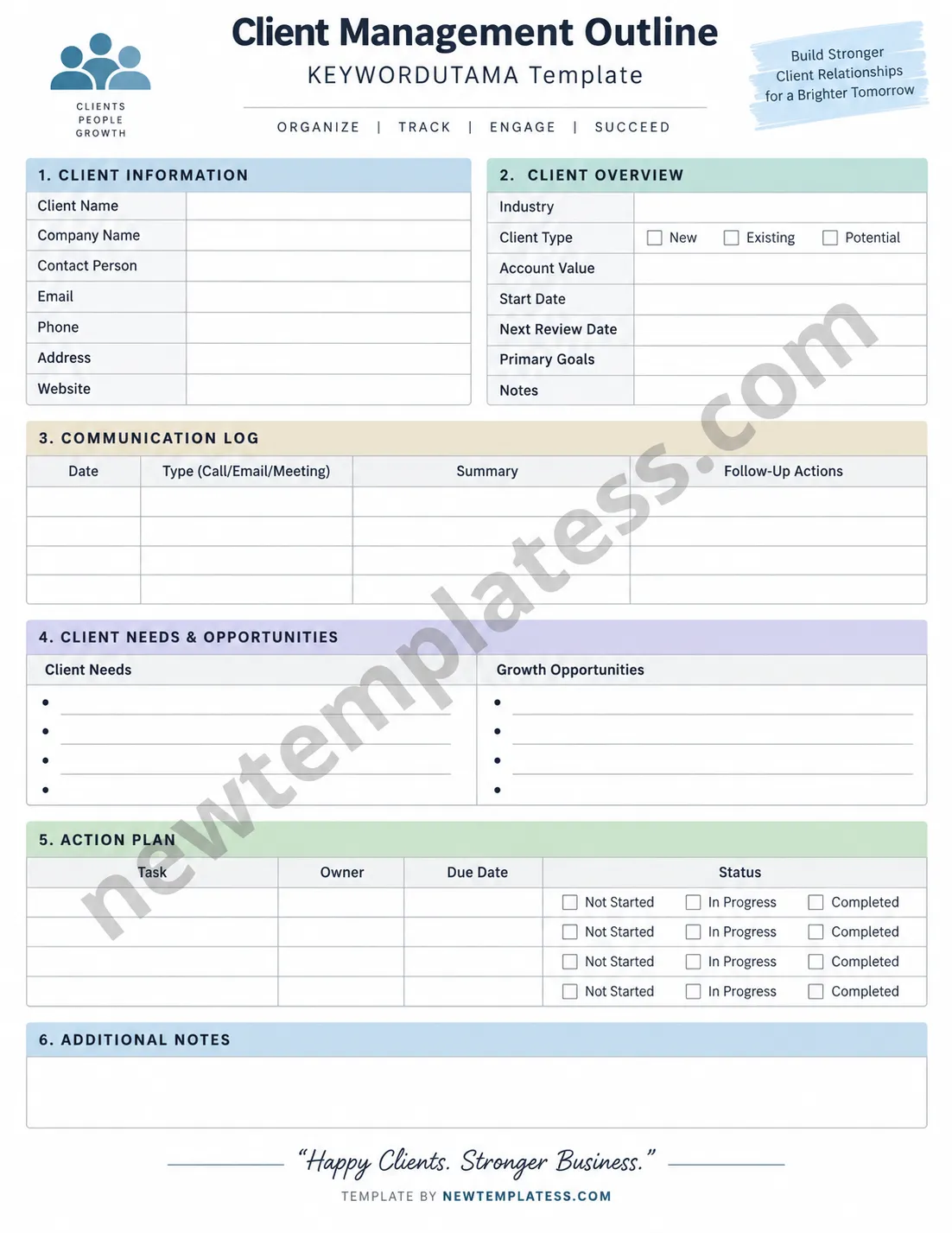
A Client Management Outline is a structured document used to organize essential information about a client and manage ongoing interactions. It typically combines client details, account information, communication history, current needs, opportunities, tasks, and notes.
Unlike a basic contact list, a client management outline focuses on the relationship itself. It helps answer practical questions such as:
- Who is the primary contact?
- What does the client need right now?
- What goals or priorities have they shared?
- When was the last conversation?
- What follow-up actions are required?
- Which tasks are currently in progress?
- Are there opportunities to provide additional value?
Because the format can be customized, a client management template can work for both individual professionals and growing teams.
Why Use a Client Management Template?
Good client management depends on consistency. Even when you have a strong memory and a manageable client list, details can become difficult to track as projects and conversations increase. A dedicated client management template provides a repeatable structure for recording information.
Keep Client Information Organized
A template gives you a defined place for names, company details, contact information, industry, client type, account value, goals, and other relevant details. This reduces the time spent searching through different sources for basic information.
Improve Follow-Up
Following up at the right time is an important part of professional client communication. A communication log can help you record calls, emails, meetings, decisions, and promised next steps. Reviewing those notes before contacting a client can also make conversations more relevant and personalized.
Track Client Needs and Opportunities
Client needs can change over time. A structured outline allows you to document current challenges as well as potential opportunities. This makes it easier to identify where additional support, services, or resources may be useful without relying on memory alone.
Create Clear Action Plans
A good client relationship requires action. Instead of ending a meeting with vague intentions, use an action plan to record the task, responsible person, due date, and status. This creates accountability and makes the next step clear.
Key Sections of a Client Management Outline
A useful client management outline does not need to be complicated. The best format contains the information you actually use while leaving enough space for updates.
1. Client Information
Start with essential identification and contact details. Depending on your business, this section may include:
- Client name
- Company name
- Primary contact person
- Email address
- Phone number
- Business address
- Website
- Industry or business category
Keeping these details together creates a quick reference point whenever you need to contact or prepare for a client.
2. Client Overview
The overview section provides context beyond basic contact information. You can record whether the client is new, existing, or a potential customer, along with account value, start date, review dates, primary goals, and other important notes.
This section is particularly helpful when managing multiple accounts because it provides a quick snapshot of the relationship.
3. Communication Log
A communication log is one of the most useful parts of a client management outline. Record the date, communication type, key discussion points, and follow-up actions after important interactions.
For example, after a client meeting, you might record the main decision, the information the client needs, and the person responsible for the next action. Over time, this creates a useful history of the relationship.
4. Client Needs and Opportunities
This section helps shift client management from simple administration toward relationship development. List the client’s current needs, concerns, objectives, and possible opportunities for future support.
For example, a marketing consultant might identify a client’s need for better lead generation while noting an opportunity to provide campaign reporting or content planning. The goal is not to force additional sales. Instead, the information helps you understand how your work can better support the client’s objectives.
5. Action Plan
Convert discussions into specific actions. A simple action plan can include the task, owner, due date, and current status.
- Task: What needs to be completed?
- Owner: Who is responsible?
- Due date: When should it be finished?
- Status: Is it not started, in progress, or completed?
Clear action items reduce misunderstandings and make follow-up conversations much easier.
6. Additional Notes
Leave space for information that does not fit neatly into other categories. This could include meeting observations, preferences, important context, upcoming events, or reminders that may improve future interactions.
How to Use a Client Management Outline Effectively
Having a template is useful, but consistent use is what makes it valuable. Establish a simple process for updating the document throughout the client lifecycle.
Update the Outline After Important Interactions
Do not wait until the end of the month to reconstruct what happened. Add important information soon after meetings, calls, emails, or project milestones. Fresh notes are generally more accurate and detailed.
Focus on Actionable Information
A client management document should help you make decisions and take action. Avoid filling it with information that will never be used. Prioritize details that help you understand the client, serve them better, or complete outstanding work.
Review Client Records Regularly
Schedule a regular review of active client records. During the review, check for overdue tasks, upcoming meetings, unresolved issues, changing priorities, and opportunities that require attention.
Use Consistent Naming and Categories
If you manage many clients, consistency becomes increasingly important. Use the same labels, status categories, date formats, and terminology throughout your client management system. Consistent records are easier to scan and maintain.
Client Management Tips for Better Relationships
A structured outline is only one part of effective client relationship management. Combine it with good communication habits to create a more reliable client experience.
- Listen carefully: Record the client’s actual goals and concerns rather than making assumptions.
- Confirm next steps: Make sure both sides understand what happens after each important conversation.
- Follow through: Complete promised actions on time or communicate early if circumstances change.
- Personalize communication: Use relevant information from previous conversations when appropriate.
- Track deadlines: Record important dates so that follow-ups do not depend on memory.
- Document decisions: Keep concise notes about important agreements and changes.
- Review opportunities: Look for ways to create additional value based on genuine client needs.
Who Can Benefit From a Client Management Outline?
A client management outline can be adapted to many professional settings. Freelancers can use it to manage project details and customer communication. Consultants can use it to track goals, recommendations, and follow-up actions. Agencies can use it to organize account information across multiple projects.
It can also be useful for:
- Sales representatives
- Account managers
- Customer success professionals
- Coaches and consultants
- Real estate professionals
- Service-based businesses
- Small business owners
- Project managers
- Independent professionals
The format can be as simple as a printable one-page client management worksheet or expanded into a more detailed digital customer relationship management system.
Printable vs. Digital Client Management Systems
Both printable and digital formats have practical advantages. A printable client management template can be convenient during meetings, brainstorming sessions, or situations where handwriting notes is faster. It also provides a simple visual overview without requiring software.
Digital client management tools, on the other hand, are useful when information needs to be searched, shared, updated by several people, or connected to other business systems.
For many professionals, the best approach depends on workflow. A printable outline can serve as a quick planning and meeting tool, while a digital system can store long-term records and automate reminders.
How to Build a Simple Client Management Workflow
You can turn a basic template into a repeatable workflow with a few simple steps.
Step 1: Create the Client Record
Enter the client’s contact details, company information, relationship status, and primary goals.
Step 2: Record the Initial Conversation
Document the client’s needs, expectations, challenges, and important decisions. Keep the notes concise but specific.
Step 3: Define Next Actions
List every important follow-up task and assign an owner and due date. Avoid leaving responsibilities implied.
Step 4: Update After Each Interaction
Add relevant communication details after calls, emails, meetings, and project milestones.
Step 5: Conduct Regular Reviews
Review active client records weekly or at another interval that fits your workload. Look for overdue tasks, changing needs, and upcoming opportunities.
Common Client Management Mistakes to Avoid
Even a good client management template can become ineffective if it is not maintained properly. Avoid these common mistakes:
- Keeping incomplete records: Missing contact details or action items can create unnecessary delays.
- Writing overly vague notes: Notes such as “follow up later” are less useful than a specific task and date.
- Failing to update information: Old contact details and outdated goals can lead to poor communication.
- Recording everything without structure: Excessive information can make important details harder to find.
- Ignoring unresolved tasks: A communication log is most valuable when it leads to clear follow-through.
Make Client Management More Consistent
A Client Management Outline provides a simple framework for organizing the information that matters most in a client relationship. By combining client details, communication records, needs, opportunities, action items, and notes, you can create a clearer picture of every active account.
The most effective approach is not necessarily the most complicated one. A straightforward client management template that you actually update can be more useful than a sophisticated system filled with information that is rarely reviewed. Start with the essentials, establish a consistent process, and adapt the outline as your client management needs grow.
Whether you prefer a printable worksheet, spreadsheet, or digital CRM, the goal remains the same: keep important client information organized, make follow-up easier, and create a more consistent professional experience.
Conclusion
Effective client management begins with having a clear view of each relationship. A well-designed Client Management Outline helps you organize contact information, document communication, understand client needs, track opportunities, and turn conversations into actionable tasks.
Use the template as a practical starting point, update it consistently, and focus on information that helps you serve clients more effectively. With a simple and repeatable system, client management becomes easier to maintain and much less dependent on memory.
