A well-structured repair shop business Template gives a repair business a consistent way to record customer information, identify the item or vehicle being serviced, describe the reported problem, document the work performed, track parts and labor, record approvals, and prepare accurate billing. Whether the shop handles automobiles, motorcycles, bicycles, appliances, computers, electronics, or equipment, the underlying recordkeeping principles are similar: every job needs a clear identity, a defined scope, traceable costs, and a reliable completion record.
Searchers looking for a repair shop template are usually trying to solve a practical business problem rather than simply find a visually attractive document. They want to know what fields belong on a repair order, which format is best for their workflow, how an estimate differs from a work order, and how receipts and service records should connect. A useful template therefore needs to support the entire job cycle, from intake and diagnosis through authorization, repair, quality checking, payment, and customer history.
This article explains how to design and use a repair shop record system that can be adapted to different industries. It also examines formats such as Excel, PDF, Word, Google Docs, and Google Sheets, while showing how a repair order can become the central document connecting customer concerns, technician notes, materials, labor, and final charges. The goal is not to prescribe one universal form, but to help you build a structure that remains useful as the shop becomes busier.
What a Repair Shop Business Template Should Accomplish
The most important function of a repair template is to create a single, recognizable record for each job. A work order number, customer name, date, asset or vehicle identification, and reported concern establish the identity of the job. Without these elements, technicians may have difficulty connecting parts, notes, approvals, and charges to the correct customer. A strong record should make it possible for someone who was not present at intake to understand what was requested and what happened afterward.
A good template also separates information that is known at intake from information discovered during diagnosis. The customer may report that a vehicle makes a noise, a device will not power on, or an appliance stops during operation. That statement should remain distinct from the technician’s diagnosis. Keeping the original concern intact helps the shop compare the customer’s description with inspection findings and the eventual repair.
Cost visibility is another major purpose. Parts, quantities, unit prices, labor hours, rates, taxes, fees, discounts, and the final amount should be organized so that calculations can be checked. A clear structure is especially important when additional work is discovered after the initial estimate. The record should show what changed, why it changed, what it cost, and when the customer authorized the additional work.
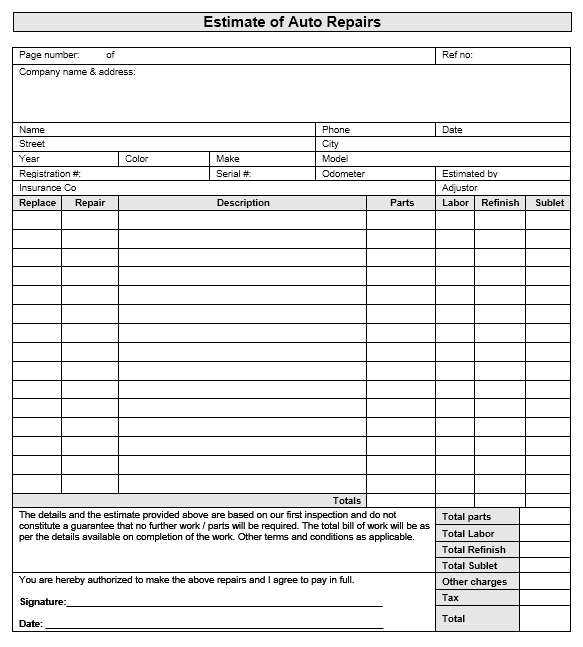
Core Sections to Include
The first section should identify the business and the customer. Include the shop name, address, phone number, email address, and other contact details that customers need for follow-up. The customer section can contain a name, phone number, email, billing address, and preferred contact method. For commercial customers, adding a company name, purchase order reference, or account identifier can make recurring work easier to trace.
The second section should identify the item being repaired. For vehicles, useful fields can include year, make, model, registration or license number, VIN, mileage, and engine or equipment information. For computers and electronics, model, serial number, device condition, accessories received, and reported symptoms may be more relevant. For industrial equipment, an asset number, location, operating hours, and equipment model may provide the necessary context.
The third section should describe the work. A practical repair record distinguishes the reported problem, inspection findings, diagnosis, recommended action, authorized work, work actually performed, and final inspection. This sequence is much more useful than a single large notes box because each stage answers a different operational question. It also gives managers a better way to review incomplete jobs and identify where delays occur.
- Job identification: work order number, intake date, promised date, and job status.
- Customer information: name, contact details, billing information, and authorization contact.
- Asset information: vehicle, equipment, device, serial number, mileage, or operating hours.
- Customer concern: the problem as originally described by the customer.
- Inspection and diagnosis: observed symptoms, tests performed, findings, and confirmed cause.
- Authorized work: repairs approved by the customer or responsible party.
- Parts and materials: part number, description, quantity, unit cost, and applicable warranty information.
- Labor: technician, task, hours, rate, and labor amount.
- Quality check: testing performed after repair and final condition.
- Approval and payment: authorization, signatures, payment status, balance, and customer acknowledgment.
Choosing Between Different Template Formats
Excel and Spreadsheet-Based Records
A spreadsheet is useful when a shop wants calculations, sorting, filtering, and basic reporting in the same environment. A repair shop business template excel structure can separate the job register, customer list, parts inventory, labor entries, and invoice calculations into different worksheets. Formulas can calculate line totals, subtotals, taxes, balances, and selected performance measures.
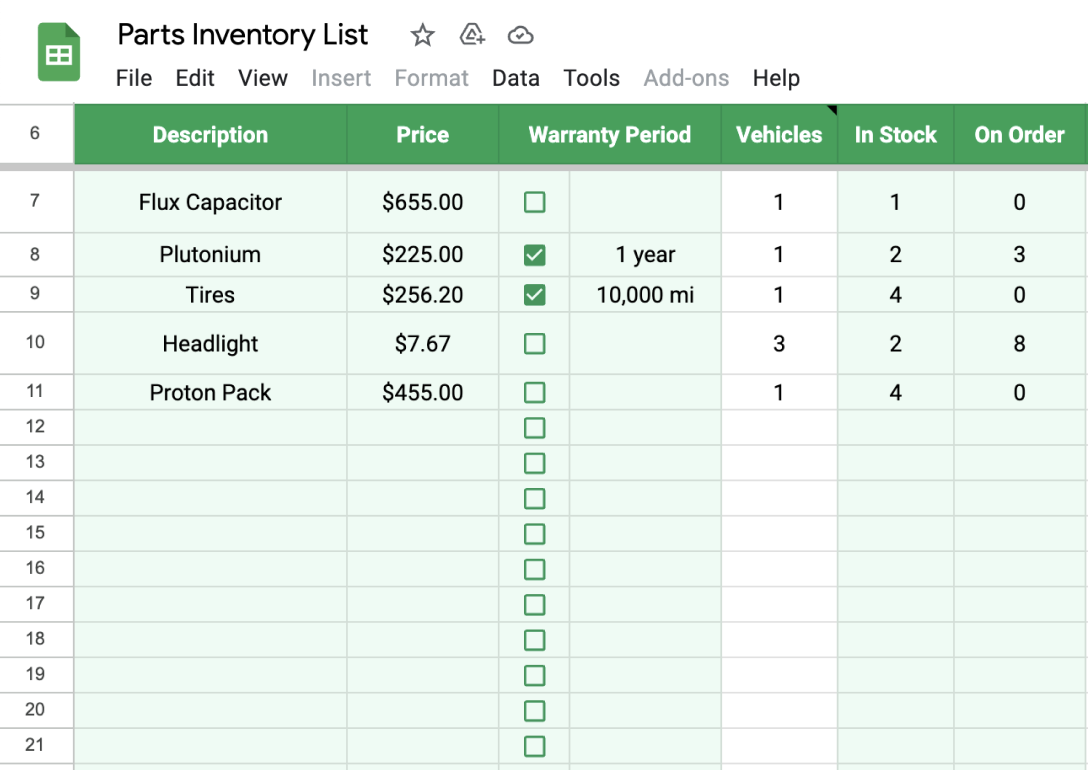
The strongest spreadsheet designs avoid putting everything into one enormous worksheet. A job register can contain one row per repair order, while a detailed work-order sheet can hold the individual parts and labor entries. A separate parts sheet can track stock quantities, reorder points, supplier references, and unit costs. This structure reduces repeated typing and makes it easier to find a job without scrolling through hundreds of unrelated lines.
Spreadsheet control also matters. Use consistent status labels such as New, Awaiting Approval, Parts Ordered, In Repair, Quality Check, Ready for Pickup, and Closed. Use unique work-order numbers rather than relying only on customer names. If multiple employees edit the file, establish clear rules for who changes formulas, who updates costs, and who closes completed jobs.
PDF and Printable Records
A repair shop business template pdf is useful when the shop relies on printed forms, signatures, physical job folders, or customer paperwork. PDF layouts are particularly helpful when the exact appearance of the form needs to remain consistent. A printed repair order can travel with the vehicle, machine, or device and provide a shared reference for service advisors and technicians.
The main weakness of a static document is that calculations and status tracking are usually manual unless the form has interactive fields. For that reason, many shops use a printed repair order for intake and technician notes while maintaining a separate digital register for job status and financial tracking. The two records should share the same work-order number so that they can be connected later.
Before adopting any printable layout, test it with realistic jobs. A form may look clean when empty but become difficult to use when a repair requires ten parts, several labor operations, multiple approvals, or a detailed diagnosis. The practical test is whether a technician can complete it accurately without searching for missing fields or squeezing important information into an unsuitable notes area.

Word and Document-Oriented Templates
A repair shop business template word format is appropriate when the document needs extensive written descriptions, branding, signatures, and flexible page design. Word-style documents are particularly convenient for shops that need a formal repair report or customer-facing work summary rather than a calculation-heavy register.
Document templates work best when the fields are deliberately structured. Instead of one large blank area, divide the document into customer details, asset details, reported concern, diagnosis, authorized repairs, work performed, parts, labor, inspection, and customer acknowledgment. This helps technicians provide complete information without creating unnecessarily long narratives.
For teams using shared cloud documents, a repair shop business template google docs workflow can support collaborative editing and centralized records. However, permissions should be controlled. Not every technician needs authority to modify pricing rules or customer billing information. A sensible structure separates operational notes from financial approval while keeping the job identifier consistent across both.
Google Sheets for Shared Shop Tracking
A repair shop business template google sheets workflow is particularly useful when several authorized team members need to see the same job register. Service advisors can update intake information, technicians can update job status, and managers can review outstanding work without maintaining separate copies of the same spreadsheet.
When using shared sheets, keep the master job register concise. Useful columns include work-order number, customer, asset, assigned technician, priority, status, promised date, estimated amount, approved amount, balance, and completion date. Detailed notes can live in a linked work-order document rather than making the tracking sheet too wide to manage.
Color coding can help, but it should never replace text labels. A status such as In Repair should remain written in the record even if a cell is visually highlighted. This makes filtering, searching, printing, exporting, and later analysis more reliable. A simple status system is often more effective than a complicated dashboard that employees do not consistently maintain.
Repair Order, Work Order, Estimate, and Receipt
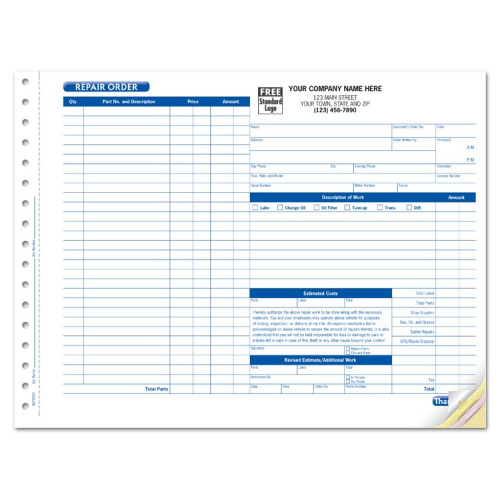
These documents are related, but they are not necessarily interchangeable. A shop repair order template generally provides the main job record that follows the repair from intake to completion. A repair estimate focuses on expected work and expected costs before authorization. A work order communicates the authorized work to the service team. An invoice records the charges being requested after the work has been completed or reached the billing stage.
The distinction becomes especially important when the diagnosis changes the scope. Suppose a customer brings in a vehicle for a brake noise. The initial estimate may cover inspection and a possible brake service. During inspection, the technician may identify another issue. The shop should record the original concern, diagnosis, revised estimate, authorization for the additional repair, and final work performed rather than silently replacing the original estimate.
A repair shop receipt template serves a different purpose again. It provides evidence of payment and should clearly connect the payment to the relevant invoice or work order. Depending on the shop’s accounting process, the receipt may show the amount paid, payment date, payment method, remaining balance if any, invoice number, and customer reference. The receipt should not become the only record of the technical work performed.

Designing a Strong Work Order
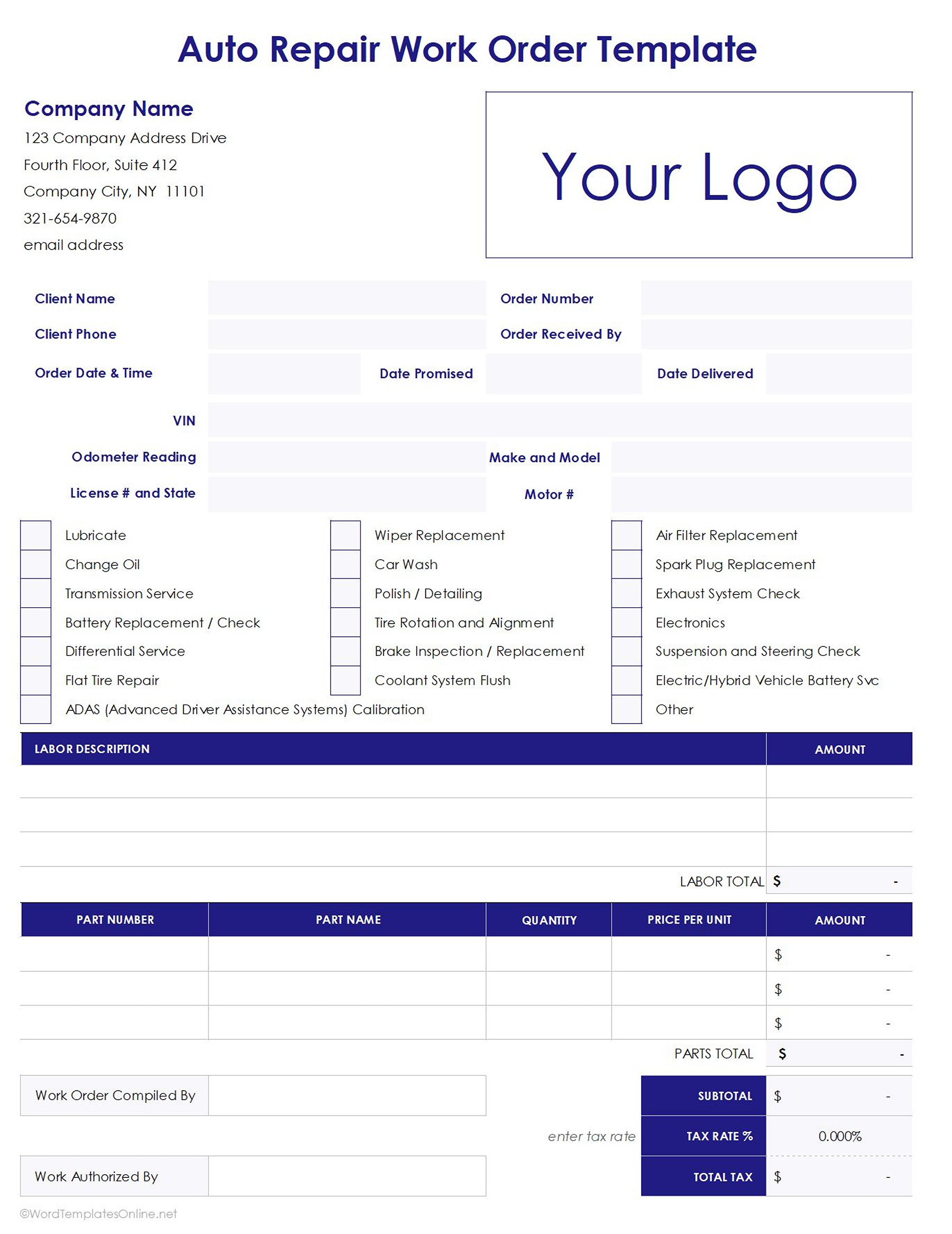
A practical repair shop work order template should begin with a unique number and a clear status. The first page should allow the service advisor to identify the customer and asset quickly. If the technician receives only the work order without access to the original intake conversation, the document should still communicate the customer’s concern and the work authorized.
Technician sections should encourage factual notes rather than vague statements. Instead of simply writing “checked brakes,” the form should make room for inspection observations, measurements where relevant, tests performed, and actions taken. The exact information will vary by industry, but the principle is consistent: record enough detail for another qualified employee to understand the work without relying on memory.
Completion fields should confirm that the job has actually reached the intended endpoint. A completed repair can include a test result, final inspection, technician sign-off, customer notification, and pickup or delivery status. For equipment that cannot be fully tested immediately, the form should allow a clear note explaining what remains outstanding rather than marking the job complete prematurely.

Parts and Inventory Information
Parts tracking is one of the areas where a repair template can have a direct operational impact. Each part entry should ideally identify what was used, how many units were used, the relevant part number, and the amount assigned to the job. If the shop maintains inventory, the same part identifier should be usable in both the work order and inventory record.
A parts section should distinguish between parts requested, parts ordered, parts received, parts installed, and parts returned when those states matter to the business. This prevents a common problem in which a technician records a part as required, purchasing orders it, and the final record never confirms whether it was actually installed.
Warranty information can also be linked to parts when appropriate. The record should preserve supplier information, invoice references, serial numbers, or warranty identifiers where they are relevant. This can make later warranty claims much easier to investigate because the shop does not have to reconstruct the original repair from memory.
Estimating Labor and Repair Costs
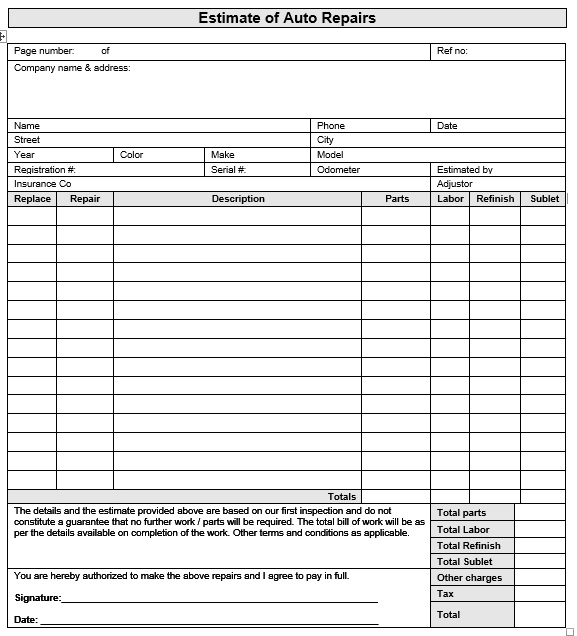
A reliable estimate separates labor from parts and other charges. Labor can be represented by a technician or operation, estimated hours, labor rate, and resulting amount. Parts can be represented by quantity, unit price, and line total. Additional categories may include outside services, shop supplies, disposal charges, taxes, or other legitimate costs that apply to the business.
The estimate should also make clear what is included and what is not. If diagnosis is billed separately from repair labor, the document should say so. If a quoted amount depends on inspection findings, the limitation should be stated clearly. These explanations help customers understand why the final amount may change when the technician discovers conditions that could not reasonably be identified during the initial intake.
For a spreadsheet-based system, calculations should be formula-driven and checked with sample jobs before production use. For a printable document, totals should be easy for both staff and customers to review. Regardless of format, never allow a final amount to appear without enough underlying detail to explain how it was reached.
Customer Intake and Vehicle Condition
Intake is the point where a repair business establishes the baseline condition of the item being serviced. For vehicles, this can include mileage, fuel level, visible damage, warning lights, keys received, accessories, and customer concerns. For devices, it may include physical condition, included accessories, passwords or access arrangements where appropriate, and the condition of screens or connectors.
A good intake process records what the customer actually reported rather than translating everything into technical terminology. This distinction helps preserve the customer’s original concern and gives the technician a starting point. It also provides a useful comparison between the condition at arrival and the condition at completion.
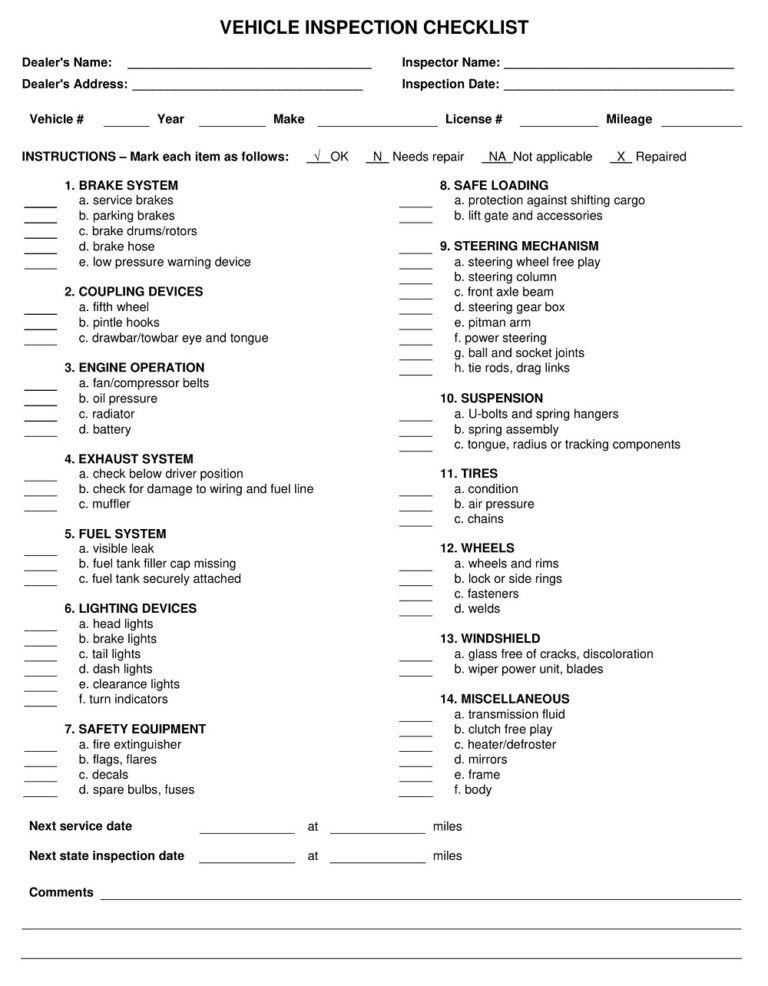
For higher-value assets, consider adding an inspection checklist or diagram. A visual condition record can help identify existing damage that is unrelated to the repair. The goal is not to create excessive paperwork, but to document the information most likely to matter if questions arise later.
How to Create a Template for Repair Work
When creating a template for repair work, start by mapping the real workflow rather than copying a generic form. Observe what information employees collect at intake, what technicians need before starting, what managers review before approval, and what accounting needs when the job closes. The template should follow the actual movement of information through the business.
Next, identify mandatory fields and optional fields. Mandatory fields might include the work-order number, customer identity, asset identity, reported concern, status, and authorization. Optional fields can include internal notes, supplier references, warranty details, or additional inspection measurements. Keeping the core form focused makes completion faster and improves the likelihood that important information will actually be entered.
Finally, test the template against several different repair scenarios. Use a simple routine service, a diagnostic job, a repair requiring multiple parts, a job with additional work, and a warranty-related return. If the same structure handles all five scenarios without awkward workarounds, the template is likely close to practical. If employees repeatedly create separate notes to compensate for missing fields, revise the design.
Common Mistakes to Avoid
One common mistake is making the form visually attractive but operationally incomplete. A polished header does not compensate for missing fields for authorization, diagnosis, parts, labor, or completion. Another mistake is combining every stage of the repair into one large notes area. This makes information difficult to scan and weakens the distinction between customer concerns and technician findings.
Another problem is using inconsistent identifiers. If the front desk calls a job “Smith brake repair,” the technician uses “Toyota job,” and accounting uses an invoice number with no reference to the work order, connecting records becomes unnecessarily difficult. A single unique job number should follow the repair through estimates, parts requests, technician records, invoices, receipts, and customer history.
Finally, avoid adding fields simply because another business uses them. A repair shop should collect information that serves a real operational purpose. Too many unnecessary fields increase completion time and encourage employees to skip important sections. A smaller form that staff consistently complete is usually more valuable than a very detailed form that becomes a burden.
Practical Solution
The most practical approach is to create one master repair record and then connect supporting documents to it. Start with a unique work-order number. At intake, record the customer, asset, reported concern, condition, date, and expected completion date. During diagnosis, add inspection findings and recommended work. Before repair begins, record the estimate and authorization. During the job, record parts and labor. At completion, record final testing, customer notification, payment status, and any warranty information.
For a small shop, this system can be implemented with a carefully designed spreadsheet and printable work order. The spreadsheet can act as the job register while the work order carries detailed notes. A larger shop may benefit from separate linked records for customers, assets, inventory, technicians, estimates, invoices, and payments. The technology can vary, but the data relationships should remain consistent.
If the immediate need is a repair shop business template free structure, begin with the simplest reliable layout rather than trying to build every possible feature. If a repair shop business template free download resource is being evaluated, inspect its fields before adopting it. For spreadsheet users, a repair shop business template excel free design should be tested for formulas, sorting, and multiple-job tracking rather than judged only by appearance.
For teams comparing formats, a repair shop business template pdf is useful when fixed presentation and printing are priorities, while a spreadsheet is better suited to calculations and job registers. A repair shop business template google sheets setup can support shared tracking, while a repair shop business template google docs format is more suitable for narrative repair records. The correct choice depends on how information moves through the shop, not on the format name alone.
Putting the Workflow Into Daily Use
Once the template is established, assign responsibility for every stage. The service advisor or intake employee should own customer and asset details. The technician should own diagnosis, work performed, parts usage, and technical completion notes. The manager or authorized employee should control approvals and exceptions. Accounting should verify invoice totals and payment status. Clear ownership prevents records from becoming incomplete because everyone assumes someone else will finish them.
Daily review is also important. A manager can review open jobs by status, promised date, parts availability, and approval state. Jobs waiting for customer authorization should not be mixed with jobs waiting for parts. Jobs completed by technicians but awaiting quality checks should remain visible. Simple categorization turns the template from a passive document into a practical operating tool.
At the end of each job, close the record deliberately. Confirm that authorized work matches completed work, parts and labor are recorded, required tests are complete, the final amount is correct, and the customer has received the appropriate billing record. A closed record then becomes useful historical information for future service, warranty questions, repeat customers, and business analysis.
Reference Examples
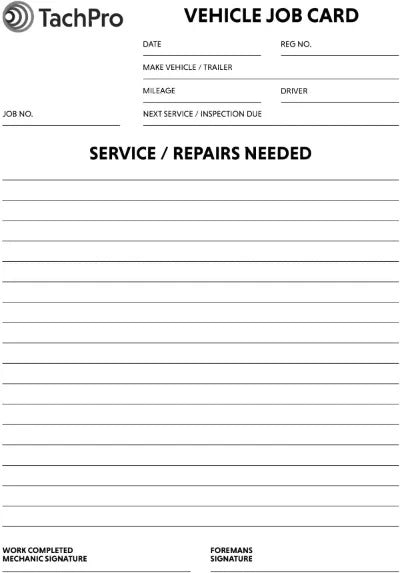
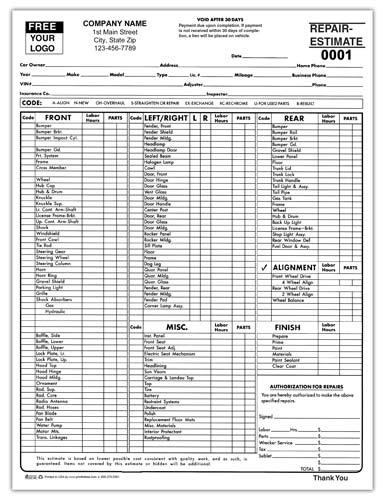
The following visual references show how a repair shop business Template can be structured around different stages of a repair workflow. The examples include repair orders, estimates, inventory records, service histories, invoices, and job cards. Although some examples come from particular repair industries, their layouts illustrate reusable principles: identify the customer and asset, describe the work clearly, separate labor from parts, show costs transparently, capture authorization, and provide a clear completion record. A useful template should be adapted to the shop’s actual services rather than copied without considering the type of repairs, equipment, customers, and internal responsibilities involved.
These references are most valuable when used for comparison. Look at where each form places customer information, asset identification, job descriptions, parts, labor, totals, signatures, and notes. Then consider which fields are essential for your own workflow and which are unnecessary. The objective of a repair shop business Template is not to imitate a particular visual design; it is to create a dependable record that technicians can use, customers can understand, and managers can review from intake through final payment.
Printable Service and Repair Order Form
Source: SignNow
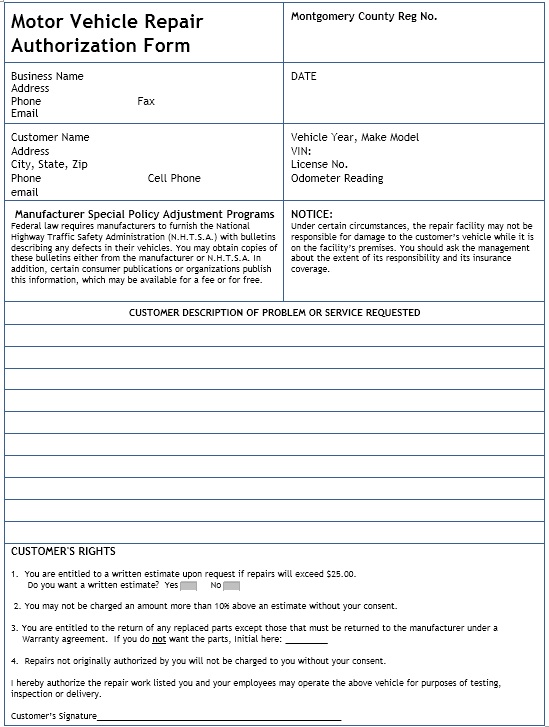
Motor Vehicle Repair Authorization Form
Source: Printable Sample
Parts Inventory Spreadsheet Example
Source: Fleetio
Automotive Repair Work Order
Source: Tekmetric
Vehicle Job Card
Source: LOADICO
