The most useful calendar is more than a list of dates. It connects topics, audiences, formats, channels, production stages, deadlines, campaigns, and performance measurements. That connection makes it easier to move from an idea to a finished piece without losing the strategic reason for creating it.
Content calendars can be simple enough for an individual creator or detailed enough for a marketing department. A solo blogger may need only a topic, keyword, format, deadline, and status. A larger organization may also need campaign relationships, approval stages, asset owners, distribution plans, calls to action, and performance fields.
The format matters less than the workflow behind it. Excel can be useful for structured data, Google-based tools can simplify collaboration, Word can work for document-oriented planning, and PowerPoint can help communicate a visual publishing roadmap. The best format is the one your team can maintain consistently.
This guide explains how to design, customize, use, review, and improve a content planning calendar. It also covers practical examples, research considerations, workflow design, measurement, common mistakes, and ways to choose a template format that fits the way you actually work.

What Is a Calendar for Content Planning Template?
A content planning calendar is a repeatable framework for organizing planned content against time. Each row, card, or calendar entry represents a piece of content or a content activity, while the surrounding fields explain what it is, why it matters, who is responsible, and what needs to happen before publication.
The word “calendar” can be slightly misleading because a useful planning system does not always look like a traditional month grid. A spreadsheet, project board, database, document table, or calendar application can all perform the same fundamental job when the right information is captured.
A strong template separates planning from improvisation without eliminating flexibility. It gives a team a planned baseline while leaving room for timely topics, customer questions, news, seasonal opportunities, and changes in business priorities.
The central objective is visibility. At a glance, a content manager should be able to determine what is planned, what is being produced, what is waiting for approval, what is ready to publish, and what has already gone live.
That visibility becomes particularly valuable when several channels operate at once. A blog article may support an email newsletter, a short video, several social posts, and a downloadable resource. A calendar can show these relationships instead of treating every asset as an unrelated task.
Content Calendar vs. Editorial Calendar
The terms are often used interchangeably, but there is a useful distinction. A content calendar primarily manages what is being published and when. An editorial calendar can add the reasoning behind those decisions, including audience needs, editorial themes, search intent, content pillars, campaign objectives, and the desired reader outcome.
For a small operation, one calendar can handle both purposes. For a larger team, the calendar may serve as the execution layer while a separate strategy document defines positioning, audience segments, brand priorities, and long-term objectives.
The distinction becomes important when a calendar starts filling up with content that exists simply because there is an empty date. A busy calendar is not automatically a successful calendar. Every planned item should have a reason for occupying production time.
A practical rule is to ask three questions before committing a topic: who needs this information, what useful outcome will it provide, and why is this organization well positioned to create it? If those questions cannot be answered, the idea may need further research before entering production.
The calendar should therefore function as both a schedule and a decision-making tool. It should help the team publish consistently while also helping it avoid unnecessary content, weak topics, duplicated ideas, and unrealistic workloads.

Why Use a Content Planning Calendar?
Without a centralized planning system, content work tends to become reactive. Writers may receive requests from different people, social managers may plan independently, designers may not know which assets are urgent, and campaign dates may change without everyone seeing the consequences.
A calendar creates a shared view of the publishing pipeline. It can reveal whether a week is overloaded, whether an important campaign lacks supporting content, whether several posts target the same audience problem, or whether an entire channel has been neglected.
Another advantage is production lead time. A planned article can be researched before its deadline, a video can be scripted before filming, and a visual campaign can be designed before launch. Planning reduces the pressure to create every asset at the last possible moment.
Calendars also make ownership clearer. A row can identify the writer, editor, designer, approver, publisher, or campaign manager responsible for a stage. Clear ownership reduces the common problem in which everyone assumes someone else is handling the next step.
Finally, a calendar creates a historical record. After several months, the team can review what was published, which topics were repeated, which campaigns were successful, and where production consistently stalled. That information can improve future planning rather than forcing the team to start from memory.
Planning Creates Capacity, Not Just Organization
One of the biggest benefits of planning is the ability to compare planned workload with realistic capacity. If one writer can comfortably complete two substantial articles per week, scheduling five substantial articles creates a production problem before the first draft begins.
Capacity should include more than writing. Research, interviews, editing, design, approvals, formatting, publishing, promotion, and performance review all consume time. A calendar that records only publication dates can hide these production requirements.
For example, a monthly plan might contain eight blog posts, four newsletters, twenty social posts, and two videos. That sounds manageable until the team maps the actual production tasks behind each item. The calendar should expose that workload instead of disguising it.
A useful template therefore includes production deadlines as well as publication dates. The draft deadline might occur several days before editing, approval might occur later, and final publishing might happen after all assets are ready.
This approach transforms the calendar from a passive schedule into a lightweight production management system. The team can identify bottlenecks early and adjust dates before a missed deadline becomes a public publishing problem.

Core Components of a Useful Content Calendar
A basic template can be surprisingly compact, but several fields consistently provide practical value. The first is the working title or topic because it gives everyone a quick understanding of what the content will cover.
The next essential field is the content type. A calendar might distinguish between a blog post, video, newsletter, social post, case study, landing page, podcast, infographic, webinar, or downloadable resource.
Publication date is another fundamental field, but it should not be the only date. A production workflow is easier to manage when the template also records draft, review, approval, asset, and finalization deadlines where those stages are relevant.
Ownership should be explicit. One person should normally be accountable for moving each item forward even if several people contribute. A team name alone is often insufficient because shared responsibility can make accountability unclear.
Status is equally important. Simple values such as Idea, Planned, Briefed, Drafting, Editing, Review, Approved, Scheduled, Published, and Updating can provide a quick view of pipeline health without requiring a complex project management system.
Strategic Fields
A stronger calendar adds a content pillar or theme. This shows how individual topics fit into broader subject areas. For SEO-focused content, the same field can connect an article to a topic cluster or broader pillar page.
Audience is another useful field. A business may serve several segments, and content created for a beginner audience may require a very different angle from content intended for experienced buyers.
The calendar can also record the primary objective. Examples include organic visibility, education, lead generation, product consideration, customer retention, brand awareness, community engagement, or support.
Adding a primary keyword can be useful for search-oriented content, but it should not become the only strategic consideration. Search intent, reader expectations, topical relevance, originality, and usefulness still determine whether the content deserves to be created.
Finally, consider a repurposing field. If one long-form article can produce an email, a video outline, several social posts, a checklist, and a sales enablement asset, the calendar can make those relationships visible and encourage efficient reuse.
How to Build a Calendar for Content Planning Template
Start with the objective rather than the dates. Decide what the content program needs to accomplish over the planning period. A calendar built without a clear objective often becomes a list of disconnected publishing activities.
Next, identify the main audience groups. Document the problems, questions, interests, objections, and decisions that matter to each group. These inputs can become the foundation for topic research and content briefs.
Then establish several broad content pillars. Three to six pillars can be a practical starting point for many teams, although the correct number depends on the scope of the business. Each pillar should be broad enough to support multiple useful topics but specific enough to maintain a recognizable editorial focus.
After that, choose the channels that matter. A team might use a website, newsletter, LinkedIn, YouTube, Instagram, podcast platforms, or other distribution channels. Not every piece needs to appear everywhere, so define channel roles rather than copying every item mechanically.
Only after these strategic decisions should the team begin filling dates. This sequence prevents the calendar from becoming a collection of arbitrary topics that happen to fit available spaces.
Step 1: Establish the Planning Horizon
Annual planning is useful for major themes, seasonal moments, launches, and large campaigns. Quarterly planning can handle strategic priorities and campaign structures. Monthly planning can define specific topics, while weekly planning manages production and publishing details.
These horizons should connect without requiring every detail to be finalized months in advance. Long-range plans should remain flexible enough to change when new information appears.
A useful approach is to plan major campaigns further ahead while keeping individual topics more flexible. For example, a seasonal campaign may be known six months in advance even though its supporting articles are finalized closer to production.
Reviewing the calendar regularly prevents old assumptions from becoming permanent commitments. A topic that made sense three months ago may no longer deserve production time after customer priorities or business goals change.
The planning horizon should therefore balance certainty with adaptability. The farther away the date, the more strategic the entry should be; the closer the date, the more operational detail should be required.

Research Methods for Better Content Planning
Good content planning begins with evidence about what the audience actually needs. Useful inputs can come from customer questions, sales conversations, support tickets, website search behavior, competitor analysis, community discussions, interviews, surveys, and existing content performance.
Keyword research can help identify language people use when searching for information. The important step is to interpret the intent behind those queries rather than simply collecting phrases and placing them into calendar rows.
Competitor research can reveal common topics, missing explanations, weak formats, and opportunities for differentiation. The goal should not be to copy competitors. Instead, identify what readers already have available and decide what your content can do more clearly or usefully.
Existing content should also be researched before new topics are approved. A team may already have an article that can be updated, expanded, consolidated, or repurposed. Creating another article on the same subject can split attention and create unnecessary maintenance work.
Audience research should eventually produce decisions. A research note that never influences the calendar is less valuable than a smaller amount of evidence that directly changes topic selection, format, timing, or distribution.
Using Search Intent in the Calendar
Search intent describes what a person is trying to accomplish with a query. Informational searches generally seek explanations, while commercial research may involve comparing options, and transactional searches can indicate stronger purchase intent.
Recording intent in the calendar can help writers choose the right format. A straightforward definition may need a concise article, while a complex decision may justify a comparison, guide, checklist, calculator, or visual explanation.
The intent field can also prevent overproduction. Not every keyword needs a 3,000-word article. Some questions can be answered efficiently, while others benefit from deeper research and supporting examples.
For each planned search-oriented item, consider the question behind the query, the likely reader stage, the information they expect, and the action that should logically follow the content.
This makes keyword planning part of editorial strategy rather than a mechanical optimization step. The calendar becomes a record of why a topic exists and what experience the reader should receive.

Creating a Practical Production Workflow
A content calendar works best when every status corresponds to a real action. “Drafting” should mean that someone is actively writing. “Review” should mean that the draft is ready for review. “Approved” should mean the content can move into final preparation.
A simple workflow might run from Idea to Research, Brief, Draft, Edit, Approval, Production, Scheduled, Published, and Measurement. Teams can rename these stages, but the transitions should be understood by everyone involved.
Each stage should have an owner and, where appropriate, a deadline. This makes delays easier to diagnose. If an article is late because approval has not happened, the calendar should show that rather than simply marking the whole article as overdue.
Dependencies are also important. A video may depend on a finished script. A landing page may depend on design and copy approval. A campaign may depend on a product launch date. Recording these relationships prevents unrealistic scheduling.
Finally, define what “ready to publish” means. A content item should not move into the final stage simply because the writing is finished if required links, graphics, metadata, legal checks, or calls to action are still missing.
Use a Workback Schedule
Start with the publication date and work backward. If content needs three days for editing, two days for approval, and several days for drafting and research, each stage should receive a realistic deadline before publication.
For example, if an article is scheduled for Friday, the final approved draft might be due Wednesday, the edited version Tuesday, the first draft several days earlier, and research before that. The exact timing depends on complexity and team capacity.
This method is more reliable than choosing an arbitrary draft deadline and hoping the production stages fit afterward. It treats publication as the endpoint of a sequence rather than the only date that matters.
A workback schedule also makes rescheduling easier. If the publication date moves, the connected production deadlines can move with it instead of forcing the team to recalculate every stage manually.
For recurring content, templates can standardize the workback pattern. A simple article may have one schedule, a research-heavy report another, and a multi-format campaign a third.

Choosing the Right Calendar Format
There is no universal best format. The right choice depends on team size, collaboration needs, technical comfort, workflow complexity, and how much information needs to be stored in each calendar entry.
A spreadsheet is often a strong starting point because rows and columns make structured information easy to filter, sort, group, and analyze. It is especially useful when content managers need to compare dates, owners, channels, statuses, and performance fields.
A document can be preferable when the planning process is heavily narrative. A team may use a document to combine a campaign overview, editorial principles, topic lists, and publishing notes in one place.
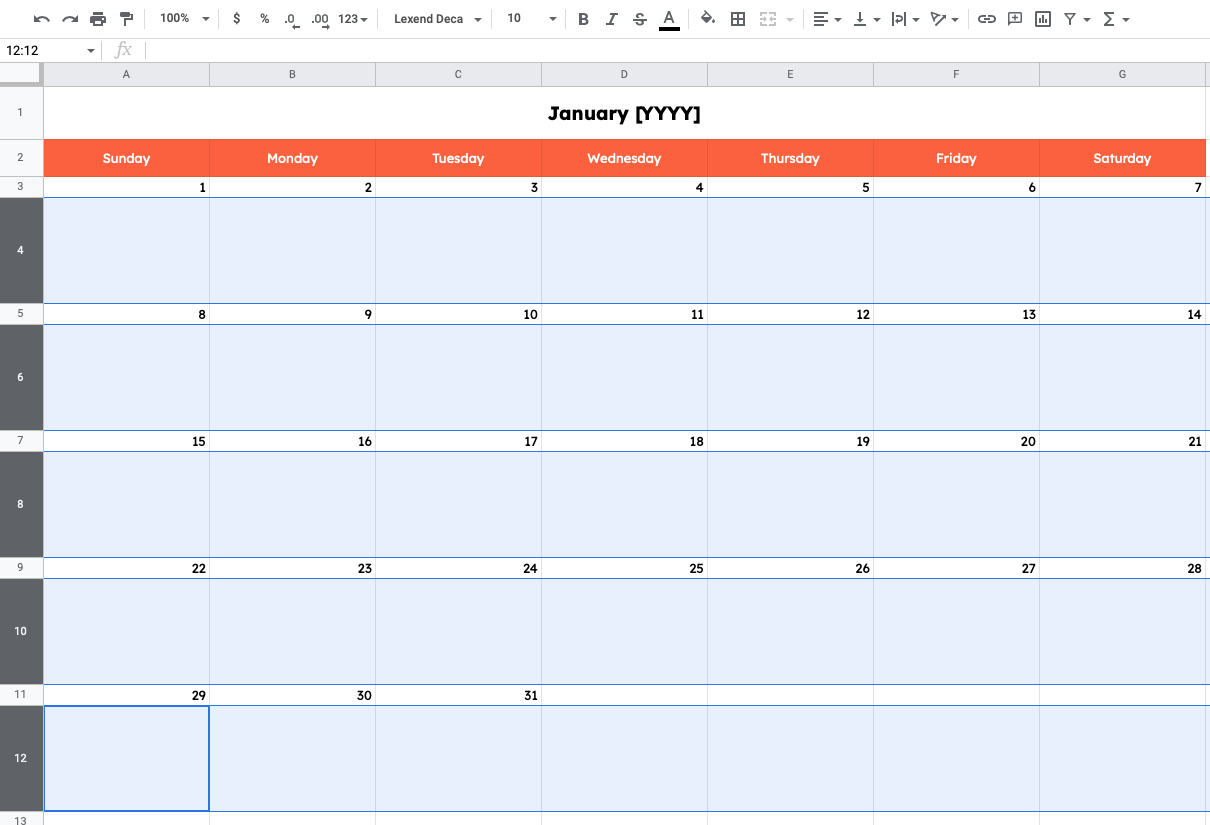
A calendar application is useful when timing and scheduling are the main concern. It provides a familiar date-based view and can make deadlines easier to visualize, although it may require additional fields or a separate repository for detailed briefs.
Project management software can be appropriate when the content process includes many dependencies, approvals, assignments, and automated workflows. The important point is to choose a system that reduces friction instead of creating another administrative task.
When a Spreadsheet Is Enough
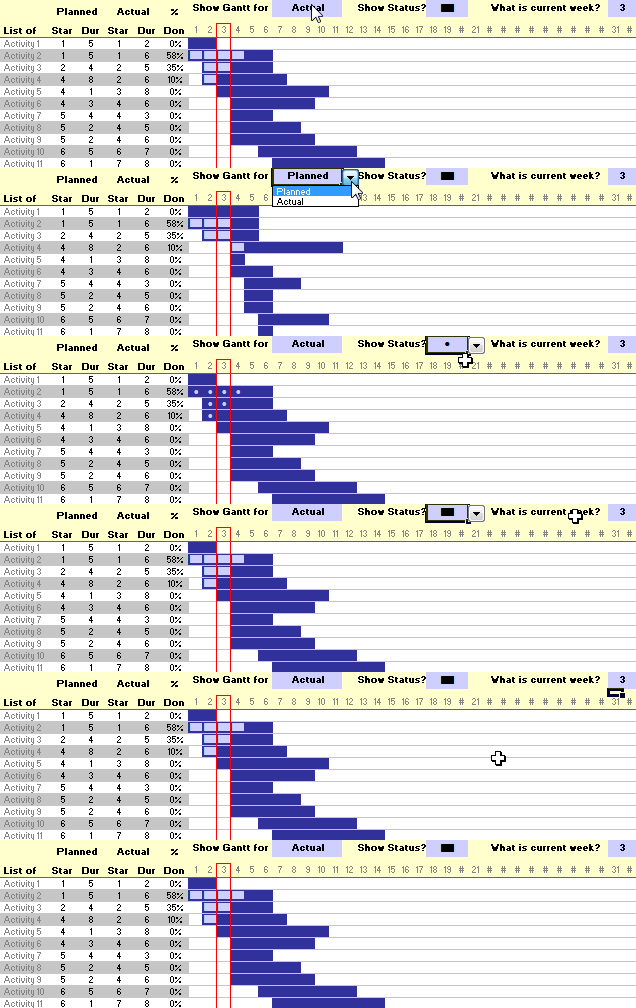
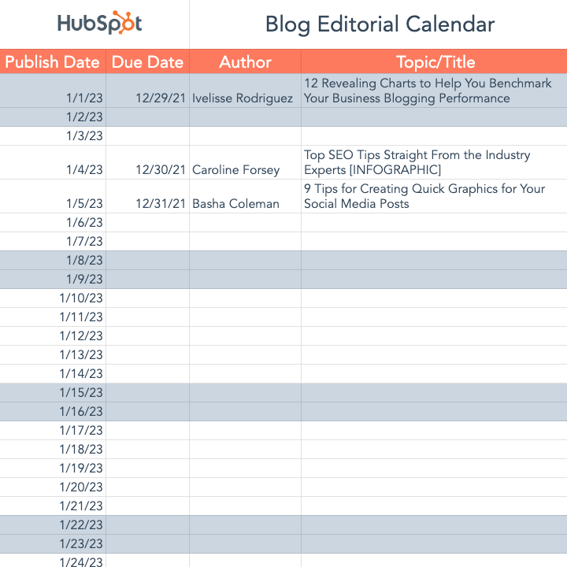
A spreadsheet can work extremely well for individuals and small teams. A practical structure might include Publish Date, Working Title, Content Type, Audience, Pillar, Primary Keyword, Owner, Status, Draft Deadline, Channel, CTA, Asset Status, and Performance Notes.
Filtering can then answer practical questions such as which content is scheduled next week, which items are waiting for approval, which author owns the most work, or which campaign lacks supporting assets.
Color coding can improve scanning, but it should support clear status labels rather than replace them. A calendar should remain understandable even if color formatting disappears.
Separate tabs can be useful for an idea repository, active production, published content, performance tracking, and evergreen assets. However, too many tabs can create fragmentation, so each tab should have a distinct purpose.
The simplest system that reliably gets used is usually better than an elaborate system that becomes outdated after a few weeks.

How to Use a Calendar for SEO Content Planning
SEO planning becomes more manageable when the calendar records the relationship between a topic and the broader site structure. A planned article should ideally have a clear purpose within a larger subject area rather than existing as an isolated keyword target.
Start by identifying a primary topic or pillar. Supporting articles can then address narrower questions, practical problems, comparisons, definitions, examples, and related subtopics.
Internal linking should be considered during planning rather than after publication. The calendar can include a field for the page that the new article should support or link toward, helping writers understand the content relationship before drafting.
Update opportunities should also have a place in the calendar. Content planning should not always mean producing something new. Revising outdated information, improving structure, expanding weak sections, and consolidating overlapping pages can be valuable editorial activities.
SEO measurement should be connected to decisions. If a topic consistently attracts relevant visitors but produces little engagement, the problem may be the page experience, search intent alignment, offer, or next step rather than the topic itself.
Build Topic Clusters Instead of Isolated Lists
A topic cluster groups related content around a central subject. The calendar can show the cluster or pillar beside each planned piece, making it easier to see whether the editorial program is developing depth in meaningful areas.
For example, a business selling project management software might plan a central guide about project planning, followed by supporting pieces about timelines, task ownership, project documentation, risk planning, meeting structures, and reporting.
The exact subjects should come from audience research rather than a predetermined number of articles. Each supporting piece should answer a distinct need and contribute something useful to the overall subject.
This structure also helps editors identify gaps. If a pillar has many introductory articles but no practical implementation guides, the calendar can correct the imbalance.
Topic clusters should remain flexible. Search behavior, customer questions, product changes, and new research can all create reasons to add, remove, or revise planned topics.

Using Data Collection and Performance Tracking
A planning calendar becomes significantly more valuable when it connects future decisions with past performance. The performance fields do not need to be complicated. They should capture the measurements that can actually influence future planning.
For a website, useful fields may include organic traffic, engagement indicators, conversions, assisted conversions, backlinks, or content update status. For social content, relevant measurements may include reach, engagement, clicks, saves, shares, or audience growth.
Email content may be evaluated using delivery, opens where applicable, clicks, unsubscribes, conversions, and downstream actions. Video content may use views, average watch behavior, engagement, subscribers gained, or conversions depending on its objective.
The most important principle is to avoid collecting metrics merely because a platform makes them available. A metric should help answer a decision-making question. If it never changes what the team does, its place in the calendar should be reconsidered.
Performance information should also be tied to a time horizon. Some content can be evaluated quickly, while search-oriented evergreen content may need a longer period before meaningful conclusions are drawn.
Use Performance Data to Improve the Next Calendar
At the end of a planning cycle, compare what was planned with what actually happened. Identify content that was published late, content that was canceled, topics that required more effort than expected, and formats that repeatedly created bottlenecks.
Then compare production information with audience outcomes. A highly successful article may justify follow-up content. A weak article may need revision rather than immediate abandonment. A consistently inefficient format may require a different production process.
Look for patterns instead of judging individual items too quickly. One poor-performing post does not necessarily prove that its entire topic is weak.
A monthly or quarterly review can include three decisions for each major content group: continue, improve, or stop. This makes the calendar an evolving system instead of a static archive.
Performance review should feed directly into the next planning cycle. Otherwise, the organization collects information without converting it into better decisions.
Practical Examples of Content Calendar Structures
A solo creator can use a compact weekly calendar with columns for date, topic, format, channel, status, and notes. This keeps administration low while still creating enough visibility to avoid last-minute publishing.
A small marketing team can add owner, primary keyword, audience, campaign, draft deadline, editor, and performance notes. The same spreadsheet can serve as both the editorial plan and production tracker.
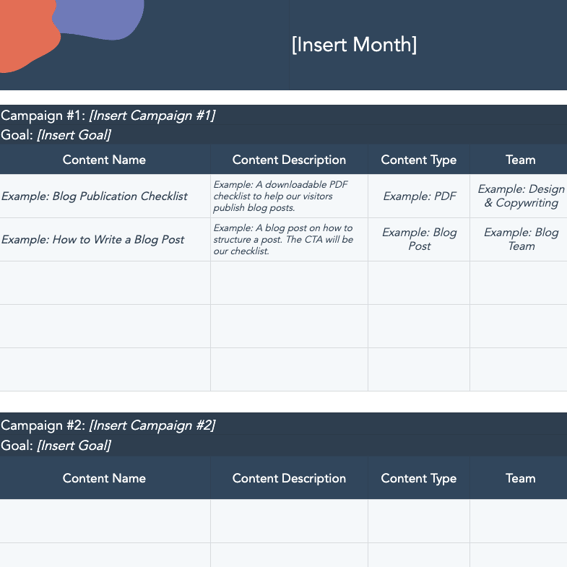
A larger team can organize campaigns as groups and connect multiple assets to each campaign. A product launch, for example, might include a landing page, announcement article, email sequence, video, social posts, customer story, and sales enablement document.
An agency may need client, approval status, revision round, asset owner, publishing account, and invoice-related fields. In that environment, the calendar must account for external approvals as well as internal production.
A publisher may prioritize issue dates, sections, writers, editors, assignments, fact checking, image requirements, legal review, and final production. The template should reflect the publication workflow rather than copying a marketing calendar unchanged.
Example: A One-Month B2B Content Plan
Imagine a hypothetical software company whose monthly goal is to educate operations managers and generate qualified product interest. Its calendar could include a foundational guide, two practical articles, a customer-focused case study, a newsletter, a webinar, and several social posts.
The foundational guide might establish the main topic, while the practical articles answer narrower implementation questions. The case study can demonstrate the concept in a real business context, and the webinar can provide deeper instruction.
The newsletter can connect the month’s strongest ideas into a recurring communication. Social content can then extract individual insights rather than requiring the social team to invent unrelated topics.
Each item can have a different objective while still supporting the same monthly theme. This creates consistency without making every asset identical.
At the end of the month, performance data can determine which subjects deserve follow-up coverage and which parts of the workflow should be changed.

Managing Content Ideas Without Overloading the Calendar
Not every idea should immediately become a scheduled item. Keeping an idea repository separate from the active calendar prevents the publishing schedule from becoming cluttered with concepts that have not been researched or prioritized.
An idea repository can capture the topic, source of the idea, audience problem, suggested format, strategic pillar, and notes. Ideas can remain there until they meet the criteria for active planning.
Prioritization can consider relevance, audience value, strategic importance, available evidence, production effort, timing, and potential reuse. The exact scoring method matters less than using a consistent decision process.
Ideas should also be reviewed for duplication. Two ideas may look different at first but ultimately answer the same question. Combining them can produce a stronger resource and reduce maintenance.
Keeping the idea backlog separate also protects the calendar from becoming psychologically overwhelming. The active schedule should show what the team realistically intends to produce, not every interesting thought anyone has ever recorded.
A Simple Priority Framework
One practical method is to rate each idea on audience value, strategic alignment, urgency, effort, and reuse potential. These ratings do not need to be scientifically precise; they simply make trade-offs visible.
An idea with high audience value and strong strategic alignment may deserve priority even if it requires substantial research. A low-value topic with little strategic relevance should not automatically receive a publishing slot simply because it is easy to produce.
Urgency should be used carefully. Seasonal or campaign-dependent content may have a real deadline, but not every internal request is genuinely urgent.
Reuse potential can help identify efficient opportunities. A research project that can support an article, webinar, report, newsletter, and sales resource may justify more effort than a single-use social post.
The result is a calendar that reflects priorities rather than merely reflecting the order in which ideas arrived.

Common Content Calendar Mistakes
The first common mistake is planning too far ahead in excessive detail. Long-range planning is useful, but filling every future date with specific topics can create unnecessary rigidity.
The second mistake is tracking only publication dates. A calendar that ignores research, drafting, editing, design, approval, and publishing preparation provides an incomplete picture of the real workload.
Another mistake is assigning content to teams rather than individuals. When ownership is unclear, tasks can sit untouched even though the calendar appears to have an owner.
Keyword stuffing is another planning problem. A calendar should not be built around forcing a phrase into every piece. Search language should inform topic selection and optimization, but usefulness and intent should remain central.
A final mistake is failing to review the calendar. If nobody regularly checks what is working, what is delayed, and what no longer matters, the calendar eventually becomes an outdated document rather than an active management tool.
How to Prevent Calendar Fatigue
Calendar fatigue happens when maintaining the planning system becomes more difficult than the benefit it provides. The solution is usually simplification rather than adding more fields.
Remove fields that nobody uses. Combine redundant statuses. Standardize naming conventions. Automate calculations where appropriate. Keep notes short and place detailed briefs in a dedicated location if necessary.
Set a regular review rhythm. A short weekly check can focus on immediate production, while a monthly review can examine workload and performance, and a quarterly review can revisit strategic direction.
Do not require every future idea to have the same level of detail. An idea scheduled for next week needs more information than an unconfirmed concept for six months from now.
A healthy calendar should make work easier to understand. If it creates confusion, excessive administration, or duplicate data entry, redesign the system rather than blaming the team for not maintaining it.
Calendar for Content Planning Template Excel and Spreadsheet Workflows
Spreadsheet-based planning is useful when the team needs structured fields and fast sorting. A row-based design allows managers to filter by author, channel, status, campaign, month, content type, or priority.
The spreadsheet should have one clear row structure. If each row represents one content item, avoid mixing unrelated subtasks into the same row unless the workflow is deliberately designed that way.
Use consistent date formats and status values. Inconsistent entries such as “Draft,” “drafting,” “In Progress,” and “Writing” can make filtering unreliable.
Keep titles readable and avoid putting entire briefs into calendar cells. A short description can identify the purpose while the detailed brief lives elsewhere.
When performance data is added, separate planning fields from historical metrics where possible. This prevents the active calendar from becoming so wide that basic scheduling becomes difficult.
When a Spreadsheet Should Become a More Advanced System
A spreadsheet may stop being efficient when many people edit it simultaneously, when there are complex dependencies, or when automated reminders and approvals become necessary.
That does not mean a spreadsheet has failed. It may simply indicate that the workflow has outgrown a simple table and needs a project management or database-oriented structure.
Before switching tools, identify the exact problem. If the issue is merely inconsistent status updates, better conventions may solve it. If the issue is dozens of dependencies and approvals, a more specialized system may be justified.
Migration should preserve the information that actually matters. Do not move every historical column simply because it exists.
The objective is not to own a sophisticated tool. The objective is to maintain a reliable publishing system that people can understand and use.
Using Google-Based Planning Workflows
Cloud-based planning can be helpful when multiple contributors need access to the same schedule. A shared calendar or spreadsheet can reduce the need to circulate separate versions of a document.
However, collaboration should not mean that everyone edits everything. Define who can change dates, who owns status updates, and who approves final publication decisions.
Shared systems also need naming conventions. Campaign names, content titles, asset names, and statuses should be predictable so people can search and filter information quickly.
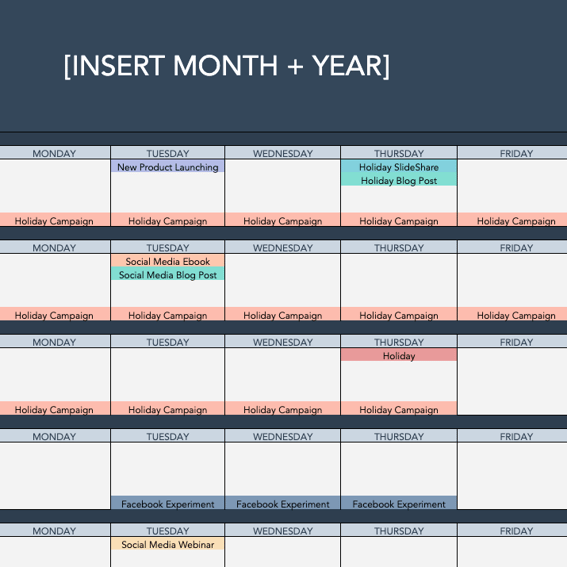
A Google-based workflow can combine a spreadsheet for structured planning, a calendar for deadlines, and documents for briefs. The connections should be clear enough that contributors know where the authoritative information lives.
The same principle applies to any platform: avoid creating multiple competing versions of the schedule. A single source of truth is more valuable than having the calendar in every tool.
Calendar Visibility for Remote Teams
Remote teams benefit from calendars that make context visible without requiring constant meetings. The calendar should answer what is happening, who owns it, what stage it is in, and what is expected next.
Short notes can record decisions that affect production. For example, a change in campaign timing can be recorded directly on the relevant item rather than buried in a long message thread.
Clear deadlines are especially important across time zones. Use one consistent date and time convention for publication and clarify which timezone controls scheduled releases.
Remote collaboration also makes approval status important. “Waiting for review” communicates more than a vague “in progress” label and helps managers identify where intervention may be required.
The calendar should reduce communication overhead, not become another reason to schedule meetings.
Planning Social Media Content Alongside Long-Form Content
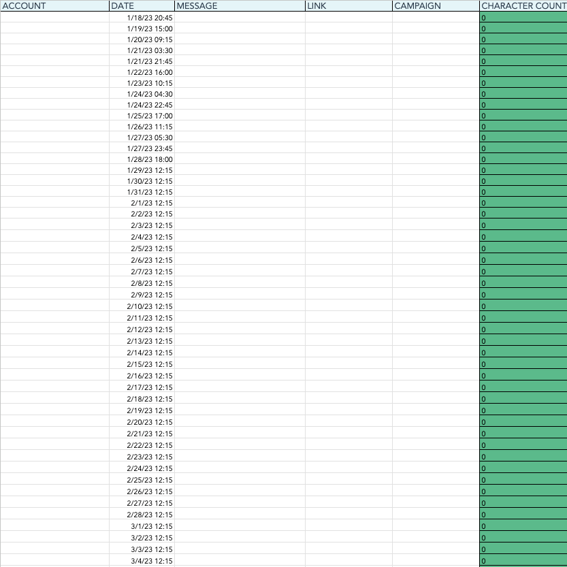
Social planning becomes more efficient when it connects to larger content assets. A long-form article can provide multiple smaller ideas, while a webinar or research report can generate a sequence of promotional and educational posts.
The calendar should record the relationship between the source asset and derivative content. This helps the team understand why several posts cover related ideas without treating them as accidental duplication.
Each channel should still have its own role. A professional network post may emphasize an insight, a short video may demonstrate a process, and an email may provide context that a short social post cannot include.
Repurposing should not mean copying the same text everywhere. Adapt the idea to the expectations, format, and audience behavior of each channel.
A good content calendar makes these relationships visible while preserving enough flexibility for platform-specific creativity.
Example of a Repurposing Sequence
Imagine a hypothetical research-based article about improving content workflow. The original article becomes the primary educational asset and provides the factual foundation for related distribution.
A newsletter can summarize the major lessons. A short video can demonstrate the workflow. Several social posts can isolate individual principles, while a downloadable checklist can turn the process into a practical tool.
The calendar can connect every derivative asset to the original article and assign separate owners and deadlines. This creates a coordinated campaign rather than a collection of disconnected posts.
Performance can then be evaluated at both the individual asset level and the campaign level. One derivative may attract attention while another may produce stronger conversions.
The result is a more efficient content operation because one research effort can support several useful experiences without requiring unrelated ideas for every channel.
How to Keep the Calendar Accurate
A calendar only works when its information can be trusted. If published items remain marked as scheduled, old deadlines are not updated, or ownership fields are incorrect, users stop relying on the system.
Assign responsibility for calendar maintenance. In a small team, this may be the content manager. In a larger organization, different contributors may maintain their own items while an editor manages structure and quality control.
Define what triggers a status change. For example, an item should move from Draft to Editing only when the assigned writer has completed the agreed draft and required materials are present.
Rescheduling should be visible. Changing a publication date without recording the reason can make the historical schedule difficult to interpret and may hide recurring production problems.
At the end of each planning period, archive completed items while preserving useful historical information. The active calendar should remain focused on upcoming work.
Weekly Calendar Review
A weekly review can be short. Check the next two weeks, confirm owners, identify overdue work, verify approvals, and determine whether scheduled content still supports current priorities.
Then review production capacity. If several major pieces are due simultaneously, move lower-priority work before the team reaches the point of failure.
Check campaign dependencies as well. A delayed landing page may affect email and social promotion, so related items should be reviewed together rather than independently.
Finally, record decisions. A calendar review should produce concrete changes rather than becoming a status-reading exercise.
This small routine keeps the system alive and prevents the calendar from becoming a document that is opened only when something goes wrong.
Practical Solution: Build a Content Calendar You Can Maintain
Start with a single master table containing the fields that directly support decisions: publication date, working title, content type, audience, pillar, objective, owner, status, production deadline, channel, and notes.
Create a separate idea repository for topics that are not yet approved. This prevents the active calendar from becoming a dumping ground for every possible content idea.
Add a research layer for important topics. Record the audience problem, search intent where relevant, supporting evidence, competing resources, proposed angle, and desired reader outcome before assigning a final production date.
Build the production workflow backward from publication. Give research, drafting, editing, approval, design, and final preparation realistic deadlines based on the complexity of each asset.
Review the calendar every week and review performance at a longer interval. Remove or reschedule weak ideas when priorities change, and use completed content data to improve the next planning cycle.
Recommended Minimum Fields
Content title: use a working title that communicates the subject clearly. Publish date: record the intended release date. Status: use standardized workflow stages.
Owner: identify the person accountable for progress. Content type: distinguish articles, videos, emails, social posts, and other formats. Channel: identify where the content will appear.
Audience: specify the intended reader or customer group. Content pillar: connect the item to a broader strategic theme. Objective: state the intended business or audience outcome.
Primary keyword: use this when search visibility is relevant. Production deadline: distinguish internal completion from public publication. Asset status: record whether required graphics, video, downloads, or supporting materials are ready.
Performance notes: capture useful observations after publication. The exact fields can expand over time, but starting with a focused structure makes adoption easier.

Recommended Monthly Workflow
During the first stage, review performance from the previous period and identify the topics, formats, and campaigns that deserve continuation. Avoid automatically carrying every recurring activity into the new month.
Next, define the month’s main themes and strategic priorities. These themes provide a framework for selecting individual topics without forcing every asset into the same subject.
Then research and prioritize specific content ideas. Confirm audience relevance, intent, differentiation, production requirements, and available capacity before assigning final dates.
After topics are approved, build the production schedule. Assign owners, deadlines, approval stages, distribution channels, and required assets.
Finally, publish, measure, document lessons, and feed those lessons into the next cycle. This closes the loop between planning and learning.
Reference Examples
The following examples illustrate different visual formats that can support a calendar-based planning workflow. They are organized in the same order as the requested resource phrases.
calendar for content planning template excel

Source: Wikimedia Commons
calendar for content planning template free

Source: Wikimedia Commons
calendar for content planning template google docs

Source: Wikimedia Commons
calendar for content planning template free download

Source: Wikimedia Commons
calendar for content planning template word

Source: Wikimedia Commons
calendar for content planning template excel free

Source: Wikimedia Commons
calendar for content planning template powerpoint

Source: Wikimedia Commons
content planning calendar template

Source: Wikimedia Commons
Frequently Asked Questions
What should a content planning calendar include?
At minimum, include the topic, publication date, content type, owner, status, channel, and relevant notes. A more advanced calendar can add audience, content pillar, objective, keyword, production deadlines, approvals, assets, calls to action, and performance information.
How far ahead should content be planned?
There is no universal timeframe. Annual planning is useful for major themes and campaigns, quarterly planning works well for strategic priorities, and monthly or weekly planning is better for specific production details. The farther away the date, the less rigid the plan should usually be.
Is a spreadsheet enough for content planning?
For many individuals and small teams, yes. A spreadsheet can manage dates, owners, topics, statuses, channels, and performance fields effectively. A more advanced platform becomes useful when the workflow contains many dependencies, approvals, contributors, or automation requirements.
Should SEO keywords be included in a content calendar?
They can be useful when organic search is an important acquisition channel. However, keywords should be paired with search intent, audience needs, content purpose, and a clear editorial angle. A calendar should not encourage content that exists only to target a phrase.
What is the difference between a content idea list and a content calendar?
An idea list stores possible topics without necessarily committing them to a production date. A content calendar contains prioritized work that the organization realistically intends to produce, with dates, ownership, workflow information, and often distribution details.
How often should a content calendar be updated?
Active production information should be updated whenever meaningful changes occur. A short weekly review is useful for upcoming work, while monthly or quarterly reviews can examine strategy, workload, and performance.
Can one calendar manage blogs, email, video, and social media?
Yes. A unified calendar can provide a cross-channel view while still using content-type and channel fields to distinguish formats. Larger teams may create separate views for individual channels while retaining one shared source of truth.
What makes a content calendar sustainable?
Sustainability comes from simplicity, clear ownership, realistic capacity, consistent status definitions, regular reviews, and a willingness to remove unnecessary fields. The calendar should save time and improve decisions rather than become an administrative burden.
Conclusion
A strong calendar for content planning template turns content production from a collection of isolated tasks into a coordinated system. It gives teams a shared view of topics, deadlines, ownership, channels, campaigns, and production status while creating a record that can support future decisions.
The most effective calendar starts with strategy rather than dates. Define the audience, objectives, themes, channels, and priorities before filling the publishing schedule. Then connect each content item to a realistic production workflow with clear ownership and deadlines.
Keep the active calendar focused on work that has genuinely earned a place on the schedule. Store unapproved ideas separately, use research to prioritize topics, and allow long-range plans to remain flexible as business and audience needs change.
Finally, treat the calendar as a learning system. Review what was published, compare planned work with actual capacity, study meaningful performance signals, and use those findings to improve the next planning cycle. The value of a calendar grows when its lessons continuously influence future decisions.
A well-maintained content planning calendar does not guarantee successful content by itself, but it creates the structure needed to produce useful work consistently, coordinate people and channels, reduce avoidable delays, and make editorial decisions with greater clarity.

The best calendar for content planning template is ultimately the one that your team can understand, update, review, and trust every week; start with a practical structure, keep it aligned with real objectives, and improve it as your content operation becomes more mature.
