Managing financial records does not have to be complicated. A well-organized Digital Accounting Record can help individuals, freelancers, entrepreneurs, and small businesses track income, expenses, and financial activity with greater accuracy. Instead of relying on scattered notes or paper receipts, a digital record keeps important information in one convenient place.
Accurate accounting records also make it easier to understand where money comes from and where it goes. With a structured template, you can record transactions, categorize expenses, calculate totals, and review your financial position without creating a complicated accounting system.
Whether you manage a growing business or simply want better control over personal finances, a digital accounting template can provide a practical starting point. The key is to keep your records consistent, simple, and up to date.
What Is a Digital Accounting Record?
A Digital Accounting Record is an electronic system for recording financial transactions and organizing accounting information. It can be maintained in a spreadsheet, accounting application, document, or specialized bookkeeping platform.
A typical record includes details such as transaction dates, descriptions, categories, amounts, payment methods, and reference numbers. Income and expenses can then be summarized to show the overall financial position for a selected period.
Unlike a traditional paper ledger, a digital accounting record can be searched, edited, duplicated, and updated quickly. This makes it useful for both everyday bookkeeping and longer-term financial planning.
Why Use a Digital Accounting Record Template?
Starting an accounting record from a blank page can take unnecessary time. A ready-made template provides a consistent structure from the beginning. It also helps reduce the risk of forgetting important transaction details.
A good digital accounting template can help you:
- Record income and expenses in an organized format.
- Separate different types of financial transactions.
- Monitor spending and revenue over time.
- Calculate total income and total expenses.
- Identify the difference between income and expenses.
- Keep supporting notes and references with each transaction.
- Prepare information for budgeting and financial reviews.
- Maintain more consistent bookkeeping habits.
The biggest benefit is simplicity. You can use the same structure every day, every week, or every month. As a result, financial information becomes easier to understand and review.
Key Sections of a Digital Accounting Record
A useful accounting record should contain the information needed to understand each transaction. However, it should not include unnecessary fields that make bookkeeping harder.
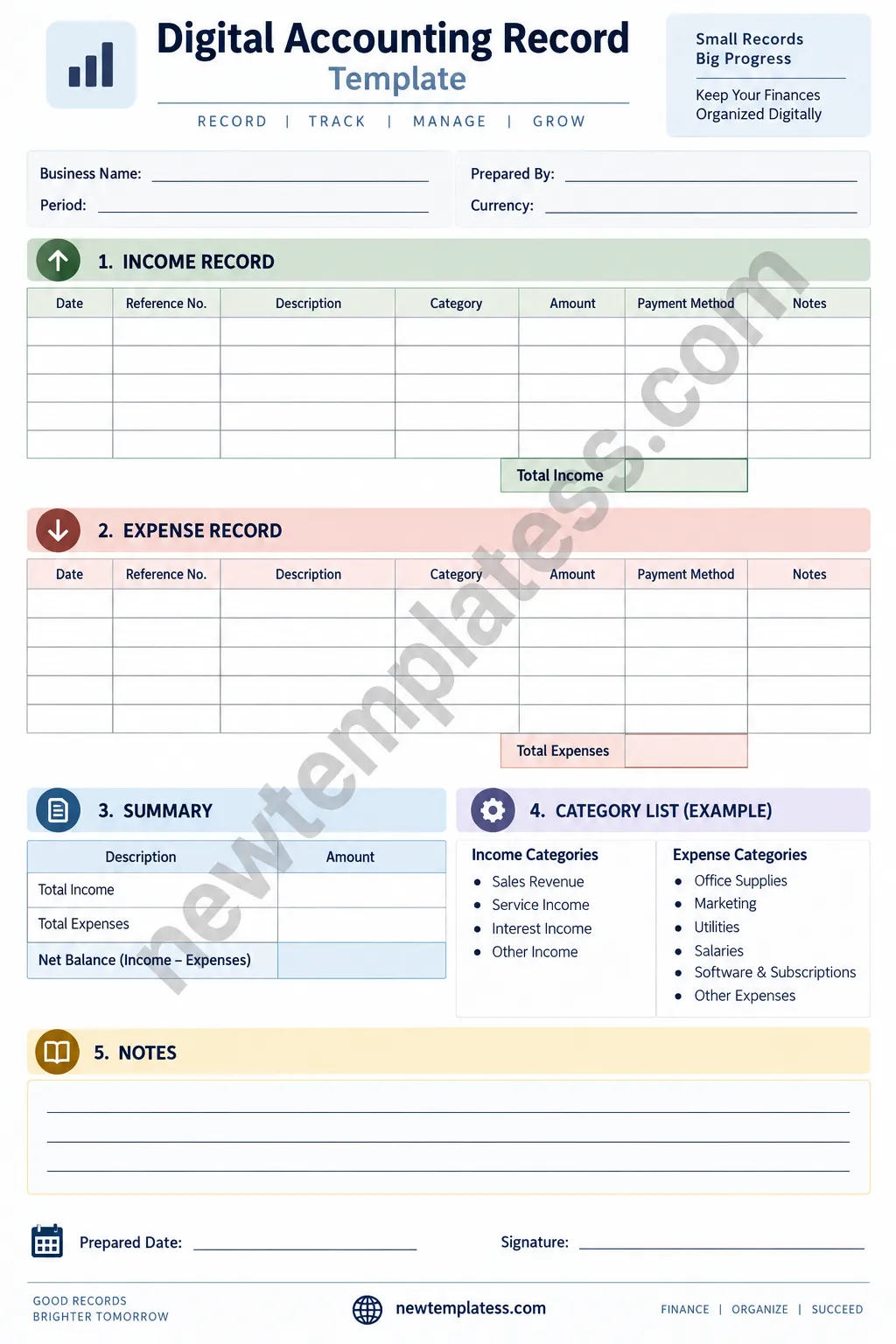
1. Business or Account Information
Start with basic information such as the business name, reporting period, currency, and person responsible for the record. This makes each accounting document easier to identify later.
For businesses with multiple projects or accounts, these details are especially useful. They help prevent records from being mixed together.
2. Income Record
The income section is used to record money received during the selected period. Common examples include product sales, service revenue, consulting fees, interest income, and other business receipts.
Useful income fields include:
- Date
- Reference number
- Description
- Income category
- Amount
- Payment method
- Notes
Recording income as soon as possible can improve accuracy. It also reduces the chance of forgetting smaller transactions.
3. Expense Record
The expense section tracks money spent by the individual or business. Typical categories include office supplies, marketing, utilities, salaries, software subscriptions, transportation, and other operating costs.
Separating expenses by category makes spending patterns easier to identify. For example, you may discover that software subscriptions or marketing costs have increased significantly over several months.
4. Financial Summary
A summary section provides a quick overview of the recorded information. At minimum, it can show total income, total expenses, and net balance.
The basic calculation is simple:
Net Balance = Total Income − Total Expenses
This figure provides a useful snapshot of the difference between money received and money spent during the selected period. However, it should not be treated as a complete measure of business profitability unless all relevant accounting items have been properly recorded.
5. Notes and Supporting Information
A notes section is useful for recording additional details. You might use it to explain unusual transactions, payment references, pending items, or adjustments.
Clear notes can save time later. They also make it easier for another person to understand why a transaction was recorded in a particular way.
How to Use a Digital Accounting Record Effectively
Creating a template is only the first step. Consistent use is what makes a digital accounting system valuable.
Record Transactions Regularly
Do not wait until the end of the month if you can avoid it. Record transactions as they happen or set a regular bookkeeping schedule.
For example, you could update your records every evening or dedicate one short session each week to bookkeeping. Regular updates make the process easier and reduce the amount of work that builds up.
Use Consistent Categories
Choose clear categories and use them consistently. Avoid creating several categories that describe the same type of expense.
For example, decide whether software tools belong under Software & Subscriptions or another specific category. Then use that category every time.
Keep Transaction Descriptions Clear
A vague description may not be useful several months later. Instead of writing “payment,” include enough information to identify the transaction.
A better description might be “Monthly website hosting” or “Office stationery purchase.” Clear descriptions make financial reviews much faster.
Check Your Records Against Supporting Documents
Whenever possible, compare your digital accounting record with invoices, receipts, bank statements, and other supporting documents. This can help identify missing or duplicated transactions.
Regular checks are particularly important when several payment methods are used. Cash, bank transfers, cards, and digital payment services can otherwise make records difficult to reconcile.
Digital Accounting Record for Small Businesses
Small businesses often need accurate financial information without the complexity of a large accounting system. A structured digital record can provide a practical solution for basic transaction tracking.
Business owners can use a template to monitor daily sales, operating expenses, recurring costs, and other financial activity. The information can then support monthly reviews and budgeting decisions.
However, a basic template may not replace professional accounting software when a business has complex requirements. Businesses with payroll, inventory, tax obligations, multiple entities, or large transaction volumes may need more advanced accounting tools.
Digital Accounting Record for Personal Finance
A digital accounting record is also useful outside business. Individuals can use a simplified version to track household income and spending.
Personal categories might include:
- Salary and other income
- Housing costs
- Food and groceries
- Transportation
- Utilities
- Subscriptions
- Education
- Entertainment
- Savings
- Other personal expenses
Reviewing these categories regularly can make spending patterns more visible. It can also help you identify recurring expenses that may no longer be necessary.
Benefits of Keeping Accounting Records Digitally
Digital bookkeeping offers several practical advantages. First, records are easier to update than traditional paper ledgers. Second, information can usually be searched and organized quickly.
Other benefits include:
- Better organization: Financial information stays in a consistent structure.
- Faster reviews: Digital records make it easier to find specific transactions.
- Improved visibility: Income and spending patterns become easier to understand.
- Less manual work: Spreadsheet formulas can calculate totals automatically.
- Easy duplication: A template can be reused for different months or projects.
- Better preparation: Organized records can make financial discussions and reporting easier.
Tips for Maintaining Accurate Digital Accounting Records
Accuracy is more important than complexity. A simple system that is updated consistently is often more useful than a complicated system that is rarely maintained.
- Enter transactions promptly.
- Use consistent date and currency formats.
- Keep income and expenses clearly separated.
- Use meaningful categories.
- Review totals regularly.
- Keep copies of important receipts and invoices.
- Protect financial files with appropriate access controls.
- Back up important records regularly.
- Review unusual transactions before finalizing a reporting period.
It is also helpful to establish a simple monthly review routine. Check the total income, total expenses, unusual transactions, recurring costs, and outstanding items. This routine can turn bookkeeping into a manageable habit.
How to Choose the Right Digital Accounting Template
The best template depends on the type and volume of financial information you need to manage. Avoid choosing a template simply because it contains many fields.
Instead, look for a structure that is easy to understand and fits your workflow. A basic user may only need income, expenses, categories, totals, and notes. A growing business may require additional fields for invoices, customers, projects, tax information, or payment status.
Before using a template regularly, ask yourself:
- Does it include the financial information I actually need?
- Are income and expenses easy to distinguish?
- Can I calculate totals quickly?
- Are categories clear and consistent?
- Can I review the information by month or reporting period?
- Can I keep supporting notes with important transactions?
Common Mistakes to Avoid
Even a well-designed accounting template can produce poor results if it is used inconsistently. One common mistake is entering transactions weeks after they occur. This increases the chance of missing information.
Another mistake is using inconsistent categories. If similar expenses are assigned to different categories, reports become harder to interpret.
It is also important not to delete financial records simply because a transaction looks unusual. Instead, investigate the transaction and add an explanatory note when appropriate.
Make Financial Recordkeeping a Simple Habit
Good financial management starts with reliable information. A Digital Accounting Record gives you a structured way to capture that information without making bookkeeping unnecessarily complicated.
Start with the basics. Record income. Track expenses. Use consistent categories. Review totals. Keep useful notes. Then improve the system as your needs grow.
For individuals and small businesses, a clean digital accounting template can be a practical foundation for better organization and financial visibility. The goal is not to create more administrative work. The goal is to make financial information easier to record, understand, and manage.
Conclusion
A Digital Accounting Record can make everyday financial tracking more organized and manageable. By keeping income, expenses, categories, totals, and notes in one structured format, you can reduce clutter and gain a clearer view of your financial activity.
The most effective approach is simple: choose a practical template, update it consistently, use clear categories, and review the information regularly. With these habits in place, digital bookkeeping becomes less of a chore and more of a useful financial management tool.
Whether you are managing personal finances, running a freelance business, or operating a small company, a well-structured accounting record can help you stay organized and make better-informed financial decisions.
