A construction flight ticket reimbursement request helps construction companies, contractors, project managers, and employees document airfare expenses incurred for work-related travel. When a construction project requires employees to travel between cities, states, or countries, having a clear reimbursement process makes it easier to track costs, verify supporting documents, and obtain timely approval.
Instead of submitting flight receipts and travel details in an unorganized format, employees can use a structured reimbursement request template to present all necessary information in one place. A well-designed form can include employee details, project information, flight details, ticket costs, supporting documents, signatures, and approval sections.
This guide explains what a construction flight ticket reimbursement request should contain, how to complete one correctly, and how a printable template can simplify construction travel expense management.
What Is a Construction Flight Ticket Reimbursement Request?
A construction flight ticket reimbursement request is a document used by an employee, contractor, or authorized project worker to request repayment for airfare purchased for legitimate business travel. The travel may be required for a construction project, job site visit, project meeting, inspection, training session, mobilization, or other work-related activity.
The request typically provides finance or management teams with enough information to confirm that the flight expense was necessary and complies with the company’s travel reimbursement policy.
Depending on the organization, the form may also be called a construction travel expense reimbursement form, employee flight reimbursement form, business travel expense claim, or airfare reimbursement request.
Why Use a Flight Ticket Reimbursement Template?
Construction projects often involve employees traveling to temporary job sites or working across multiple locations. Without a standardized reimbursement process, travel expenses can become difficult to organize and audit.
A dedicated template provides several practical advantages:
- Better documentation: Employees can record flight information and costs in a consistent format.
- Faster review: Managers can quickly identify the project, destination, travel dates, and amount claimed.
- Fewer missing documents: A checklist can remind employees to attach tickets, receipts, boarding passes, and approvals.
- Improved expense tracking: Finance teams can associate airfare costs with specific projects or departments.
- Consistent approvals: The form can provide designated signature areas for project managers and finance personnel.
A standardized construction travel reimbursement form is especially useful for organizations managing several active projects at the same time.
Construction Flight Ticket Reimbursement Request Template
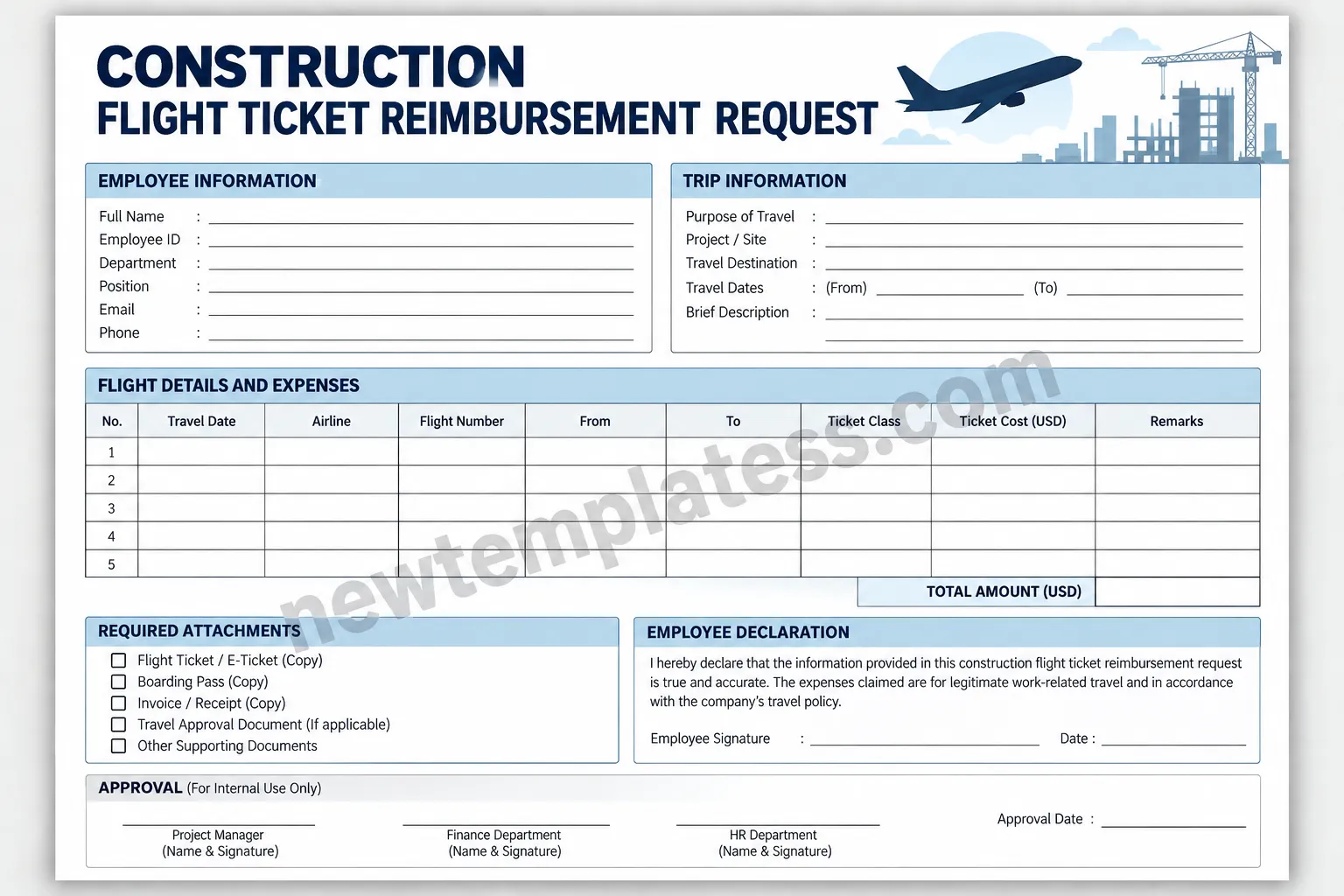
The template below is designed as a practical printable document for recording construction-related flight expenses. It includes employee information, trip information, flight details, ticket costs, required attachments, an employee declaration, and internal approval fields.
What Information Should Be Included?
A useful construction flight ticket reimbursement request should collect enough information for the expense to be identified, verified, and approved. The exact requirements vary by company, but several fields are commonly useful.
Employee Information
The first section should identify the person requesting reimbursement. Typical fields include:
- Full name
- Employee ID
- Department
- Job position
- Email address
- Phone number
Accurate employee information helps the accounting team match the reimbursement request with payroll, employee records, or the appropriate project account.
Project and Trip Information
Construction travel should be connected to a specific business purpose whenever possible. Include details such as:
- Construction project or job site
- Purpose of travel
- Travel destination
- Departure and return dates
- Short description of the work-related trip
For example, the purpose might be a site inspection, project mobilization, client meeting, equipment coordination, safety training, or project management assignment.
Flight Details and Ticket Costs
The expense section should provide enough space to document each flight. Useful fields include the travel date, airline, flight number, departure location, destination, ticket class, and ticket cost.
If the employee took multiple flights for the same construction assignment, each flight can be recorded as a separate line. This makes the total reimbursement amount easier to verify.
Documents to Attach to the Reimbursement Request
Supporting documentation is one of the most important parts of an airfare reimbursement claim. Companies commonly require evidence showing that the flight was purchased and that the expense relates to authorized business travel.
Depending on the company’s policy, useful attachments may include:
- Flight ticket or electronic ticket
- Airline invoice or payment receipt
- Boarding pass
- Travel authorization
- Project manager approval
- Other supporting expense documentation
Employees should check their organization’s travel policy before submitting the claim because some companies have specific documentation, fare-class, booking-method, or submission-deadline requirements.
How to Complete a Construction Flight Ticket Reimbursement Request
1. Enter Employee Details
Start by completing the employee information section. Make sure the name, employee ID, department, and contact information match the company’s records.
2. Identify the Construction Project
Enter the relevant project name, project number, job site, or cost center if required. Clearly identifying the project helps the accounting department allocate the airfare to the correct budget.
3. Explain the Business Purpose
Briefly explain why the flight was necessary. A specific explanation is more useful than a vague description such as “business travel.” For example, state whether the trip was for a site inspection, project meeting, mobilization, training, or another work-related purpose.
4. Record Every Flight
Enter the travel date, airline, flight number, origin, destination, ticket class, and amount paid. If there were multiple tickets, record each one separately rather than combining unrelated expenses into one figure.
5. Attach Supporting Documents
Attach the required receipts, e-tickets, boarding passes, and authorization documents. Before submitting the request, compare the information on the form with the attached documents to make sure the amounts and dates are consistent.
6. Calculate the Total
Add all eligible flight expenses and enter the total reimbursement amount. If the company requires currency conversion or separate treatment of taxes and fees, follow the applicable accounting procedure.
7. Sign and Submit the Form
Complete the employee declaration and signature section. Submit the completed request through the company’s designated process, such as email, an expense management platform, or the finance department.
Tips for Getting Flight Reimbursement Approved Faster
A complete request is generally easier for a reviewer to process. The following practices can help reduce unnecessary back-and-forth:
- Submit promptly: Follow the company’s expense submission deadline.
- Keep original receipts: Save digital copies of tickets and receipts immediately after booking.
- Use the approved booking process: Follow company rules regarding airlines, booking platforms, and ticket classes.
- Match all amounts: Make sure the reimbursement amount agrees with the attached receipt or invoice.
- Explain unusual expenses: Add a short note when an expense requires additional context.
- Check signatures: Make sure all required approval fields are completed before submission.
- Keep a copy: Save a copy of the completed reimbursement request and attachments for your records.
Common Mistakes to Avoid
Even a straightforward airfare claim can be delayed when important information is missing. Common mistakes include submitting an incomplete flight itinerary, forgetting the receipt, entering the wrong project name, or claiming an expense that does not meet the company’s travel policy.
Another common issue is combining several unrelated expenses without enough detail. Keeping each flight clearly identified makes the claim easier for a manager or finance employee to review.
Employees should also avoid submitting duplicate claims for the same ticket. Maintaining organized copies of submitted reimbursement forms can help prevent accidental duplicate submissions.
Who Can Use This Construction Travel Reimbursement Template?
This type of template can be adapted for many construction-related roles and organizations, including:
- Construction companies
- General contractors
- Subcontractors
- Construction project managers
- Site supervisors
- Engineers and inspectors
- Construction consultants
- Project coordinators
- Employees traveling between job sites
The template can also be modified to include company-specific policies, project codes, additional expense categories, or extra approval levels.
Digital and Printable Use
A construction flight ticket reimbursement request can be used as a printed form or converted into a digital workflow. A printable version can be useful when employees need to sign physical documents, while a digital version can make it easier to attach electronic tickets and receipts.
For organizations with frequent construction travel, the form can also serve as the foundation for a standardized expense reporting process. Additional fields can be added for purchase order numbers, cost centers, client billing codes, tax information, or accounting categories.
Final Checklist Before Submission
Before submitting your airfare reimbursement request, review the following checklist:
- Employee information is complete and accurate.
- Construction project or job site is clearly identified.
- Business purpose of the trip is explained.
- All flight dates and destinations are correct.
- Ticket prices match the supporting documents.
- Required receipts and tickets are attached.
- Travel authorization is included when required.
- Total reimbursement amount has been calculated correctly.
- Employee declaration and signature are completed.
- Required manager or finance approvals are obtained.
Conclusion
A well-organized construction flight ticket reimbursement request makes work-related airfare claims easier to document, review, and approve. By recording employee information, project details, flight information, ticket costs, supporting documents, and approvals in a consistent format, construction organizations can improve expense tracking while reducing avoidable delays.
Whether you are an employee traveling to a construction site, a project manager reviewing travel expenses, or a finance professional processing reimbursement claims, a standardized template provides a practical starting point. Customize the form to match your company’s travel policy and approval workflow, then keep copies of all submitted documentation for accurate recordkeeping.
