For individuals, businesses, nonprofits, students, joint applicants, minors, and non-resident customers, the structure of an application can look very different. A good template therefore does more than provide blank spaces. It organizes information in a logical sequence, makes required fields obvious, separates customer information from bank-use sections, and reduces the chance that important information will be omitted.
This guide explains how to evaluate and build a bank account opening form template, what fields commonly belong in one, how paper and digital versions differ, how to handle PDF and Word formats, and how to design a practical workflow for reviewing completed applications. Examples are illustrative rather than official bank requirements, because each institution determines its own documentation, verification, and approval procedures.
Current official banking materials demonstrate that account-opening forms can include individual customer profiles, account selections, declarations, tax information, signatures, supporting-document checklists, and bank-use fields. For example, publicly available forms from banks in Indonesia and other jurisdictions show different layouts while following the same broad objective: collecting enough accurate information to establish and verify a customer relationship.
That distinction matters when searching for a reusable template. A downloadable example can be useful for understanding layout and field structure, but it should not automatically be treated as the form required by a particular bank. The safest approach is to use templates for planning, drafting, internal administration, or comparison, while following the actual instructions issued by the bank handling the application.
What Is a Bank Account Opening Form Template?
A bank account opening form template is a reusable framework for gathering information from a person or organization that wants to establish a bank account. It normally contains labeled fields, checkboxes, declarations, signature areas, and administrative sections that can be adapted to the intended account type.
The template may be designed as a printable document, an editable PDF, a Word document, or an online form. The format changes the way information is collected, but the underlying purpose remains similar: create a consistent record of the applicant’s identity, requested account, contact information, and other information required by the institution’s procedures.
A well-designed form also helps the organization receiving the application. Instead of receiving information in an inconsistent letter, email, spreadsheet, or handwritten note, staff receive information in predictable locations. That makes review, verification, data entry, exception handling, and record retention easier.
The phrase can also refer to a blank example intended for personal use. In that context, the template is often used as a preparation worksheet. Applicants can review the information they will need before completing the bank’s actual application, reducing the likelihood of discovering missing information halfway through the process.
The most useful templates are therefore not necessarily the longest ones. A strong design asks for relevant information, explains what each field means, distinguishes mandatory from optional data, and avoids collecting sensitive information that is not necessary for the stated purpose.
Why the Form Matters in the Account-Opening Process
Opening a financial account requires more than choosing an account name. The institution needs a reliable way to establish who the applicant is, understand the requested relationship, verify relevant information, and record the applicant’s declarations. The form creates a structured starting point for that process.
Customer due diligence is an important part of modern financial onboarding. International standards such as the FATF Recommendations provide a framework for measures intended to combat money laundering and terrorist financing, while allowing countries and institutions to adapt implementation to their own legal and operational environments.
In Indonesia, Bank Indonesia’s rules on anti-money-laundering, counter-terrorism-financing, and related customer due diligence distinguish between simplified and enhanced approaches depending on circumstances and risk. That is one reason a form used for one type of customer may ask for different information from a form used for another.
A form also establishes an audit-friendly record. When an applicant submits a completed document, the organization can see what was declared, when it was submitted, which supporting information was supplied, and which sections still require review. The document can therefore become part of a broader customer file rather than being the entire approval process.
For businesses, the importance is even greater because the applicant may involve directors, authorized representatives, beneficial owners, multiple signatories, corporate documents, and information about the nature of the business. A template that works for a simple personal account may be inadequate for an entity account.
Core Components of a Bank Account Opening Form Template
1. Application and Administrative Details
The first section usually establishes the basic context of the application. Useful fields can include application date, branch or service channel, application reference, customer number if an existing relationship exists, and the type of application being submitted.
These fields should be visually separated from information the applicant must complete. A common design approach is to reserve a clearly marked area for bank or administrator use. This prevents applicants from accidentally entering information that should be assigned internally.
If the form is used digitally, the application reference can be generated automatically. If it is printed, a clearly labeled reference field can help staff associate the document with the correct customer record.
Do not create unnecessary administrative fields simply because another bank uses them. Every field should have a defined purpose. If staff cannot explain why a field exists, it may be better omitted from a generic template.
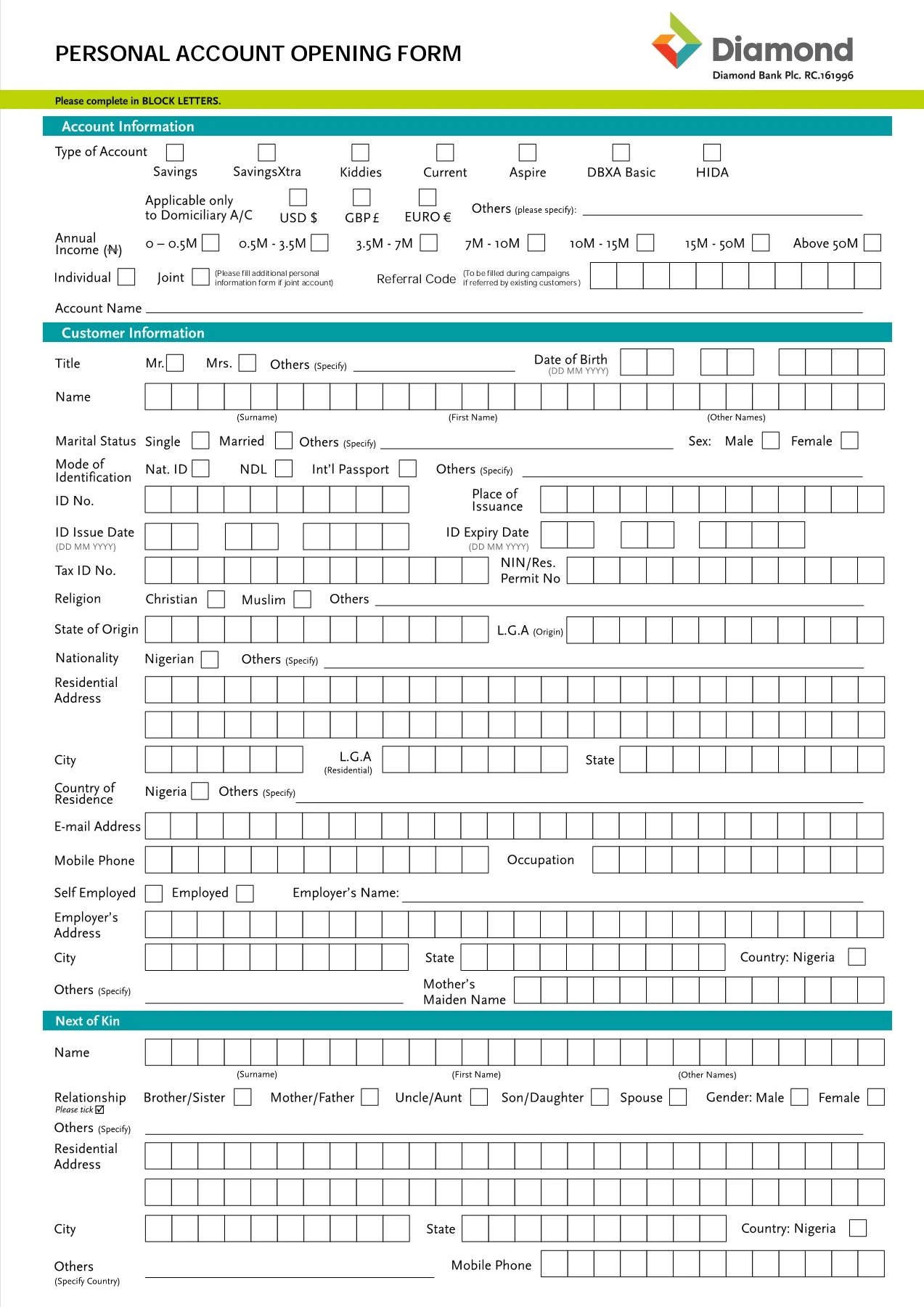
The opening section should also make the intended account type clear. Savings, current, business, joint, fixed-term, student, minor, and other products may have different application requirements, so a simple account-type selection can help route the application correctly.
2. Applicant Identity Information
The identity section is usually one of the most important parts of the form. A practical template can provide fields for legal name, date of birth or incorporation, nationality or jurisdiction where relevant, identification document type, document number, issuing authority, and expiry date when applicable.
The applicant should be encouraged to enter information exactly as it appears on the relevant identity document. Differences in spelling, order of names, dates, or identification numbers can create unnecessary verification questions later in the process.
For an individual, additional personal information may be relevant depending on the institution and jurisdiction. Examples include residential status, tax residency, occupation, source of income, and contact information. These should not be presented as universal requirements because requirements differ by bank and customer profile.
For an organization, identity information changes substantially. The template may need legal entity name, registration number, incorporation jurisdiction, registered address, business activity, authorized representatives, and information about people who control or own the organization.
The strongest layout groups related fields together instead of spreading them throughout the document. This allows an applicant or reviewer to complete one information category at a time and makes later checking more efficient.
3. Contact and Address Information
Address fields deserve careful design because different addresses can serve different purposes. A template may distinguish residential address, registered business address, mailing address, correspondence address, and permanent address where the circumstances require it.
Each address should use a predictable structure. Depending on the country, this can include street or building information, locality, city, state or province, postal code, and country. International applicants may need a more flexible format than domestic applicants.
Contact fields commonly include telephone number, mobile number, and email address. A digital form should validate basic formatting without preventing legitimate international numbers or addresses. Overly restrictive validation can create more problems than it solves.
If a mailing address is the same as the residential address, a checkbox can reduce repeated typing. Digital forms can use conditional logic so that the second address is only displayed when it differs from the first.
Address and contact information should be treated as sensitive customer data. A template should collect only what the process genuinely requires and should not encourage applicants to place passwords, PINs, one-time codes, or unrelated financial credentials into an account-opening form.
4. Account Selection and Operating Instructions
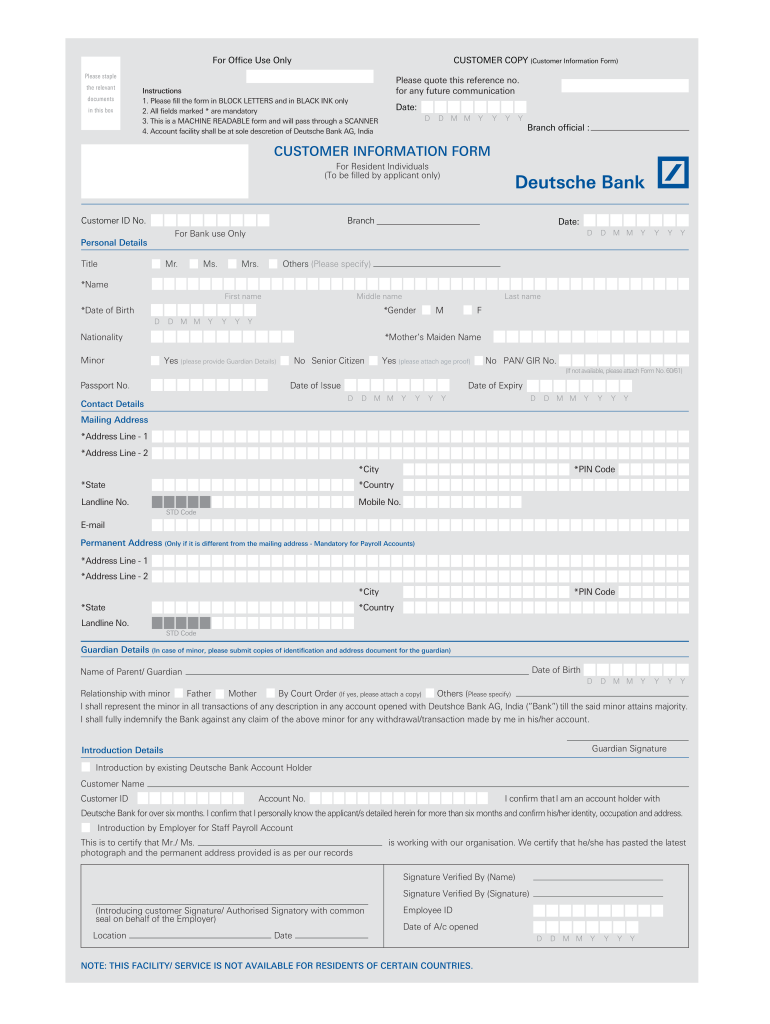
The account selection section identifies what the applicant wants to open. It can include account category, currency, product name, ownership structure, and operating instructions. A clear design prevents the applicant from confusing the account type with optional banking services.
For a joint account, the template should provide enough space to identify each applicant and explain the relationship between them when required. It should also distinguish the account holders from authorized representatives who may have a different legal role.
Business applications can require additional choices. A company might request a current account, savings facility, cash-management service, debit card, online banking access, or other service. These selections should be grouped logically rather than mixed with personal identity fields.
Currency selection is another area where precision matters. If multiple currencies are available, use explicit labels rather than relying on abbreviations that an applicant may misunderstand. The actual product rules should always be confirmed with the bank.
The form should avoid implying that checking a box automatically guarantees approval. Product availability, eligibility, verification, and bank policies can affect whether the requested account or service is ultimately provided.
5. Employment, Business, and Financial Profile
Some account-opening processes request information about occupation, employer, business activity, income, expected account activity, or source of funds. The purpose is generally to help the institution understand the nature and expected use of the relationship.
For an individual, a template might include occupation, employer, employment status, approximate income range, and source of funds. For a business, it may include business activity, expected transaction volume, countries of operation, ownership structure, and source of funds or wealth.
These fields should be designed carefully because they can become confusing when a single template attempts to cover every possible customer. Conditional sections are usually better than presenting dozens of irrelevant questions to every applicant.
For example, a student may not need the same employment fields as a full-time business owner. A nonprofit organization may need organizational and governance information instead. A generic template should therefore be modular.
When financial amounts are requested, labels should explain whether the figure refers to monthly income, annual income, expected deposits, expected transaction value, or another measurement. Ambiguous financial fields are a common source of inconsistent answers.

6. Tax Residency and Regulatory Declarations
Modern account-opening workflows can include tax-residency declarations and related self-certification. International tax-reporting frameworks can require institutions to collect information that identifies where an account holder is tax resident.
Because tax rules differ across jurisdictions, a generic template should avoid pretending to replace the institution’s official tax forms. It is better to include a clearly identified section that can be replaced or supplemented with the bank’s current official declaration.
Applicants should never guess tax-residency information merely to complete a blank field. If the correct answer is unclear, the applicant should seek appropriate professional or bank guidance before submitting the form.
Business applications can introduce additional complexity when the organization operates in multiple countries or has beneficial owners or controlling persons in different jurisdictions. A modular template can accommodate these situations without making every personal application unnecessarily complicated.
The declaration section should also explain that information must be accurate and current. A good workflow includes a mechanism for updating information when circumstances change, subject to the bank’s own procedures and applicable law.
7. Beneficial Ownership and Control
Beneficial ownership is especially relevant for organizations because the person submitting a form may not be the person who ultimately owns or controls the entity. A corporate account-opening template may therefore require information about shareholders, controlling persons, directors, trustees, partners, or other relevant roles.
A practical beneficial-owner section normally uses a table so that several individuals can be recorded consistently. Possible columns may include name, role, ownership or control percentage, nationality, address, identification-document type, and other information required by the institution.
The exact threshold for identifying beneficial ownership depends on the applicable legal and regulatory framework. A generic template should therefore avoid hard-coding a percentage unless the form is specifically designed for a jurisdiction and purpose where that threshold has been verified.
For small organizations, the section may be short. For complex companies, trusts, partnerships, or nonprofit structures, the information may need to be supported by additional documents and declarations.
The most important design principle is clarity. Applicants should be able to distinguish between the account holder, authorized signatory, beneficial owner, director, and contact person rather than assuming these terms describe the same individual.

8. Supporting Document Checklist
A document checklist can be one of the most useful features of an account-opening form. It allows the applicant and reviewer to see which supporting materials are included, missing, pending, or not applicable.
Common categories can include identity documentation, address evidence, incorporation or registration documents, tax documentation, ownership information, authorization documents, and other records relevant to the account type.
The checklist should not state that a particular document is universally required. Requirements vary according to the bank, product, applicant type, jurisdiction, and circumstances. A better generic label is “documents requested by the institution” with configurable rows.
For digital forms, applicants may upload files against individual checklist items. For paper workflows, staff can tick a box after physically receiving and checking each document. In either case, the checklist should make the status easy to understand.
Good document handling also reduces repeated follow-up. If the reviewer can immediately see that an identification document is missing, the applicant can be contacted with a specific request instead of receiving a vague message that the application is incomplete.

9. Signature and Declaration Section
The declaration section gives applicants an opportunity to confirm that the information they supplied is accurate and complete to the best of their knowledge. The wording should be reviewed by the institution’s legal or compliance team when the form is used operationally.
A paper form may provide signature and date fields for the applicant, joint applicants, authorized representatives, or other relevant signatories. A digital workflow may use an approved electronic-signature process instead.
Some banks require signatures to be witnessed or verified by an authorized official. That requirement should not be assumed for every bank or country. A template can instead provide a configurable field labeled for bank verification where applicable.
Signature areas should be large enough to use comfortably when printed. If multiple applicants are expected, each signature line should clearly identify whose signature is required.
The declaration should be positioned after the applicant has had an opportunity to review the form. A signature should not be treated as a substitute for verification; it is one component of the broader onboarding process.
10. Bank-Use-Only Section
A professional account-opening form often reserves a final area for internal processing. This can contain customer identification numbers, account numbers, branch codes, verification results, approval information, reviewer initials, processing dates, or other internal fields.
Keeping internal fields separate from applicant fields reduces accidental changes and makes the form easier to review. In a digital system, these fields can also be restricted to authorized staff.
The bank-use section can include a checklist showing whether identity verification was completed, supporting documents were reviewed, signatures were checked, and any additional approval was obtained.
Internal status fields should be standardized. If one reviewer writes “OK,” another writes “verified,” and another writes “complete,” the resulting data becomes harder to analyze. Consistent statuses are better for operational reporting.
For a generic template, internal fields should remain adaptable. Different institutions have different customer-number structures, branch identifiers, approval chains, and record-management systems.

Types of Bank Account Opening Forms
Personal or Individual Account Forms
Individual account forms generally focus on personal identity, contact details, residential information, occupation, account selection, tax information where applicable, and declarations. The layout is usually designed around one primary applicant with optional fields for a joint holder.
The form may also ask whether the applicant is an existing customer. That distinction can affect how much information needs to be supplied because the institution may already have a customer record that can be updated or linked.
For a first-time applicant, identity and contact information are typically more prominent. For an existing customer, the form may include fields that identify the existing customer relationship and only request information that needs to be updated.
A reusable personal template should therefore provide enough flexibility for both scenarios without implying that all banks follow the same process.
When comparing personal forms, focus on structure rather than branding. A clean layout with logical sections is generally more useful for creating an internal template than copying the visual appearance of a particular bank.

Business and Corporate Account Forms
Business forms are more complex because an organization has a legal identity separate from its individual representatives. The form may need information about incorporation, registered office, business activity, ownership, directors, authorized signatories, and expected account usage.
A business application may also need a section for resolutions or authorization documents. The purpose is to establish that the people requesting the account have appropriate authority to act for the organization.
Corporate templates should use repeatable tables for directors, owners, authorized signatories, and beneficial owners. This is more practical than providing one large free-text box where applicants can enter information inconsistently.
The account purpose should also be specific enough to be useful. “Business” alone may be insufficient in an operational workflow. A more informative structure can request a short description of the business activity and the intended purpose of the account.
For multinational businesses, additional jurisdiction and tax fields may be necessary. Those sections should be designed as configurable modules rather than embedded into every simple business-account application.

Joint Account Forms
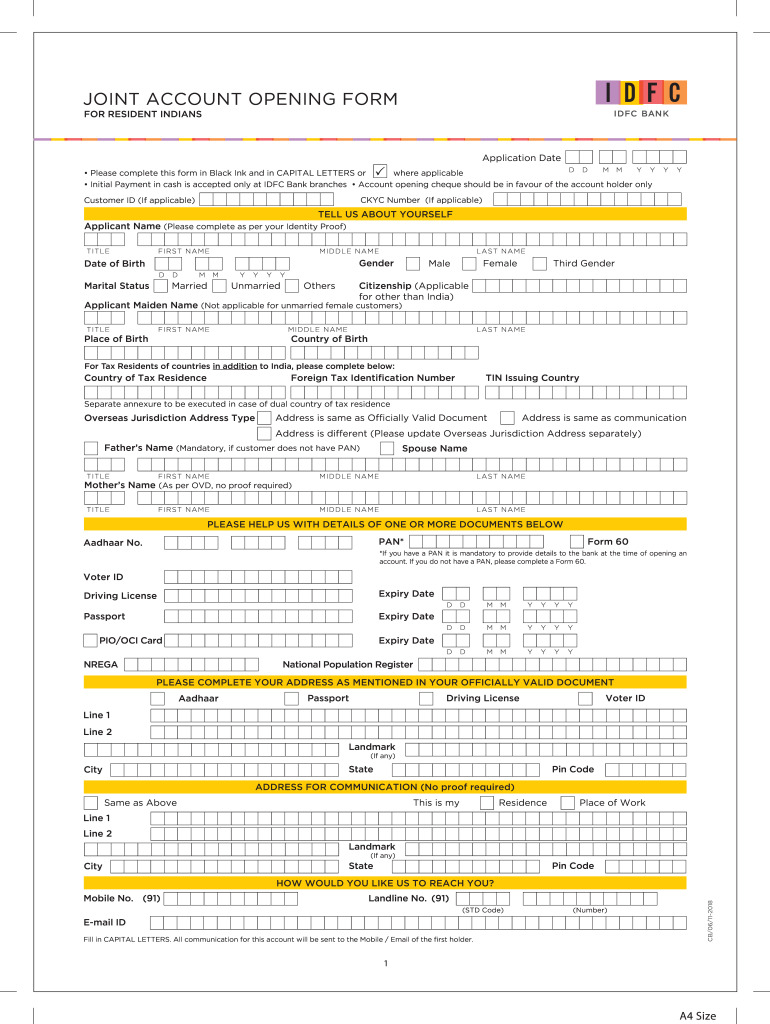
Joint-account forms must make the relationship between applicants especially clear. Each holder should have an identifiable information block so that names, addresses, identification details, and signatures do not become mixed.
The form may also contain an operating instruction that explains how the account is intended to be operated, subject to the bank’s available options. Different institutions can use different terminology for joint-operation arrangements.
A good template uses repeated sections with the same field order for each applicant. This makes the completed form easier to compare and reduces the risk that one applicant supplies information that another applicant was never asked to provide.
Where a joint account involves a minor, guardian, trustee, or other special relationship, the form may require additional documentation and declarations. Those fields should be activated only when relevant.
Joint-account forms are also a good example of why a generic template should be treated as a design reference rather than a substitute for the institution’s official application.
Minor or Guardian Account Forms
Accounts involving minors usually require a different structure because a parent or guardian may participate in the application. The template can include dedicated sections for the child and the responsible adult rather than combining their information.
Useful fields may include the minor’s name, date of birth, address, guardian relationship, school information where relevant, and the account features requested. The guardian section can contain identification and contact information.
A strong template also makes it visually clear who is the applicant, who is the account holder, and who is acting in a representative capacity. These roles can have different legal significance.
Supporting-document requirements may include evidence of the relationship or authority. Because such requirements vary, a generic form should use configurable document categories rather than asserting a universal list.
Special account types should also avoid collecting more information than necessary. The goal is a complete application, not a collection of unrelated personal data.

Non-Resident and International Applicant Forms
International applicants can require more extensive fields because the bank may need information about citizenship, country of residence, overseas addresses, tax residency, passport details, and other cross-border information.
The layout should give enough space for international addresses without assuming every country follows the same postal structure. Country selection can be particularly useful in digital forms because it allows the interface to adapt address requirements.
Tax-residency information may also need to cover more than one jurisdiction. The form should provide clear instructions about how applicants should respond when they have multiple tax residences.
International applications can also involve translated documents or additional verification. A template should therefore provide a document checklist with room for institution-specific requirements rather than claiming that one checklist applies worldwide.
The South Indian Bank example illustrates how an NRI-oriented form can combine identity, overseas address, Indian permanent address, tax information, and regulatory declarations into one structured document.

Term Deposit and Fixed-Deposit Forms
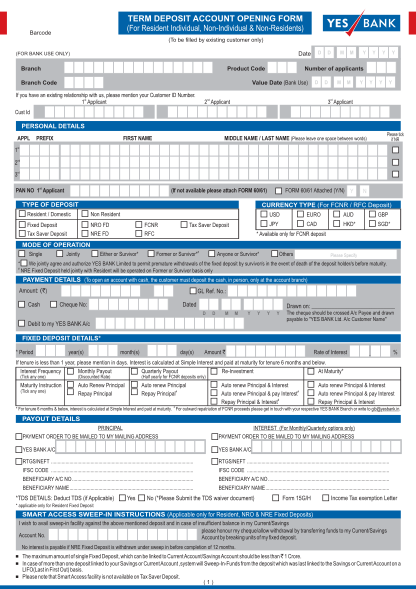
Term-deposit applications differ from ordinary transaction-account applications because the deposit itself has additional characteristics. A form may need deposit amount, term, maturity instructions, interest preferences, payout instructions, renewal choices, and funding information.
The application should clearly distinguish the underlying customer account from the new deposit product. This helps prevent mistakes when several accounts or deposit products are being opened simultaneously.
For existing customers, a term-deposit form may require less identity information because the institution already has a customer record. However, the exact process depends on the bank and product.
Digital versions can use conditional questions to show only the fields relevant to the selected deposit type. This reduces the amount of information visible to the applicant and makes the form easier to complete.
A printed template can achieve a similar result by grouping product choices at the beginning and using clearly labeled sections for the corresponding details.
PDF, Word, and Online Versions: Which Format Is Best?
PDF Templates
A bank account opening form template PDF is useful when a document needs to preserve a consistent visual layout across devices and printers. PDF is particularly useful for forms that must be printed, signed, archived, or shared as a fixed document.
However, not every PDF is fillable. A scanned PDF may only be an image of a paper form, while a true fillable PDF contains interactive fields. Users should distinguish between these two formats before assuming that information can be typed directly into the file.
Fillable PDFs can include text boxes, checkboxes, dropdown menus, and signature fields. They can be convenient, but their behavior can vary between PDF applications, especially when advanced features are used.
A PDF should also be checked after editing to ensure that entered information remains visible when printed or opened on another device. A form that looks correct in one application but loses data in another can create operational problems.
For a reusable template, maintain a clean master version and create controlled copies for specific workflows. This makes future revisions easier and reduces the risk of distributing an outdated form.
Word Templates
A bank account opening form template word document is often convenient for organizations that need to edit fields, add branding, adjust tables, or customize sections without specialized PDF software.
Word is particularly useful during the drafting stage. Teams can quickly change headings, reorder sections, add instructions, and create versions for different customer categories.
The main weakness is layout stability. A Word document can change appearance when opened with different software, fonts, page settings, or versions. Tables can move, page breaks can change, and signature areas can shift.
For that reason, Word is often best treated as the editable master document while PDF is used for controlled distribution or printing after the form has been finalized.
When creating a Word-based template, use tables and styles consistently rather than manually positioning every field. A structured document is much easier to maintain when requirements change.
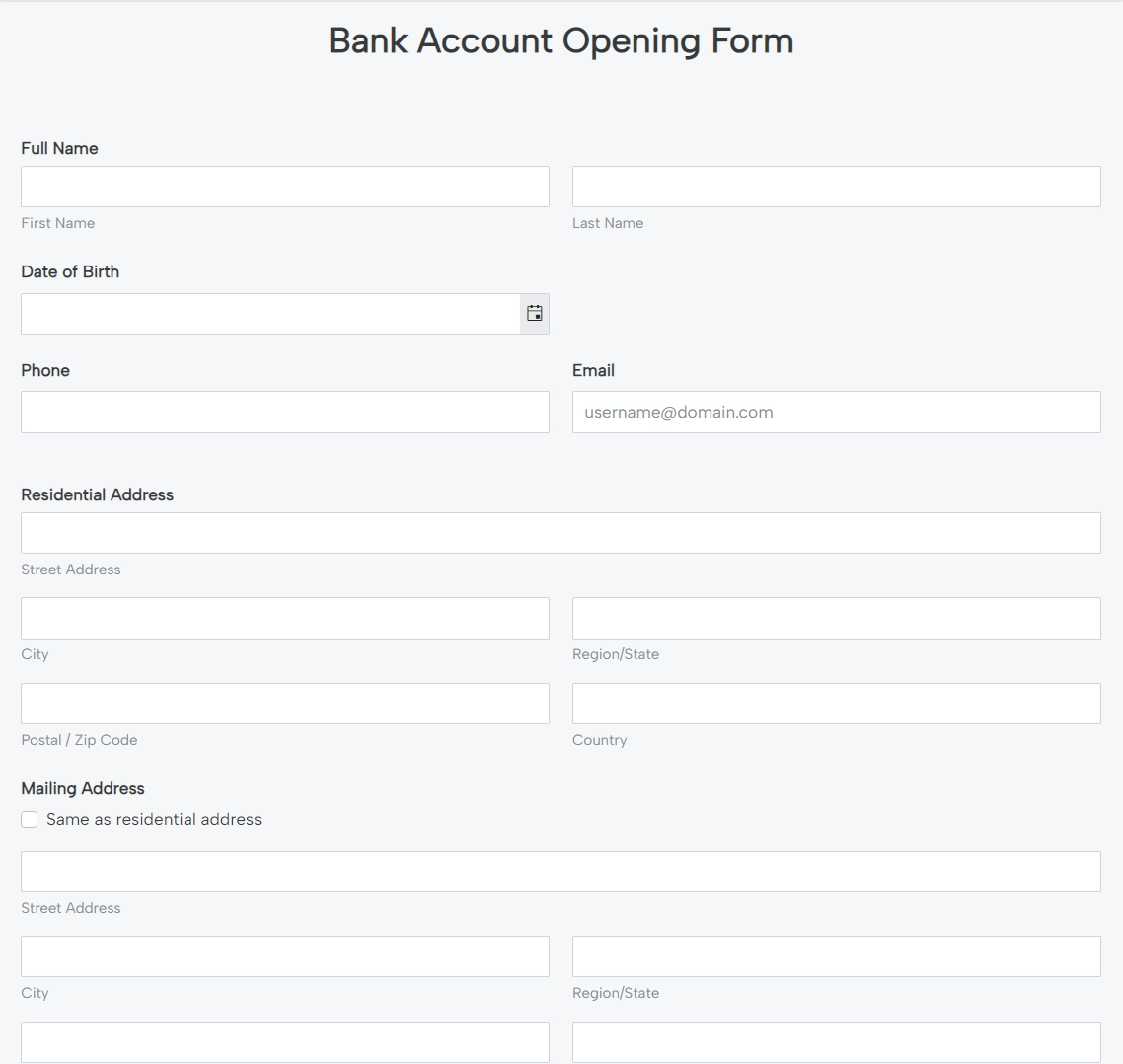
Online Forms
Online account-opening forms can reduce manual data entry because information is captured directly into a structured system. They can also validate required fields, display conditional questions, and provide upload areas for supporting documents.
Filling forms online for bank account opening can therefore be more efficient than printing a long document, handwriting information, scanning it, and sending it back. The exact process, however, depends on the bank’s technology and verification requirements.
Digital forms should be designed around short, understandable sections. Asking every question on one giant page can make the experience difficult, especially on mobile devices.
Conditional logic is particularly useful. For example, selecting “business account” can display company fields, while selecting “joint account” can display additional applicant fields. This keeps the form relevant to the person completing it.
Online forms should also use secure systems appropriate for sensitive financial information. A generic web-form template should never be treated as a substitute for a bank’s secure account-opening portal.

How to Create a Bank Account Opening Form Template
Step 1: Define the Intended Applicant
Start by deciding who will use the form. A personal-account template has different needs from a corporate-account template, and a form for an existing customer may be shorter than one for a new customer.
Write down the customer categories before designing the fields. Typical categories might include individual, joint applicant, business, nonprofit, minor, international applicant, or existing customer.
Do not try to solve every category with one enormous document. A modular system with a common core and optional sections is usually easier to maintain.
The common core can contain identity, contact, account selection, declarations, and signature information. Optional modules can then address beneficial ownership, guardianship, tax residency, or business activity.
This approach also makes digital implementation easier because conditional sections can be activated based on the applicant’s choices.
Step 2: Build a Field Inventory
Before creating the visual design, list every field the process actually needs. Group fields by category rather than placing them in the order in which they occur to the designer.
For example, create groups for application information, identity, contact details, account preferences, financial profile, tax information, supporting documents, declarations, and internal processing.
For each field, record whether it is required, optional, conditional, or bank-use-only. This simple inventory becomes extremely valuable when converting a paper form into an online form.
It also helps identify unnecessary duplication. If the applicant’s full legal name is already collected once, there is usually no reason to request it again unless another section has a specific legal or operational purpose.
A field inventory is also useful for quality assurance because every field can later be tested against the final document.
Step 3: Design the Page Hierarchy
Use headings and visual grouping to show the applicant where one information category ends and another begins. Long forms become easier to understand when each page has a clear purpose.
Keep related information together. Identity information should not be interrupted by unrelated product selections, and document checklists should not be buried between address fields.
Use consistent labels and capitalization. A form looks more professional when “Date of Birth,” “Date of birth,” and “DOB” are not used interchangeably without explanation.
Tables are useful for repeated information, especially joint applicants, directors, beneficial owners, or multiple account products. They should remain readable when printed.
Leave sufficient space for handwriting if the form will be printed. A field that is technically present but too small to use is not a well-designed field.
Step 4: Add Instructions Without Overloading the Form
Instructions should explain what the applicant needs to know at the point where the information is requested. Avoid creating a long page of instructions that applicants are unlikely to revisit while completing individual sections.
Short examples can clarify ambiguous fields. For instance, an address field can indicate the expected components, while a document field can specify the type of identification number requested.
Required-field indicators should be consistent. An asterisk, label, or explicit “required” notation can be used, but the same convention should apply throughout the form.
If the form includes sensitive information, explain why it is requested when appropriate. Clear explanations can improve completion accuracy and reduce confusion.
Instructions should also make clear that the template is not itself an approval. The bank may still need to verify documents, conduct checks, or request additional information.

Step 5: Test the Template With Realistic Scenarios
Do not test a form using only one simple applicant. Create several hypothetical scenarios representing different customer types and complete the form from beginning to end.
A useful test set might include an individual applicant, a joint application, a small business, a nonprofit, a minor with a guardian, and an international applicant.
Look for fields that become irrelevant, sections that become confusing, duplicate questions, insufficient writing space, unclear instructions, and missing signature or document areas.
For online versions, test mobile and desktop screens. Check validation, conditional logic, file uploads, error messages, and confirmation screens.
Testing should include the reviewer as well as the applicant. A form can be easy to complete but difficult for staff to review, or easy for staff to review but confusing for applicants.
How to Fill Out an Account-Opening Form Correctly
Review the Entire Form First
Before entering information, scan the entire document. Identify which fields are mandatory, which sections apply to you, which documents must be supplied, and where signatures are required.
This prevents a common problem: completing the first page and discovering later that a required document, tax declaration, or additional applicant is needed.
Gather the relevant documents before starting. The exact list depends on the bank and account type, so use the institution’s current instructions rather than relying on a generic checklist found online.
Keep the information consistent across the form and supporting documents. Differences in names, addresses, dates, or document numbers can result in additional questions.
Finally, check whether the bank requires the form to be completed in a specific format, such as capital letters, a particular paper size, or a specific submission channel.
Enter Legal Information Accurately
Use the applicant’s official information rather than an informal nickname when the form requests a legal name. If the form provides separate fields for first, middle, and last names, follow the institution’s instructions.
Dates should be entered using the requested format. A date such as 04/05/2026 can be ambiguous if the form does not specify whether the order is day/month/year or month/day/year.
Identification numbers should be copied carefully. Do not insert spaces or punctuation unless the form specifically allows them.
For business applicants, use the organization’s legal name and registration details rather than a trading name when the form asks for legal information.
If an answer does not apply, use the form’s stated option such as “not applicable” instead of leaving the field blank when the instructions require an explicit response.
Review Before Signing
Review the completed form from the beginning rather than checking only the last page. Errors can occur when information is copied from one section to another.
Compare names and identification numbers against the relevant documents. Check telephone numbers and email addresses carefully because these may be used for important communication.
Review account selections and optional services. Selecting an incorrect product can create confusion even if the identity information is accurate.
Confirm that required supporting documents are actually attached or uploaded. A checklist should be treated as a practical control, not merely as a decorative section.
Only sign after reviewing the declarations and instructions. A signature can represent confirmation that the information provided is accurate, so applicants should understand what they are confirming.
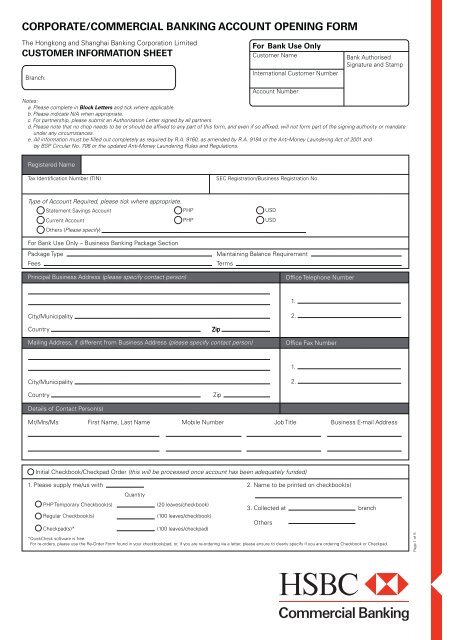
Practical Examples of Template Structures
Example: Individual Savings Application
A simple individual template could begin with application date and account type, followed by applicant identity, address, contact details, occupation, account preferences, supporting documents, declarations, and signature.
The identity section could include full name, date of birth, nationality, identification type, identification number, and expiry date where relevant. The contact section could contain phone and email fields.
The account section could include savings or current selection, currency, optional services, and the intended purpose of the account.
A supporting-document checklist could provide rows for identity evidence, address evidence, tax documents where applicable, and other bank-requested materials.
The final sections could contain declarations, signature, date, and a separate bank-use area for internal processing.
Example: Small Business Application
A business template can begin with legal entity information, including registered name, business type, registration details, registered address, and business activity.
A second section can identify directors, owners, beneficial owners, and authorized signatories. Repeated table rows are preferable to a large free-text area.
The account section can identify the requested product, currency, expected usage, and requested services. The template can then provide space for the bank to request additional documentation.
A declaration section can confirm that the applicant is authorized to act for the organization and that submitted information is accurate, subject to the institution’s actual legal wording.
This structure can be adapted for companies, partnerships, nonprofits, and other entities without forcing the same personal-account questions into every application.
Example: Joint Applicant Workflow
A joint-account template should repeat the applicant block for each account holder. Each block can contain name, identification information, contact details, address, and signature requirements.
The relationship between applicants should be captured where the institution needs it. A separate operating-instruction section can then identify how the account is intended to be managed, using terminology approved by the bank.
Supporting documents should be clearly associated with the correct applicant. This is particularly important when each person must provide separate identification or address evidence.
Digital systems can repeat applicant sections automatically after the user selects “joint account.” Paper forms can provide two or more applicant blocks with an instruction to attach an additional page when necessary.
The goal is to make every applicant equally visible in the record and prevent information from one applicant being accidentally attributed to another.
Example: International Applicant
An international template may need both local and overseas address fields. It can also include citizenship, passport information, residence status, tax residency, and other institution-specific declarations.
The form should not assume that all international applicants have the same documentation. A country-specific or customer-specific document checklist may be more appropriate.
Where multiple tax jurisdictions are possible, the template should allow additional rows instead of forcing applicants to place several jurisdictions into one small text field.
Clear country labels are also important. An applicant should be able to identify whether a field asks for country of citizenship, country of residence, country of birth, or country of tax residence.
International templates benefit significantly from modular design because different customers can trigger different regulatory and operational questions.

How to Evaluate a Free Template Before Using It
Check Whether the Template Is Actually Editable
Some websites describe a document as a free template even though the preview is only an image. Before relying on a resource, determine whether the file is genuinely editable and whether the claimed format is available.
A PDF preview can be useful for studying layout even when the underlying file is not directly editable. In that case, it should be treated as a visual reference rather than as a ready-to-use form.
For Word resources, check whether the download is genuinely a Word document rather than a PDF embedded in a Word wrapper or an image inserted into a document.
For online templates, check whether the form can actually be customized and exported in the required format. Some platforms provide previews without providing unrestricted access to the editable version.
Most importantly, do not confuse a third-party template with an official bank application.
Check the Date and Version
Banking forms can change when products, policies, technology, or regulatory requirements change. A template that was suitable several years ago may no longer reflect the current process.
Look for publication dates, revision dates, version numbers, or update notices. Official bank download pages are especially useful for determining whether a particular form has been superseded.
For example, some bank websites publish separate forms for resident individuals, non-individual customers, non-residents, minors, and tax declarations. This is a reminder that one universal document is rarely sufficient for every scenario.
If an organization maintains its own internal template, establish version control. A simple version number and effective date can prevent employees from accidentally using an obsolete form.
Archived forms can still be useful for research or historical records, but they should not automatically be distributed as current application forms.

Check Privacy and Data Minimization
A template should collect information for a defined business purpose. Adding sensitive fields merely because they appear on another form increases complexity and can create unnecessary privacy risks.
Do not include passwords, PINs, one-time authentication codes, full online-banking credentials, or similar security information in a generic account-opening template.
If the form requests financial information, explain what category is being requested and whether the answer is mandatory. Ambiguous financial questions can cause applicants to provide inconsistent information.
For digital systems, consider access controls, secure file storage, retention rules, and transmission security. A well-designed form cannot compensate for an insecure system behind it.
Privacy should be considered at the design stage rather than added as an afterthought. This is especially important when forms will be reused across multiple departments or shared with external parties.
Common Mistakes When Designing or Using a Bank Form
Using One Form for Every Customer
The first mistake is assuming that one document can handle every account type without conditional sections. Individual, business, joint, minor, and international applications can have materially different information requirements.
A single universal document often becomes excessively long. Applicants then spend time reading sections that do not apply to them and may accidentally answer the wrong questions.
Modular design solves this problem. Use a common core and separate modules that activate when relevant.
For paper forms, modules can be attached or clearly marked. For digital forms, conditional logic can display the appropriate sections automatically.
The result is a shorter and more relevant experience without sacrificing necessary information.
Copying Another Bank’s Form Without Adaptation
A visually polished form can still be inappropriate for another organization. Different banks use different product names, customer classifications, verification processes, and regulatory workflows.
Copying another institution’s terminology can create confusion. A template should therefore be adapted to the actual process, not merely rebranded.
Official examples are useful for understanding common patterns, such as separating customer information from bank-use fields or providing dedicated sections for tax information.
However, the final document should be reviewed by the organization responsible for the account-opening process.
The goal is functional consistency, not visual imitation.

Making Fields Too Small
One of the most practical design problems is insufficient writing space. A form can technically contain every required field while remaining difficult to use because the fields are too small.
This problem is especially common when a designer attempts to compress a long application onto one or two pages. More pages can be preferable if they significantly improve readability and completion accuracy.
Printed forms should be tested at their actual intended size. A field that appears comfortable on a large computer screen may be frustrating when printed on standard paper.
Digital forms have different considerations. Input fields should be large enough for mobile users, and long sections should be divided into manageable screens.
Good design balances completeness with usability rather than maximizing the number of fields per page.
Leaving Instructions Too Vague
Labels such as “ID,” “Address,” or “Income” can be ambiguous. A stronger template specifies what information is expected without becoming unnecessarily verbose.
For example, “Identification document number” is more informative than “ID.” Similarly, “Annual income range” communicates more clearly than simply “Income” if annual income is what the process needs.
When a field can have multiple interpretations, provide a short explanation or example. This is particularly valuable for tax residency, source of funds, beneficial ownership, and account purpose.
Instructions should be reviewed from the applicant’s perspective. Designers often understand their own terminology so well that they underestimate how confusing it can be to a first-time user.
A short usability test with someone unfamiliar with the form can reveal unclear labels very quickly.
Data Collection and Review Workflow
A strong form is only one part of the process. The information collected must then be reviewed, verified, entered into appropriate systems, and retained according to the institution’s procedures.
The workflow should define who receives the application, who checks completeness, who verifies identity documents, who reviews exceptions, and who approves or rejects the application.
A simple status model can make the workflow easier to manage. Possible internal stages include received, incomplete, under review, verification required, approved, rejected, or awaiting customer response.
Digital workflows can automatically route applications based on account type or risk factors. Paper workflows can use internal checklists and reviewer initials.
Clear ownership is important because a form should never become an unattended document simply because one field or supporting document is missing.
Quality-Control Checks
Quality control should begin with completeness. Check whether all mandatory fields are present and whether the applicant has supplied the required supporting information.
The next step is consistency. Compare important information across the form and supporting documents, paying attention to names, dates, identification numbers, addresses, and account ownership.
Then review exceptions. If information cannot be verified or a required document is unavailable, the reviewer should follow the institution’s documented escalation process rather than improvising.
For digital forms, validation rules can prevent many simple errors before submission. However, automated validation does not replace substantive review.
Organizations should periodically analyze common errors and update the template accordingly. If applicants repeatedly misunderstand the same field, the field or instruction probably needs redesign.
Practical Solution: A Simple Workflow for Using a Bank Account Opening Form Template
The most practical approach is to treat the bank account opening form template as a controlled workflow rather than simply as a blank document. Begin with the institution’s actual account-opening requirements, identify the common information needed across customer categories, and then create a modular template around those requirements.
First, create a master field inventory containing identity, contact, account, financial, regulatory, document, declaration, and internal-processing fields. Mark every field as required, optional, conditional, or bank-use-only. This inventory becomes the foundation for both Word/PDF and online versions.
Second, divide the inventory into modules. Keep the personal-account core separate from business ownership, joint applicants, guardians, international tax information, beneficial ownership, and other specialized areas. This prevents the main form from becoming unnecessarily complicated.
Third, create the editable master in a format that is easy for the responsible team to maintain. Word can be useful for drafting and structural changes, while a controlled PDF can be generated for distribution. If the process is digital, map each field from the master inventory into the online form.
Fourth, test the form with realistic fictional scenarios. Complete the document as an individual, joint applicant, small company, minor with guardian, and international customer. Record every point of confusion, missing field, duplicate question, or inadequate document-upload area.
Fifth, establish a review checklist for staff. The checklist should cover completeness, identity information, supporting documents, account selection, declarations, signatures, and internal processing. The purpose is to create consistent review rather than relying on memory.
Sixth, introduce version control. Give the master form a version number and effective date, store it in a controlled location, and retire outdated versions. When requirements change, update the field inventory and form together.
Finally, remember that a generic template is a design aid. The actual application should always follow the current instructions of the bank or financial institution responsible for opening the account. A third-party template should never be presented as an official bank form unless its official status has been verified.
Reference Examples
The following examples are visual references for understanding different account-opening layouts, letter formats, information structures, and digital onboarding approaches. They are examples of document design rather than universal official requirements.
bank account opening form template pdf
Source: AnyFlip
bank account opening form template free download
Source: TechGuruPlus
bank account opening form template word
Source: Plumsail
bank account opening form template free

Source: Jotform
bank account opening form
Source: Scribd
bank account opening letter template
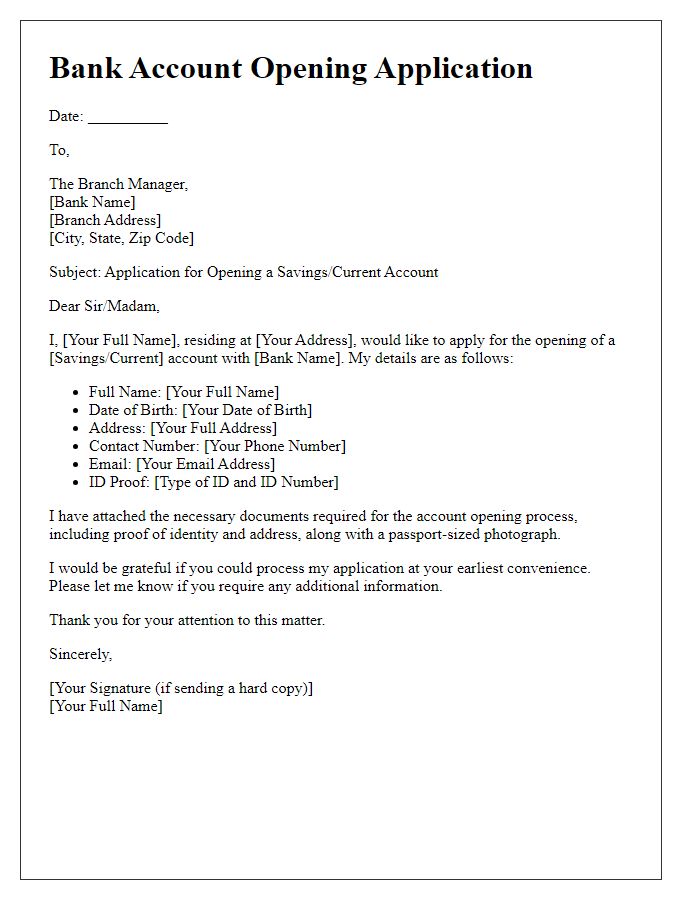
Source: Letterin
customer account opening form template
Source: pdfFiller
new account opening in bank form
Source: Scribd
bank account number opening form
Source: Jotform
banking email template for account opening
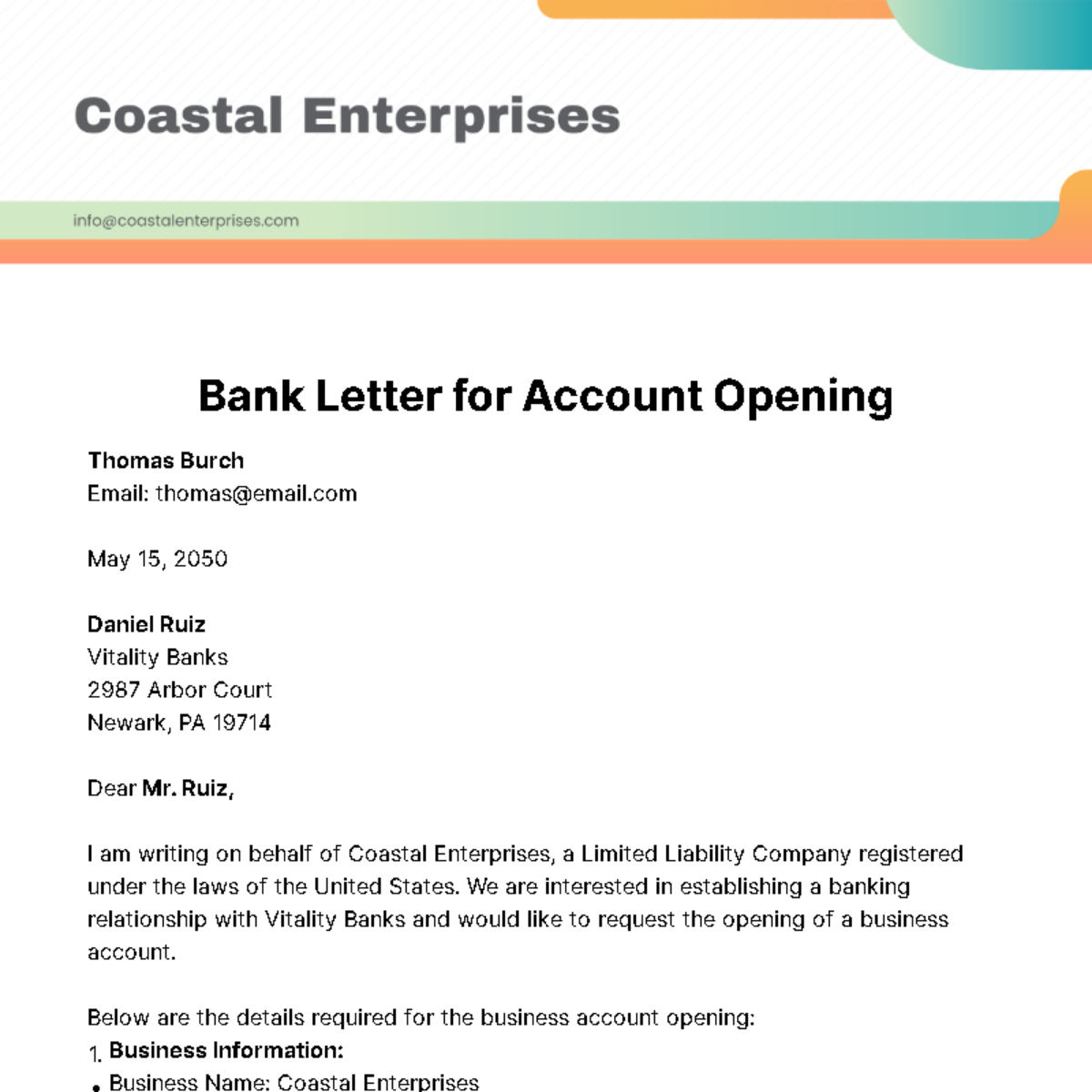
Source: Template.net
bank account info template

Source: Scribd
filling forms online for bank account opening
Source: TheBanks.eu
Frequently Asked Questions
What should a bank account opening form template include?
A useful template commonly includes application details, applicant identity, contact information, address, account type, financial or employment information where relevant, regulatory declarations, supporting-document information, signatures, and a bank-use section. The exact fields should be adapted to the institution, account type, and jurisdiction.
Can I use a generic bank account opening form template to open an account?
A generic template can help you prepare information, but it should not automatically be treated as an official application. The bank may require its own current form, disclosures, verification process, or supporting documents.
Is a bank account opening form template PDF better than Word?
Neither format is universally better. PDF is useful when a fixed layout must be preserved, while Word is convenient when the template needs frequent editing. Many organizations use Word as an editable master and PDF as a controlled distribution format.
Can a bank account opening form be completed online?
Yes, many institutions offer digital account-opening workflows. Online forms can provide field validation, conditional questions, document uploads, and electronic confirmations. Applicants should use the bank’s secure official channel when submitting sensitive financial information.
What information should I prepare before completing a form?
Prepare the information specifically requested by the bank, which may include legal name, identification details, contact information, address, account preferences, tax information, employment or business details, and supporting documents. The exact requirements vary by institution and account type.
Why does a bank ask for information about the source of funds?
Some account-opening processes request information about source of funds, income, business activity, or expected account usage as part of customer due diligence and risk assessment. The exact questions and level of detail depend on the institution and applicable requirements.
Should a business use the same form as an individual?
Usually, a business application needs additional information because the bank may need to identify the legal entity, authorized representatives, beneficial owners, directors, and business activity. A modular business form is generally more appropriate than simply adding a few company fields to an individual form.
What is the difference between an account opening form and an account opening letter?
A form is a structured data-collection document with predefined fields. A letter is a narrative request that explains the purpose of opening the account and may identify the applicant and supporting documents. Some business or institutional processes may use both.
How can I make a form easier to complete?
Use clear section headings, logical field order, consistent labels, sufficient writing space, required-field indicators, concise instructions, and conditional sections. Test the form with realistic scenarios before distributing it.
How should old templates be handled?
Maintain version numbers and effective dates, remove outdated versions from active distribution channels, and keep historical versions only where they are needed for legitimate records or audit purposes. Always verify the current form before starting a new application.
Conclusion
A well-designed bank account opening form template can make the application process clearer, more consistent, and easier to review. The strongest templates organize identity, contact, account, financial, regulatory, supporting-document, declaration, and internal-processing information without collecting unnecessary data. Whether the final document is a PDF, Word file, or online form, the most important principle is to adapt the template to the actual institution, customer type, jurisdiction, and account product. Used correctly, a bank account opening form template is not merely a blank document; it is a practical framework for accurate information collection, efficient review, and a more reliable account-opening workflow.
